






Table of contents
When you’re choosing a point-of-sale system, you’re looking for something simple, reliable, and flexible — software that helps you take payments anywhere and keeps your day-to-day running without surprise fees. But many POS providers charge monthly subscriptions, add hidden costs, or lock key features behind premium plans. Finding a free POS system that still delivers real value can make a big difference for growing businesses.
Today’s POS technology is doing more than just ringing up sales. According to 2025 statistics, newer POS tech has helped 70% of retailers improve inventory management and reduce stock shortages, while 72% of restaurants utilize mobile POS tools to enhance order accuracy and the customer experience.
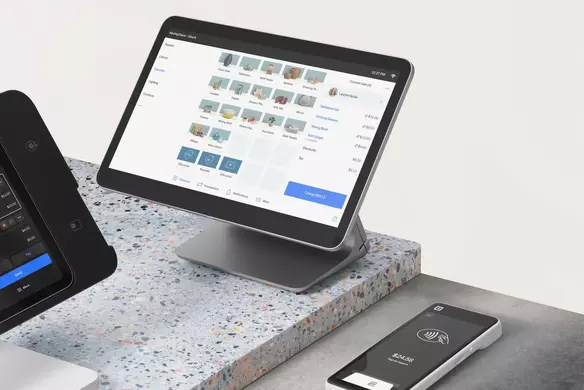
Free POS software like Square POS is built to meet the needs of modern businesses. Whether you’re running a one-person operation, managing a team, selling on the go, booking appointments, or working remotely, it gives you the tools to stay on top of it all. And because it’s a POS without monthly fees, you can access the features that matter most without being locked into a subscription.
Here’s the lowdown on what’s included, how it works, and why so many business owners choose Square to power their checkout.
More than 4 million merchants use Square free POS software
From local retailers and market stalls to service-based businesses and non-profits, millions of sellers use Square free POS software to help them run and grow their operations.
The core software is free — no setup charges, monthly subscription, hidden fees, or long-term commitment required. You only pay a small transaction fee when you take a payment, with clear, flat-rate processing fees. And if you need extra tools as your business grows, like advanced features, hardware, or add-ons, you can choose and pay for only what you need.
It’s easy to get started, and you don’t need a merchant account to accept payments. Here’s a snapshot of standard rates per transaction with Square:
- 2.6% + 15¢ for in-person payments
- 3.5% + 15¢ for manually entered card payments
- 2.9% + 30¢ for online store payments
- 3.3% + 30¢ for invoice payments
- Custom rates available for businesses processing over $250,000 annually
Square is intuitive. People understand it. It’s as simple as using a smartphone, whether you use an Apple or an Android, it’s got the kind of interface that pretty much anybody can figure out how to do.”
Elisabeth Emory → Owner of BLACKLION Home Decor
Advanced features in the Square free POS system
Square’s free point of sale system does more than just process payments — it’s a powerful tool for managing sales, inventory, and customer relationships in one place. Here are just some of the features included in the free plan:
- Sales reporting and analytics: Track top-selling items, monitor trends, and view real-time performance.
- Inventory management: Stay on top of stock with alerts, modifiers, and item-level details.
- Multi-location support: Manage sales and inventory across multiple sites from a single account.
- Flexible payment methods: Accept tap, dip, swipe, and mobile payments like Apple Pay. Pair your POS with optional Square hardware to suit your needs.
- Virtual Terminal: Turn your computer into a web POS and take payments remotely.
- Receipts and tipping: Offer digital or printed receipts, and accept tips in-app or on paper.
- Offline payments: Keep making sales even when your internet connection drops.*
- Invoicing tools: Send one-time or recurring invoices straight from your phone or desktop.
- Card on File: Speed up checkout for your regular customers by securely storing their payment info.
- Split tender and open tickets: Easily manage group payments and running tabs.
“The backend administrative technology, including Square’s suite of tools, has made running the business a lot easier… I’d freak out if I didn’t have Square,” shared Peter Mulvihill, who co-owns Green Apple Books. “There’s so much that Square does that’s integrated together. If we didn’t have Square, I’d have to find at least three separate solutions when I have one now.”

Robust point-of-sale software with no monthly fees
Square’s free POS software includes a wide range of built-in features to help you run your business, with no monthly subscription required. You only pay for what you use, like payment processing or optional add-ons. Here’s how the pricing breaks down by feature:
| POS Software Features | What You Get | Square’s Fees |
|---|---|---|
| Accepts all major credit cards |
Take payments from all major card brands — including Visa, Mastercard, American Express, and Discover — with one simple, flat rate. No hidden card network fees; everything’s included in Square’s standard processing rate. | 2.6% + 15¢ per in-person transaction |
| No monthly software fee | No subscription costs, no lock-in contracts, no setup fees. The free plan includes everything you need to start selling in person, online, over the phone, or out in the field. | Free |
| Sales reporting and analytics | View real-time sales data, top-selling items, trends, and more from your mobile device or desktop. Customizable, easy-to-read reports help you make more informed business decisions. Explore Square Analytics. | Free |
| Invoicing and recurring billing | Send professional digital invoices from your phone or computer, with options for one-time or recurring payments. Get paid fast and track invoice status in real time. Get started with invoicing. | Free to send — pay 2.9% + 30¢ per paid invoice |
| Offline payment processing | Keep selling even if your internet goes down. Payments process automatically once you’re back online.* Learn more about offline payments. | Free to enable — standard rate of 2.6% + 15¢ applies |
| Phone orders and remote payments (card-not-present transactions) | Take payments over the phone or manually enter card details by using either Virtual Terminal on your computer or the free POS software, Square Point of Sale. | 3.5% + 15¢ per keyed-in transaction |
| Proactive fraud protection |
Transactions are automatically monitored by Square’s system, which adapts in real time to spot and stop suspicious activity. Discover how Square protects your payments. |
Free |
| PCI compliance | Square handles PCI compliance for you — no extra validation steps, third-party tools, or added fees. Your customer data is encrypted and protected. What is PCI compliance? | Free |
| Customer support | Reach Square’s support team by phone, email, or through the Support Center whenever you need help. | Free |
Square has been by my side since day one and has supported me as my business has grown from one team member to 34. Having everything in one place has unlocked our power to grow so quickly.”
Rachel Dang → Owner of Urban Nail Box
Affordable POS hardware to match
Free POS software gives you everything you need to start selling — and adding POS hardware can streamline checkout even further, helping you move faster, stay organized, cut down on lines, and create a better experience for your customers. This is especially true in customer-facing or busy environments.
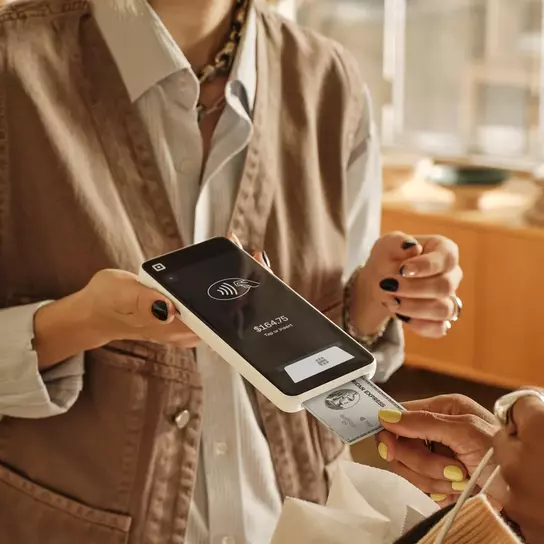
For example, Square Handheld is a slim, lightweight POS device that fits in your pocket — ideal for taking orders and payments anywhere on the sales floor or tableside. Staff can ring up sales, apply discounts, and complete checkouts on the spot. Plus, it comes with a built-in barcode scanner and camera to help with cart building and inventory management.
“The thing that I like about Square is that it has a modernized look and it’s really easy to use,” said CEO of Grand Central Bakery, Claire Randall. “You’re not forced to jump through hoops like you are with older systems and you always know what you’re looking at.”
Whether you’re looking for something compact and mobile or a full countertop solution, Square offers user-friendly hardware designed to work seamlessly with your setup. See which hardware suits your business.
How Square builds the best point-of-sale system for small businesses
Square started with a simple idea: accepting payments should be simple and accessible for everyone. That’s why its POS software is designed to support businesses of all shapes and sizes with smart tools, reliable service, and pricing that’s easy to understand.
As your business grows, Square grows with you — from marketing and loyalty programs to team management and payroll — all integrated into the same POS system. Every new product and feature is shaped by the challenges businesses face day to day, helping to support your needs better.
“For us, it’s always been Square… It feels like we’ve grown up with [the business],” said Jimmy Brower, co-owner of Sun of the Desert. “We’ve seen the evolution, the benefits, the advances, the support, and the real respect for businesses.”
Ready to get started? It’s fast to sign up and start accepting payments with Square POS. Create your free Square account.
Free POS system FAQs
What is free point-of-sale (POS) software?
Free POS software lets businesses take payments, track sales, and manage operations without paying monthly software fees. Square’s free POS includes a range of essential features such as inventory tracking, reporting, and invoicing, all designed to help businesses run smoothly from day one.
Is Square POS really free in the US?
Yes. Square Point of Sale is free to download and use. There are no setup costs, no monthly fees, no hidden fees, and no long-term contracts. You only pay a small processing fee when you take a payment. If you ever need hardware or more advanced tools, like marketing, loyalty, or team management, add-ons are available — but you’ll only pay for them if and when you choose to use them.
What is the best free POS software?
The best free POS software should be reliable, user-friendly, and built to grow with your business. Square POS offers a complete set of tools to get sellers started — from payments and reporting to inventory and customer insights — all without a monthly fee. It’s trusted by millions of businesses and backed by Square’s secure payments infrastructure.

What features are included in a free POS system?
A good free POS system offers powerful features such as payment processing, inventory management, sales reporting, customer profiles, invoicing, offline payments, and more. These tools help you start and grow your business without extra costs for basic functionality. For example, Square POS includes all these essential features in its free plan, giving you everything to start and grow your business.
What types of businesses can use a free POS system?
Free POS systems are designed to be flexible enough for a wide range of businesses, from retail shops, cafes, and salons to service providers, food trucks, event vendors, and beyond. Whether you sell in person, online, or on the move, a free POS system can streamline operations and help you manage sales and customers effectively. Square POS, for instance, is a versatile option used by many businesses across these sectors to support their day-to-day operations.
If I process payments with Square, what are my transaction fees?
Square keeps fees simple with flat, transparent pricing. For in-person payments, whether your customer taps, dips, or swipes, the fee is just 2.6% + 15¢ per transaction. This same rate applies to all major credit cards (Visa, Mastercard, American Express, Discover) as well as mobile wallets like Apple Pay and Google Pay.
For manually entered (or card-not-present) transactions, such as over-the-phone orders, the rate is 3.5% + 15¢. Online store transactions are charged at 2.9% + 30¢, while invoice payments incur a 3.3% + 30¢ fee.
If your business processes over $250,000 a year, with an average transaction of $15 or more, you may qualify for lower, custom rates. Learn more about Square’s payment processing fees.
How can I keep up to date with new product changes to your point-of-sale software?
Square regularly updates its point-of-sale software to introduce new features, improvements, and tools that help your business run more smoothly. For all the latest updates, check out our Releases page. You can also follow us on X and Instagram to stay in the loop with product news, tips, and announcements.
*Offline payments are processed automatically when you reconnect your device to the internet and will be declined if you do not reconnect to the internet within 24 hours of taking your first offline payment. By enabling offline payments, you are responsible for any expired, declined, or disputed payments accepted while offline. Square is unable to provide customer contact information for payments declined while offline. Offline payments are not supported on older versions of Square Reader for contactless and chip (1st generation – v1 and v2). Click here for help identifying your contactless reader. Learn more about how to enable and use offline payments here.


