Tableside Ordering and Pay-at-Table Technology: A Complete Guide for Modern Restaurants

Tableside Ordering and Pay-at-Table Technology: A Complete Guide for Modern Restaurants
Learn what tableside ordering and payments are, how they work and how they can support a better dining experience for your restaurant.
by Stella Logan Mar 12, 2026 — 9 min read
Tableside Ordering and Pay-at-Table Technology: A Complete Guide for Modern Restaurants

Tableside ordering is a restaurant service model where staff or guests place and manage food and drink orders directly at the dining table using handheld POS devices, tablets or smartphones, with orders sent instantly to the kitchen and point-of-sale (POS) system so staff don’t need to return to a fixed terminal.

For years, the last step of a restaurant meal followed the same pattern. The diner waved down a staff member. The bill arrived. The card or cash left the table. Everyone waited. Today, payments are increasingly processed at the table while guests remain seated, rather than being taken away to the counter. Consumers are keen for more seamless payment experiences: according to the Square 2025 Future of Commerce report, 65% of Aussies said they like using self-checkout tech to complete part or all of a purchase.

If you run a full-service restaurant, fast-casual venue or multi-location operation and are thinking about implementing a more modern ordering and payment process, read on to learn:

The evolution of restaurant payments

Restaurant payments have come a long way over the past few decades. Early POS systems centred on cash drawers at the counter. Credit cards followed, first with magstripe cards and later chip + PIN cards, reducing reliance on cash and speeding up transactions. Contactless cards and mobile wallets changed the pace again, making tap-to-pay not just common but expected in many Australian dining rooms. Payment then moved off the counter with handheld POS devices, letting staff bring checkout to the table. Integrated tableside technology takes it a step further, allowing guests pay for their order themselves.

Several industry forces sped up this shift. The pandemic drove rapid adoption of contactless or self-service technology. Australia’s hospitality sector has faced ongoing labour shortages since then, pushing operators to rethink how they run service. That momentum is reflected in a Square 2025 survey, which found that 87% of restaurant leaders are keen to invest in tech to improve how their businesses take payments.

Because payment is often the final touchpoint of a meal, how it feels matters. When checkout happens quickly and smoothly, guests leave on a positive note, which encourages repeat visits.

What is tableside ordering?

Tableside ordering is where orders are placed and entered at the guest’s table, then sent straight to the POS system and kitchen in real time. That can be done by staff using a handheld POS device, or by guests themselves through a digital menu on their smartphone or a touchscreen at the table.

In a traditional setup, servers usually memorise or jot orders down before walking back to a fixed terminal to enter them. That extra step slows things down and sometimes leads to mistakes. Tableside ordering removes the gap, so what the guest asks for goes directly into the system as it’s ordered.

It typically appears in two forms: Staff may take orders on a handheld POS device, or guests may browse and submit orders themselves via QR ordering. In both cases, the order is captured and sent from the table rather than a central station.

It’s worth noting the difference between tableside ordering and tableside payments. While tableside ordering focuses on placing and sending orders from the table, tableside payments relate to settling the bill at the table. The timing of payment depends on the venue; some take payment at the time the order is placed, while others wait until the end of the meal.

Types of tableside ordering systems

What does ‘pay at the table’ mean?

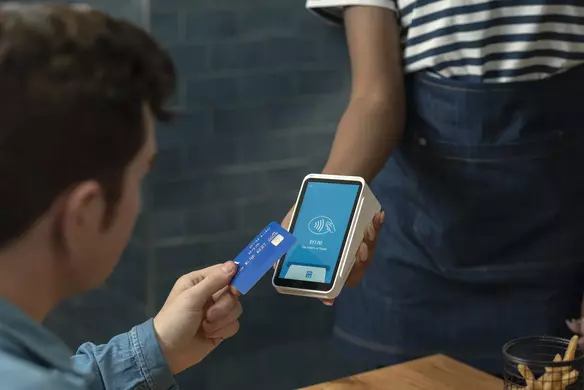
Pay at the table’ is a restaurant payment method where guests settle their bill at their seat using a card or digital wallet. The card stays with the guest while payment is authorised on a POS device, letting them confirm the total, add a tip and pay in one interaction.

How tableside payments work behind the scenes

Tableside payment looks simple from the guest perspective, but several systems work together behind the scenes to make it happen:

1. Secure payment capture

When a guest taps or inserts their card or digital wallet, the device immediately encrypts the payment information. Modern handheld POS devices are built with tamper-resistant hardware and security features to keep card data safe before it leaves the device.

2. Authorisation through the payment processor

The encrypted transaction details are sent through the restaurant’s payment processor to the card network and issuing bank. The bank checks for available funds and potential fraud, then sends back an approval or decline – usually in seconds. The device shows the result instantly.

3. Settlement and funding

Approved transactions are collected in the restaurant’s merchant account until settlement. During settlement, funds move from the guest’s bank through the card network to the restaurant’s bank. Depending on the processor, restaurants typically receive the money within 1–2 business days.

4. Tip adjustment and finalisation

If enabled, tableside devices let guests optionally select a tip on the screen during checkout. The device then automatically updates the total before the payment is finalised.

5. Fraud prevention and PCI compliance

To protect customers’ card data, tableside systems use tokenisation, replacing sensitive information with secure tokens that are useless if intercepted. End-to-end encryption and PCI-compliant devices ensure card information never appears in plain text, reducing fraud risk and making compliance easier for the restaurant.

Tableside ordering vs. traditional POS vs. QR ordering

The way your restaurant takes orders changes how service runs and how guests experience it.

Below is a comparison of the main approaches:

Factor Traditional POS Tableside ordering (handheld) Tableside ordering
(QR ordering)
Guest control Low – staff handle all ordering Medium – guests can make requests via staff or device High – guests order directly on their phone
Order accuracy Medium – orders may be misinterpreted at the counter or in the kitchen High – sent straight to kitchen, fewer mistakes High – guests enter their own selections
Payment speed Low – payment is processed at a fixed terminal High – guests tap their card or mobile wallet High – guests pay on their smartphone
Hardware cost Medium – Fixed terminals and peripherals Medium – handheld POS devices Low – QR code only
Staff involvement High – staff take orders, walk to terminal, process payment Low to medium – staff guide service, faster checkout Low – guests handle ordering and optional payment
Best fit restaurant type Counter or traditional full-service Full-service, modern casual Casual, quick-service, hybrid

Benefits of tableside ordering and payments

Tableside ordering and payment can improve how a restaurant runs day-to-day and the guest experience. Here’s how:

Operational efficiency

Taking orders at the table removes the need for staff to re-enter them later, cutting mistakes and getting tickets to the kitchen faster. Modifiers and special requests are captured clearly, and staff spend more time with guests instead of walking back and forth. These efficiencies are especially helpful when it’s busy.

Revenue growth

Pay-at-table technology shortens checkout, helping tables turn faster. Digital menus and handheld devices make it easy to upsell with add-ons or upgrades, and tips can be presented naturally on the screen during payment. These small nudges can increase spending without feeling pushy.

Improved guest experience

Guests remain in control of their payment without handing over a card or waiting for it to be returned. With the card never leaving their sight, payment feels more secure and transparent. Whether they’re paying on a handheld POS or from their smartphone, the process is fast and seamless.

Data and insights

When tableside ordering and payments are integrated with a POS system, every order provides useful data. You can track which items and hours are popular and how staff are performing. Linking orders to a loyalty program adds another layer of insight, helping you understand repeat visits and tailor promotions based on actual guest behaviour, all while rewarding your top customers.

When tableside ordering may not be the right fit

While tableside ordering brings its benefits, some venues might find traditional workflows suit them better for certain reasons, such as:

Is tableside ordering worth it? (ROI considerations)

Tableside ordering can help restaurants work smarter and deliver a measurable return on investment (ROI) across areas like:

How to successfully implement tableside ordering

Rolling out tableside ordering works best with some planning around your tech, menu and team. These few practical steps will help the transition feel natural for both staff and guests:

Choose a system that integrates payments and POS

Select a platform that can connect tableside ordering and payments to your POS. This keeps transactions, orders and reporting in one place, so there’s no need to reconcile separate systems and you always have a clear view of sales and performance.

Optimise your menu for digital ordering

Digital menus should be easy to read and navigate on-screen. Clear item names, short descriptions and well-organised modifiers help staff and diners order quickly and accurately. Images can also support upsells, especially in guest-driven ordering.

Train staff for operational flow

Tableside ordering changes how staff interact with guests during service. Training them in POS device handling, order entry and payment prompts helps these moments feel natural in conversation. Early training and mock service runs build confidence before going live.

Encourage customer adoption

Guests are more likely to use tableside ordering when it’s clearly introduced and easy to understand. Simple table signage and friendly staff guidance help show them what to do. Small incentives like loyalty points or a welcome offer can provide extra motivation to sign up.

Choosing a tableside ordering system that scales

As your restaurant grows, your tech should be ready to keep up. A tableside ordering system that can handle higher volumes, multiple locations and more complexity makes scaling easier. Features to look for include:


When tableside ordering, payments and reporting are fully integrated, restaurants can scale more confidently. Platforms like Square bring these tools together, helping you expand your business while keeping workflows consistent across your operations.

Explore tableside ordering and pay-at-table solutions

If you’re evaluating modern restaurant payment systems, tableside ordering and pay-at-table options offer a way to make service and checkout more efficient. Square solutions like the portable Square Handheld and QR code ordering integrate ordering and payment, creating a smooth experience for staff and guests. Plus, these connect to other Square tools that help you manage reporting, inventory, staff, marketing and loyalty – all in one system.

Tableside ordering FAQs

What does ‘pay at the table’ mean?

Pay at the table means diners pay their bill right from their seat, either by using a handheld POS brought to them by the server or by scanning a QR code with their smartphone. The device lets guests confirm the total, add any tips and complete the transaction in one step. This process speeds up checkout, which can improve the overall dining experience.

How does tableside ordering work?

Tableside ordering allows orders to be entered directly from the guest table, either by staff using a handheld POS or by guests through a QR code on their smartphone. Staff or guests can review items on-screen, adjust modifiers and add any special requests. The order is sent instantly to the kitchen, which means fewer mistakes and faster service for diners.

Does tableside ordering increase tips?

Tableside ordering can help boost tips by presenting suggested tip options directly on-screen during payment. With QR code ordering, guests can choose quickly and privately as they pay. Many handheld POS devices display preset tip amounts, making it easier for diners to choose an appropriate tip. The speed and convenience of tableside ordering and payment can leave guests with a positive impression and feeling more inclined to tip.

How much does tableside ordering cost?

The cost of tableside ordering depends on whether guests place their own orders or staff take orders at the table, as well as the hardware and POS software you choose. With Square, setting up QR code ordering has no upfront hardware cost because guests use their own smartphones. For staff-led tableside service, you can purchase Square Handheld – a compact device that handles tableside ordering, accepts contactless payments and comes with free Square POS software.

Can tableside ordering integrate with my POS system?

Yes, tableside ordering can integrate directly with your restaurant POS so orders and payments stay in sync. If you use Square for Restaurants, it sends orders from the table to the kitchen instantly, tracks sales and staff performance, and can even link transactions to a loyalty program. Everything updates in real time, giving you a clear, unified view across your business.

Is tableside payment processing secure?

Processing tableside payments is secure when processed using PCI-compliant hardware and software. Card data is encrypted immediately and tokenised, meaning sensitive information never appears in plain text. These safeguards protect both your guests and your business throughout every transaction.

Stella Logan
Stella Logan is a writer for Square, based on the NSW South Coast. She covers everything from the first steps of entrepreneurship to the strategies that help businesses grow.

Related

Keep Reading

Tell us a little more about yourself to gain access to the resource.

i Enter your first name.
i Enter your surname.
i Enter a valid phone number.
i Enter your company name.
i Select estimated annual revenue.
i This field is required.
✓

Thank you!
Check your email for your resource.

x
Results for

Based on your region, we recommend viewing our website in:

Continue to ->