

Table of contents
MOTO (Mail Order/Telephone Order) payments are a type of remote transaction taken over the telephone or by post or email.
In an increasingly contactless payment landscape, MOTO payments are one of the simplest, most cost-effective ways to start taking card payments, and many businesses can benefit from a MOTO payment system, including online retailers and takeaway food outlets.
What is a MOTO payment?
A MOTO payment is a remote transaction that works in a similar way to an online purchase via a secure checkout form. The big difference is that the merchant – not the customer – enters the card details manually into a web-based payment form called a virtual terminal, which is provided by a payment processor like Square.
MOTO payments are particularly useful for businesses that take orders over the telephone or by email, such as takeaway food services and online retailers, and for issuing vouchers over the phone. They’re also a good option if you’re running a small business on a budget because they don’t rely on complex setups or hardware.

Process payments right on your computer
Merchants take MOTO payments using a virtual terminal. When you set up a merchant account to accept credit, debit cards and other payment types, you will usually have access to a terminal. You simply enter your customer’s details – just like you would if making a purchase yourself – and your account provider handles the rest.
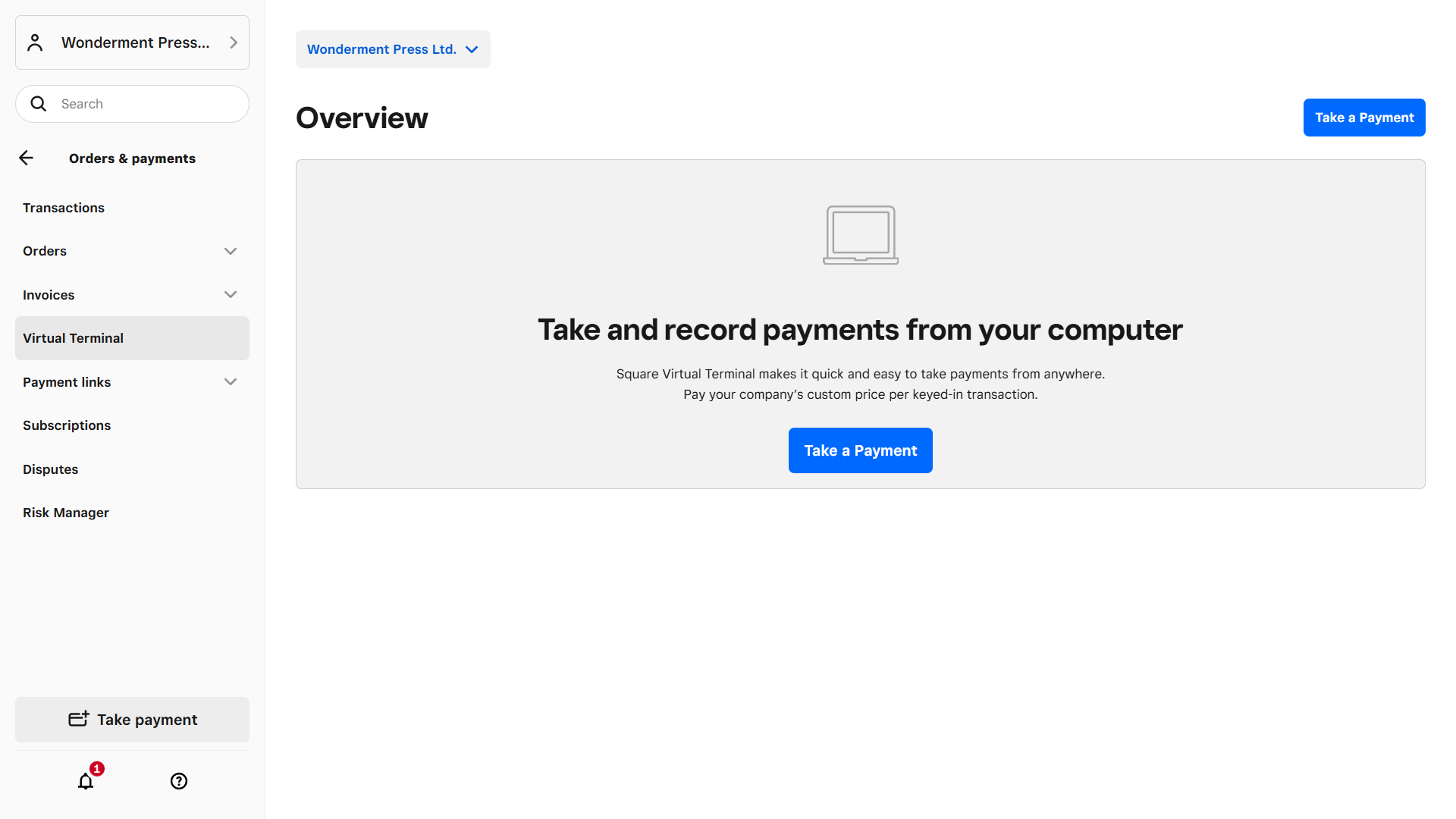
Merchant accounts like the one provided by Square are very easy to use. After creating an account and verifying your identity, all you (or your staff) need to do is open your virtual terminal from your account dashboard. You can then start processing payments on your computer.
How do MOTO payments work?
MOTO payments operate in a similar way to online payments. Both are card-not-present transactions, meaning that the physical card isn’t handed over to make payment.
Here are the key steps involved in MOTO payments:
- Customer provides details: The buyer provides you with their card information by phone, mail, email or (occasionally) fax. A card number, expiry date, CVV, and billing address are all needed.
- Merchant inputs data: You manually enter these details into a secure virtual terminal supplied by a payment provider like Square. A virtual terminal is like an online checkout form for a seller.
- Authorisation check: The terminal sends the details to a payment gateway, which contacts the card network and issuing bank to approve the transaction.
- Transaction approval: Once authorised, the payment is confirmed instantly. If it’s declined, you’re notified.
- Settlement and payout: Funds are transferred to your merchant account, where you can then withdraw them to your business account.

What are the benefits of taking MOTO payments?
The ability to process payments remotely using MOTO payments has a host of benefits for entrepreneurs and small business owners. Many sellers like them because of their simplicity, speed, and the fact that there are no set-up costs. Moto payments also work well alongside other payment methods like in-person point-of-sale (POS) systems as they allow customers a number of payment method options.
Here’s an overview of the main benefits of MOTO payments:
- Customer convenience: Customers are provided with a fast, secure and convenient way to pay for goods or services without having to physically present a payment card.
- Simple set-up: A MOTO payment system is easy to set up and use. The retailer can access the virtual terminal from any internet-enabled device from anywhere with an internet connection.
- Efficiency: Taking payments is as simple as logging into your account and entering your customer’s details. This gives you more time to focus on other aspects of the business.
- Multi-user access: Virtual terminals can be set up for multi-user access, allowing authorised employees to access the MOTO system and take payments from multiple locations 24/7.
- Wider reach: Offering payments by card over the telephone, by email or by post allows businesses to broaden their customer base and reach a wider audience.
- Time saving: During a MOTO transaction, customers can grant a business permission to save their details. This speeds up the payment process for future purchases and subscriptions, increasing convenience for the customer and retailer.
- Quick payment: MOTO payments happen in real time. Authorisation and verification are immediate, just like online payments. Settlement may take a few days, but the payment is guaranteed.
What are the disadvantages of taking MOTO payments?
While MOTO payments are easy and inexpensive to set up, they’re not perfect. There are more fraud risks, merchant fees and greated liabilities, and they’re not suitable for all selling environments.
Here are the main disadvantages of MOTO payments:
- Greater fraud risk: MOTO lacks PIN verification, making it easier for fraudsters to exploit. That said, providers like Square comply with strict PCI regulations to lower these risks.
- More chargebacks: Because they’re card-not-present transactions and harder to verify, banks are more likely to side with customers who dispute MOTO transactions and initiate chargebacks.
- Risk of errors: Entering card data manually makes mistakes more likely (though these are relatively easy to correct).
- Manual process: Because details must be entered manually, virtual terminals are unsuitable for high-volume sales. Some providers, like Square, allow for a hybrid system with an in-person terminal.
- Limited tenders: Merchant accounts sometimes only allow one payment method per sale. Split or mixed payments aren’t always possible. That said, some providers, like Square Virtual Terminal, do support split and multi-card transactions.
- Higher fees: Payment service and merchant account providers usually charge higher transaction fees compared to physical card payments.
Best practices for taking MOTO payments
One of the top benefits of MOTO payments is that they’re easy to take. Once you’ve set up your virtual terminal (the form you use to enter customer details), you’ve done most of the hard work.
That said, following some simple guidelines will ensure that you identify mistakes early and minimise the risk of fraud.
Here’s a rundown of best practices for taking MOTO payments:
- Use a PCI-compliant virtual terminal: This will ensure that all MOTO transactions meet security standards.
- Enter card data directly: Never write down or store payment details manually. If your customer gives you permission, you can store them with your provider.
- Obtain consent: Ask for verbal consent for every charge and make sure the customer understands the nature of the transaction.
- Restrict staff access: Only trained employees who understand how to use the virtual terminal should handle MOTO payments.
- Reconcile accounts regularly: Match all MOTO transactions to sales records to flag errors and over- or under-payments early.
How much do MOTO payments cost?
Fees for MOTO payments fall in the higher range. Because they’re card-not-present transactions, payment processors charge a little more to cover the added security and verification costs.
Fees vary between virtual terminal providers, so be sure to do your homework to find the best option. Look for fair fees and a nicely designed merchant account with all the features you need. Square charges a set 2.5% per transaction, with no other hidden costs or subscriptions.

How to accept MOTO payments
You can set up a virtual terminal, the form in your merchant account that you’ll use to process transactions, in minutes. There is no initial cost and no monthly fees – just a small processing fee for each transaction.
Once signed up, Square Virtual Terminal can be used for MOTO payments. The terminal can be used by any member of staff you choose, and each transaction takes no more than a few minutes to complete.
Here’s how to set up MOTO payments step by step in Square:
- Create a Square Merchant Account and complete the sign-up process.
- Complete the approval process for accepting payments by verifying your identity and connecting your bank account.
- In your main dashboard, go to Orders and payments and select Virtual Terminal.
- Follow the on-screen prompts and enter your customer’s card details.
Customers automatically receive a receipt directly to their inbox after each transaction, and all data is securely stored in the dashboard for your benefit.
Square users can also take card-present payments with a wireless Square Terminal linked to their computer to provide smooth transactions in any format.
Finally, the Square virtual terminal seamlessly integrates with other Square solutions such as Square Invoicing, Square Point of Sale and Square Register for a smooth online shopping experience. Virtual terminal transactions can be exported quickly and easily to popular accounting software platforms, such as Xero, or downloaded for reconciliation.