





Table of contents
Square’s Payout options
Square has several different types of transfers: free next day payout as standard, instantly with Square Card* or via Instant Transfers** for a 1.95% fee.
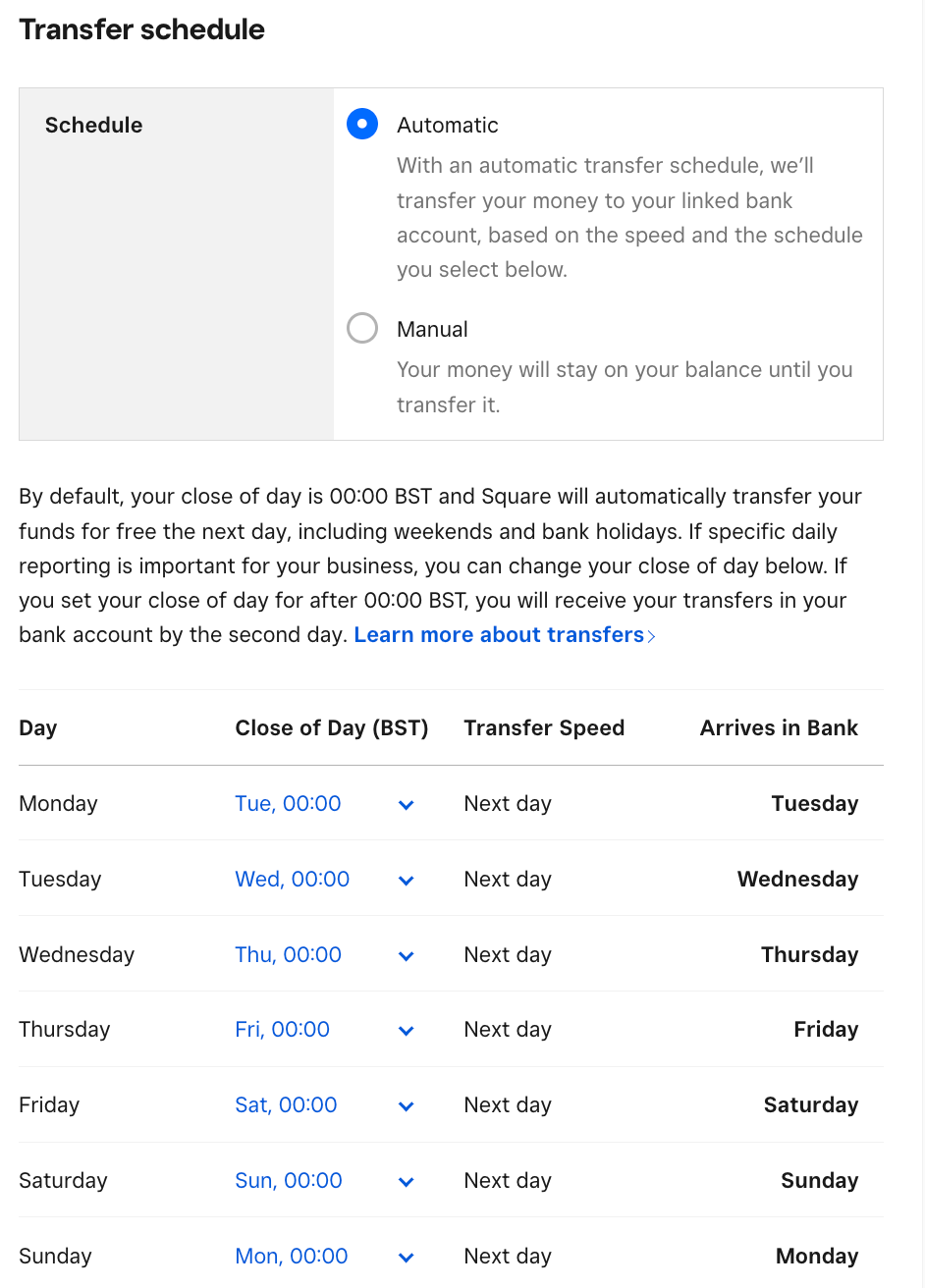
Free next day standard payout
Square will automatically transfer your funds for free the next day, including weekends and bank holidays. Square groups and sends payments based on the time you choose to end your day. By default, your close of day is 00:00 BST but you can customise your close of day. If specific daily reporting is important for your business, you can change your close of day. If you set your close of day for after 00:00 BST, you will receive your transfers in your bank account by the second day.

Square Card
Instant Access with Square Card* Your money is stored in your Square Balance after every sale, and can be accessed immediately with your free business spending card. Enjoy instant access to your sales with Square Card — no more waiting for bank transfer.
Instant transfer
If you want the money to hit your account even faster than the next day or you don’t want to get your Square card, you can use Instant Transfers. Whether it’s late at night or over the weekend, an instant bank transfer lets you transfer your sales into your bank account with just a tap.
For each transfer, the fee is just 1.95% of the amount transferred. You can learn more about how to get started with instant transfer.
Whatever your business’s needs, Square has a payout setting that can help you run, grow, and succeed.

Using an Expense Tracker to Form Good Financial Habits
FAQs
How do Square payouts work?
Square automatically transfers your sales to your linked bank account. You can choose between next-day, Square Card access or instant depending on your business needs.
When will I receive my money from Square?
Sellers can get their funds the next day for free (including weekends & bank holidays), but you can also get instant access through Square Card or Instant Transfers.
Can I choose when my Square transfers happen?
Yes, you can set your “close of day” time so that transfers group at the end of your business day.
Why haven’t I received my Square payout yet?
Most transfers complete the next day as standard. If it’s delayed, check your bank’s processing times or confirm your linked account details in the Square Dashboard.
Do bank holidays affect my Square transfers?
Standard next-day transfers process even on weekends and bank holidays, but some banks may take longer to post the funds.
*The eMoney associated with your card is issued by Squareup Europe Ltd, safeguarded and authorised by the Financial Conduct Authority under the Electronic Money Regulations 2011 (registered reference no. 900846).Funds generated through Square’s payment processing services are generally available through Square Card immediately after a payment is processed. Fund availability times may vary due to technical issues.Square does not charge fees, but ATM withdrawal fees charged by ATM providers may apply.Square Card is funded on a prepaid basis.
**Funds are subject to your bank’s availability schedule, but are generally available in your bank account within 20 minutes of initiating an instant transfer. Minimum amount is £15 and maximum transfer limit is £3,500 per day.


