

Table of contents
Contactless payments offer speed, convenience and security to both consumers and businesses. But what is a contactless payment, how does it work and what do you need to know to provide a better checkout experience to your customers? This guide answers your questions about tap to pay payments such as Interac Debit, credit cards and mobile wallets.

What is a contactless payment?
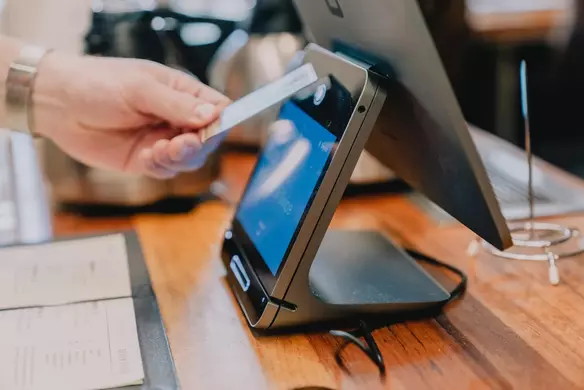
A contactless payment, as the name suggests, doesn’t require any physical contact between the buyer’s smartphone or physical credit or debit card and the POS.
You might have heard of the term NFC, which stands for “near field communication”. It’s the technology that powers contactless payments through a type of radio frequency identification (called RFID). NFC transactions take place over this specific radio frequency that enables the card or smartphone to communicate with the payment reader when they’re close together (usually two inches or less).
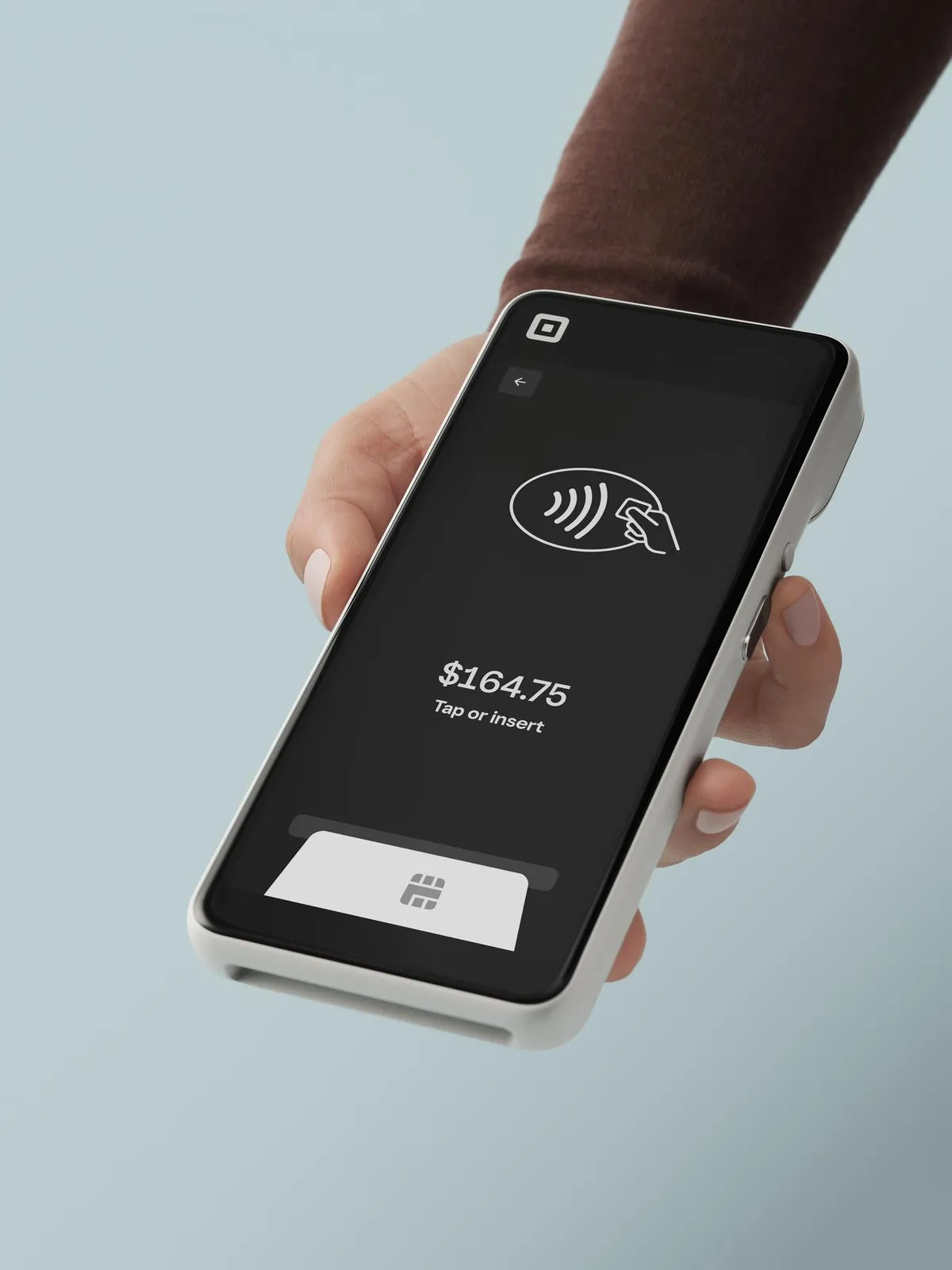
The contactless payment symbol appears on debit or credit cards and on card readers to indicate where you’re supposed to tap your card. It looks like a sideways Wi-Fi symbol, with waves that get bigger from left to right.
How do contactless payments work?
In Canada, most credit and debit cards are equipped with EMV technology, which is a global standard for secure chip payments, as well as being NFC-enabled. A customer can either insert their EMV card and input their PIN or tap their card to pay for a purchase.
Contactless payments are fast and convenient. They work in a matter of a few simple steps:
- A customer wants to pay for a purchase with a credit or debit card or a mobile wallet.
- The merchant presents them with a card reader or guides them to a countertop register.
- The customer taps or hovers their card or smartphone on the area of the device featuring the contactless symbol.
- NFC technology enables the secure exchange of information between the card orsmartphone and the device.
- Behind the scenes, the payment processing begins.
- If the transaction is approved, the customer hears a beep and the screen reads “approved.”
All of this happens within a matter of seconds, without any physical contact required. As long as your business is equipped with an NFC-enabled POS system and card reader, you can accept contactless payments.
Contactless payment technology: A brief history
In Canada, the first credit cards with contactless technology entered the market in 2006 (MasterCard’s PayPass) and 2007 (Visa’s payWave), according to a Bank of Canada report. Usage grew gradually, as banks started replacing magnetic stripe cards with chip cards and the number of merchants offering contactless terminals grew.
Interac Flash, now referred to as Interac Debit, launched in 2010 and played a big role in the adoption of contactless payments across the country. Canadians were already used to paying for purchases with Interac, as the national debit system had been in place since 1994.
Then came mobile payments. The first Interac Flash debit transaction made from a mobile phone took place at a McDonald’s restaurant in 2013. A couple of years later, in 2015, Apple Pay launched in Canada, initially as a partnership with American Express. The following year, Canada’s five biggest banks were added to the Apple Pay system, encouraging iPhone users to embrace mobile wallets. That year, contactless payments grew by 70% in both volume and value of transactions, according to Payments Canada.
The year 2020 marked another turning point in the adoption of contactless payment technology. Major credit card networks, which previously capped the transaction limit for tap to pay transactions to $100, increased the transaction limit to $250.
Now, Payments Canada’s latest Canadian Payment Methods and Trends report shows that tap to pay is here to stay as a leading payment method, with contactless payments making up 53% of total payment volume in 2023. The most popular contactless payment method? Credit cards, which make up the largest proportion of contactless transaction volume at 57% followed by debit cards at 43%.
Emerging payment methods using NFC payment technology, like wearables such as fitness trackers and smartwatches, are growing in popularity. Although wearable transactions represented less than 1% of total contactless transaction volume in 2023, their usage for payments increased by 32% year-over-year.
What is a contactless payment card?
Some debit and credit cards allow the customer to pay for items by tapping or waving their card above the card reader. These types of cards are called contactless cards, and they’re EMV cards equipped with NFC technology.
What’s EMV? It stands for Europay, Mastercard and Visa and it’s a global standard for secure card payments. These days, most cards in Canada are equipped with EMV chips, which is the microchip that you insert in a card reader when you dip your card to pay. It holds authentication data, and it’s more secure than its magnetic stripe predecessor, which could easily be cloned.
Contactless payment cards have an EMV chip as well as an NFC antenna in the body of the card. When a customer taps their card to pay, the NFC antenna securely communicates information with the card terminal and powers the EMV chip to generate a unique, encrypted code for the transaction.
Contactless payment types
Contactless cards are one of many contactless payment types. Here are some of the different contactless payment methods to be aware of.
- Credit cards: Accepting tap to pay credit cards can help you speed up checkout. According to Visa, a contactless transaction can be completed in as little as 0.5 seconds, which is seven times faster than traditional chip and PIN transactions.
- Interac Debit: Interac Debit comes with the lowest transaction fees. With Square, you only pay 0.75% + 7 cents per in-person Interac debit transaction.
- Mobile wallets: According to Payments Canada, in-store contactless mobile payments increased by 42% between 2022 and 2023. Accepting mobile wallets like Apple Pay, Google Pay and Samsung Pay is easy. Modern phones are equipped with the same NFC technology as tap to pay cards, so all you need is a contactless card reader.
- Wearables: Did you know that customers can use their Google Wallet to pay with their Fitbit or their Apple Wallet via their Apple Watch? They just need to bring their wearables next to your card reader to initiate a purchase.
- QR codes: QR codes are considered an emerging payment method in Canada, but there are creative ways to use them to create a better customer experience and smoother operations. For example, customers can scan QR codes to purchase art in a gallery, or to order and pay for their meal when dining at a restaurant.
Advantages of contactless payments
Accepting contactless payments comes with many benefits for business owners, from a smoother checkout experience to the potential to increase sales. Here are a few to think about:
- Faster checkout: With contactless payments, customers don’t need to enter their PIN or count cash to make a purchase. And when the whole checkout experience takes less than a minute, lines move faster and you can serve more customers. The result? Smoother operations, happier customers and increased profits if speedier checkout means more sales volume.
- Better customer experience: Contactless payments can have an impact on customer retention: 58% of Canadian consumers wouldn’t be likely to return to a business that doesn’t offer a convenient way to pay, according to the Square 2025 Future of Commerce report. In other words, customers expect convenience — and that includes the ability to tap to pay.
- Broader appeal: Offering a variety of payment options can help you cater to the preferences of younger customers. Seven in 10 Gen Z Canadian adults have embraced mobile wallets like Apple Pay, with six in 10 preferring to rely on their smartphones and leaving their physical wallet at home for short outings, according to an Interac survey.
- Higher sales potential: Research shows that having a contactless debit card increases the number of times you use it, especially for small purchases. You can use your checkout area to encourage sales by displaying products that might entice customers to tap their cards.
- Security: Contactless payments are highly secure. A unique code (or “token”) is generated for every transaction, which is useless if intercepted by fraudsters. Payment Service Providers like Square offer additional built-in security measures, as do financial institutions and Canada’s national payment infrastructure.
Disadvantages of contactless payments
There aren’t many drawbacks to contactless payments. The main disadvantage for business owners is the limit on larger purchases. Customers can only use contactless payments for transactions under $250 in Canada. But that doesn’t mean that you’ll miss out on a sale.
With Square, the checkout experience remains seamless with bigger-ticket purchases. Customers are simply prompted to insert their card into the card reader and enter their PIN. While there are different hardware options based on your business needs, they’re all modern, user-friendly and designed for quick and easy payments.
Like with any payment method, there is a risk of fraud with contactless payments. But they are safer than other alternatives: Canadians experience nearly three times more payment fraud using cash versus credit cards, according to a recent Payments Canada study.
How to accept contactless payments
To accept contactless payments, you’ll need a point-of-sale (POS) system with contactless hardware. The right setup depends on your business type and needs, but here are a few examples:
- Traditional checkout counter: Whether you own a retail store, a coffee shop or a quick-service restaurant, a fully-integrated POS like Square Register can live on your checkout counter. It features dual touchscreens (one for you, one for customers) and doesn’t require any extra terminals, apps or tablets.
- In-aisle or tableside checkout: Square Terminal, which includes a built-in receipt printer, is a great option for retailers looking to speed up service through in-aisle checkout. And Square Handheld, which only weighs 315 grams, can help restaurateurs turn tables faster with tableside payments.
- On-the-go business: If you own a food truck, sell goods at farmers’ markets or offer contracting services on the go, you need to be able to accept contactless payments wherever you are. With Square, you can turn your smartphone into a POS and offer Tap to Pay on iPhone and Tap to Pay on Android.
- Service-based business: Are you a massage therapist or personal trainer? Square Reader is a minimalist and affordable solution to start accepting contactless payments without the need for bulkier hardware.
Accepting contactless payments is only the beginning of what you can do with a strong POS system. With Square, you can streamline daily operations thanks to a suite of tools that includes inventory management, appointment scheduling, online ordering and much more.You can gain access to business insights thanks to real-time analytics and in-depth reports, which helps you make smarter decisions to grow your business.
To get started with your new POS system and accept contactless payments, you’ll need to follow these steps:
- Sign up for your free Square account.
- Choose your hardware.
- Add signage around your checkout counter about the payment types you accept, including the contactless symbol.
- Follow the instructions to connect your Square hardware to your phone, tablet or Wi-Fi Ethernet connection. Setup only takes a few minutes.
- To enable Tap to Pay on your smartphone with Square, download and open the Square Point of Sale app. Then, click on More > Settings > Account (for iPhone) or More > Settings > Hardware (for Android). Select the Tap to Pay option and follow the prompts.
- Start taking contactless payments. Square deposits funds into your bank account as soon as the next business day.
Why are contactless payments so secure?
Contactless payments are authenticated payments, meaning they’re really hard to hack. In a contactless payment, the data associated with your credit card on file is encrypted and constantly changing. So even if fraudsters were to hack a system, the data they found there would be useless.
A (POS) system like Square encrypts data at the card reader and throughout the entire transaction, and never stores data on the device. Square also takes care of PCI DSS compliance on your behalf and provides free dispute management services for added peace of mind.
Visa, Mastercard, American Express and Interac protect consumers against financial loss if someone uses their credit or debit card without permission with zero-liability policies (learn more about them).

Contactless payment FAQs
What is tap to pay?
Tap to pay is a contactless payment method, which means you don’t need to insert your card and input your PIN to complete a transaction — you simply tap it to make a purchase. You can also tap to pay with a mobile wallet or a wearable like a smartwatch.
What is an example of a contactless payment?
An example of a contactless payment is buying a latte by tapping your smartphone on the payment terminal of a coffee shop via Apple Pay, or tapping your Interac Debit card on a parking meter to pay for parking. As long as you tap your card, mobile device or wearable to pay, it’s a contactless payment.
How do I know if my card is contactless?
All contactless cards come with a contactless payment symbol, which looks like a sideways Wi-Fi symbol on the front or back of the card, sometimes both.
Do they have contactless in Canada?
Yes, contactless payments are widely used in Canada. From tap to pay credit cards to Interac Debit, contactless is a leading payment method in Canada, with Payments Canada data showing that contactless payments account for 53% of total payment volume. You’d be hard pressed to find a business that doesn’t accept contactless payments.