

Table of contents
From paying for coffee with a smartphone to tapping our credit card at the grocery store, consumers love the speed and convenience of contactless payments. Near Field Communication (NFC) technology has powered this tap-and-go way of life here in Canada, but you may have questions around what is NFC and how it works. To help you accept contactless cards and mobile payments at your business, here’s a guide to NFC.
What is NFC?
NFC, which stands for Near Field Communication, is short-range wireless technology frequently used to facilitate contactless payments. If you’ve tapped a credit or debit card or paid for a purchase with a mobile wallet, you’ve used NFC technology.
These days, most credit and debit cards, smartphones and wearables in Canada are equipped with NFC, and most businesses have NFC-enabled card readers that allow them to accept contactless payment methods. Even though NFC is associated with tap to pay, it’s also used in other contexts, such as public transit passes and health and fitness trackers that sync with gym equipment and key fobs.
In short, NFC lets two devices — like your credit card and a payment terminal or your Fitbit and a treadmill — talk to each other when they’re at a close distance.

How NFC works
To understand the technology, it’s useful to talk about its predecessor, radio-frequency identification (RFID). You can think of RFID like an advanced barcode. It’s an identification system that relies on a small chip implanted in a tag to store data. These tags can then be scanned. Library books, microchip implants for pets and car keys are examples of RFID in action.
NFC is very similar and builds on RFID, but there are a few notable differences between NFC and RFID. The first one is that RFID often works in one direction when you do something like scan a product or open a door. On the other hand, NFC enables two-way communication between devices.
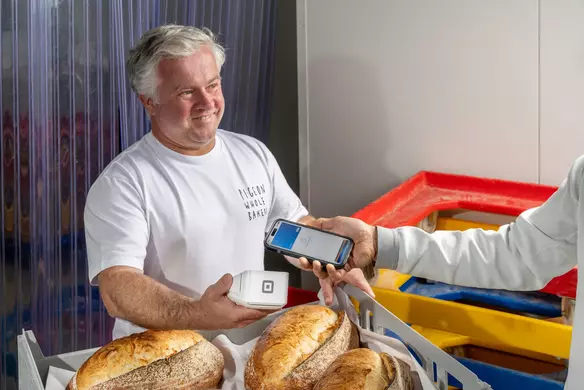
An NFC-enabled smartphone like an iPhone or Android can function as both a reader or a tag. As a business owner, it means that you can accept contactless payments with a mobile device with a solution like Square Point of Sale. As a customer, it means that you can pay with a mobile wallet.
NFC is also meant for short-range use covering only a couple of centimetres, not several metres, which makes it more secure, as it’s harder to intercept data from up-close. Plus, modern NFC systems and devices come with additional security layers that protect payment information, such as authentication and tokenization (more on that later).
Both RFID and NFC rely on a principle called inductive coupling. A reading device runs an electric current through an antenna, which generates a magnetic field that creates the opportunity for short-range wireless communication. When it’s close to the antenna of a device containing a tag, it can power the tag and the devices can then exchange data. In the case of NFC, both devices can generate power, but it’s the same principle that lets them exchange information.
Examples of NFC payments
One of the most prevalent examples of NFC payments in day-to-day life is Interac Debit, which has been around since 2010. Debit card transactions account for 43% of total contactless transaction volume, according to Payments Canada. And whenever you tap your Visa, Mastercard or Amex to pay, that’s an NFC payment, too. In fact, credit cards are the most popular contactless payment type in Canada at 57% of total contactless transaction volume, according to the same Payments Canada data.
And, if, like 63% of Gen Z shoppers surveyed by Interac, you prefer to leave your physical wallet at home in favour of your mobile wallet during short outings, you’re also embracing NFC payments. Mobile wallets like Apple Pay, Samsung Pay and Google Pay all use NFC technology to let users pay with credit and debit cards through their smartphone.
Wearable payments made with fitness trackers and smartwatches are also emerging as a new way to pay with NFC technology. According to recent Payments Canada data, they were used to initiate 44 million payment transactions in 2023, a 32% year-over-year increase.
Is NFC secure?
Yes, NFC payments are secure. The idea of paying through a mobile device can make people uneasy, but NFC payments are dynamically encrypted, meaning they’re constantly changing. This makes them one of the most secure ways to pay. In Canada, the limit for contactless payments is $250 to mitigate the risk of fraud if someone taps a card to make purchases without permission from the cardholder.
Plus, Canadian cardholders are protected from unauthorized debit and credit transactions through the zero-liability policies of Interac, Visa, Mastercard and American Express. Plus, NFC payments don’t store the card data directly on the device; instead, they use digital technologies such as tokenization to maintain security.
Tokenization also protects payment data by temporarily replacing it with a unique code, the “token.” This code takes the place of the real data during the transaction, which means that it would have no value if data were to somehow be compromised.
With a POS system like Square, your business and customers benefit from extra layers of security during contactless transactions, such as end-to-end encryption, built-in PCI DSS compliance and fraud prevention measures.
How does NFC work with smartphones and other digital devices?
Customers simply hold their NFC-enabled smartphone or other digital device around two inches away from the payment terminal to pay. Once a customer initiates a contactless payment, NFC technology begins the secure exchange of data required for transaction verification. Using the specific RFID frequency mentioned earlier, the NFC-enabled reader and the device or card pass encrypted information back and forth to each other to complete the payment within seconds.
Do all smartphones have NFC?
Most modern smartphones have NFC, and it’s been a standard for iPhones, Samsung and Google phones for years, but some older and more budget-friendly models might not.
Apple first included NFC on the iPhone 6, but usage was restricted to contactless payments with Apple Pay. NFC tag reading via apps became possible with the iPhone 7 and native tag reading became standard from the iPhone XS/XR onward. NFC has been a standard for the Samsung Galaxy since the S III and for Google phones since the Nexus S.
To check if your phone has NFC, search for “NFC” in the settings. You should see it appear along with the option to enable or disable it on Android phones. On iPhones, NFC is always on but you can manage your payment preferences in Apple Pay or Apple Wallet to choose which cards can be used with contactless.
EMV and NFC: What’s the difference?
EMV and NFC are often mentioned in the same conversation because both technologies are part of most Canadian credit and debit cards, but they’re not one and the same.
EMV (Europay, Mastercard, Visa) is a set of standards governing both NFC protocols and EMV chip card technology. When people talk about EMV as a kind of payment, they’re often referencing EMV chip cards. A chip card is a super-secure form of payment that encrypts bank information.
While EMV focuses on secure payment standards and chip cards, NFC technology enables contactless card and mobile payments.
EMV contactless chip cards, a sub-category of EMV chip cards, also feature an NFC antenna in the body of the card, which allows the exchange of encrypted data during contactless transactions.
Many consumers use both tap to pay and chip and PIN transactions via their payment cards. As long as your business is equipped with an NFC-enabled POS system and card reader, you can easily accept all forms of payments, including contactless payments. You can also benefit from the digital identity verification provided by NFC technology, enhancing authentication measures in transactions.
NFC vs Bluetooth vs UWB
If you’re wondering about the differences between NFC, Bluetooth and ultra-wide band technology (UWB), it comes down to the way these technologies transmit information and the way we use them.
NFC is very short-range and enables communication between devices through a magnetic field. It uses tokenization to protect sensitive data, which makes it safe for payments.
Bluetooth works at longer distances than NFC and connects devices through ultra-high frequency (UHF) radio waves, which is great for applications like listening to music on a speaker but less suitable for financial transactions compared to NFC because of the range involved.
UWB transmits information in short-range, rapid pulses similar to a radar instead of a continuous wave like Bluetooth. It can do things like unlock your car or home door when you’re nearby. In healthcare or logistics settings, it can be used to locate assets. It’s unique from both NFC and Bluetooth due to its ability to precisely locate and track devices.
That precision also makes it safer, since it greatly reduces the risk of relay attacks, which involves “tricking” a locked device into thinking its owner is nearby and unlocking it. It also uses security protocols such as Scrambled Time Sequences (STS), a technique that protects the integrity of timestamped data while making it difficult for attackers to intercept it.
While it’s still early, UWB is being recognized for its potential in enabling secure payments, according to FiRa, which could transform contactless payments into touchless ones—imagine waving your arm to pay, for example.
The benefits of NFC
NFC-enabled payments are important for your business for three key reasons: they’re faster, more convenience, and more secure.
Faster payments
NFC transactions are the fastest way to pay — they take just seconds, a fraction of the time of chip and PIN and cash transactions. And that speed is a huge plus for businesses, as faster transactions can mean more sales.
More convenient
What’s easier than tapping your card or phone? When it comes to making a payment, not much. That’s one of the reasons why it’s a leading payment type among Canadians, with Payments Canada data showing that contactless payments made up 53% of total payment volume in 2023.
More secure
Contactless cards are protected by the same technology that secures a regular EMV chip card. NFC-enabled credit and debit cards and mobile wallets like Apple Pay tokenize your bank details, meaning they replace your information with algorithmically-generated random numbers called tokens. These tokens then pass through the networks needed to process the payment, without exposing your actual bank details. What’s more, these tokens change every time an NFC transaction takes place — so the data is nearly impossible to isolate and extract.
Additional security layers are built into the contactless payment process. For example, NFC payments using Apple Pay are additionally locked with Apple’s fingerprint or facial recognition technology, ensuring a higher level of digital security.
Card networks also protect consumers with zero-liability policies if someone uses their card without permission. And Payment Services Providers (PSPs) provide their own security measures too. For instance, Square offers end-to-end data encryption and built-in PCI DSS compliance.
How do you pay with NFC?
To pay with NFC with a debit or credit card, tap your card on the area of a card reader featuring the official contactless payment symbol, which looks like a sideways Wi-Fi sign. To pay with a mobile wallet, hold your smartphone or wearable next to the card reader. You might be prompted to unlock your device, such as using Touch ID with an iPhone. Whether you use a card or a mobile device, you’ll typically hear a beep and see “approved” on the screen when the transaction goes through.
How do you accept NFC?
To accept NFC mobile and contactless payments at your business, you’ll need to get set up with a card reader like Square Reader, which can accept a variety of payment types, from Interac Debit to credit cards and mobile wallets. You can even turn your smartphone into a point-of-sale (POS) with Tap to Pay on iPhone or Tap to Pay on Android.
Ultimately, the right NFC-friendly payment setup depends on your unique needs. Here are a few examples to consider based on different business types:
- Restaurants: Whether you own a fast-casual spot or a full-service high-end restaurant, you need a POS that can adapt to your needs. For tableside service, a portable terminal like Square Handheld helps servers take both orders and payments right at the table to reduce friction and speed up service. For quick-service restaurants, a self-ordering solution like Square Kiosk can reduce wait times and let customers fully customize their orders. Both options work with the Square Kitchen Display system, which keeps orders organized and syncs front and back of house.
- Coffee shops: If you own a coffee shop, you may want to start with a simple and affordable card reader like Square Reader or go with a more robust option like Square Register, which features two displays, including one on the customer’s side of the counter. Either way, you’ll keep lines moving thanks to Square’s intuitive design, which makes it easy for customers to tap to pay (even if they haven’t had their morning coffee yet). And you can even create your own loyalty program to boost repeat visits with Square Loyalty.
- Retail stores: Do you own a boutique or a specialty store like a flower shop? Square Stand, which turns an iPad into a sleek POS that you can swivel to face your customers when it’s time to tap their cards, may work well for you. It doesn’t take much counter space and it’s easy to use. Meanwhile, real-time inventory tracking helps you stay on top of stock.
- Beauty businesses: Beauty businesses like spas need a payment setup that doesn’t throw off the flow of the customer experience. With Tap to Pay on iPhone or Android or Square Reader, you can take payments in treatment rooms. Square Appointments also lets you manage bookings and add notes to customer profiles to customize their visits.
To get started with NFC payments, simply follow these steps:
- Sign up for your free Square account.
- Choose your hardware.
- Follow the instructions to connect your Square hardware to your phone, tablet or Wi-Fi Ethernet connection depending on the device.
- To enable Tap to Pay on your smartphone with Square, download and open the Square Point of Sale app. Then, click on More > Settings > Account (for iPhone) or More > Settings > Hardware (for Android). Select the Tap to Pay option and follow the prompts.
- Start taking Interac Debit, credit card and mobile wallet payments.
- Explore Square’s ecosystem of tools to better manage your business, from shift scheduling to marketing and more.
Costs for NFC point-of-sale systems
Some POS systems can cost in the hundreds of dollars and come with both setup and monthly fees, but you don’t have to spend a fortune to get started. Square software is free of charge, and you only pay 2.5% per credit card transaction and 0.75% + 7 cents per Interac Debit transaction. There are no monthly fees or contracts, and you only pay when you take a payment. As for hardware, you can get started with Square Reader, which accepts both EMV and NFC payments and costs just $69. Learn more about POS system costs.
Familiarizing yourself with NFC as a customer
Familiarizing yourself with how to pay with NFC as a customer will help you troubleshoot any issues your customers might have when they go to pay with their device.
Getting yourself set up to pay via your mobile phone is relatively easy. Most mobile wallets use your phone’s camera to read the numbers on your credit card (which, as we mentioned above, become encrypted). You may also sync your digital wallets on your iPhone with iTunes billing info if you have iPhone 6s or newer and want to use Apple Pay. (Check out our step-by-step guide on how to pay with Apple Pay here.)

What is NFC FAQs
What does NFC do on my phone?
NFC enables short-range wireless communication capabilities within your phone, which means that it can talk to other NFC-enabled devices. It allows you to use your phone to pay for purchases through a mobile wallet and accept contactless payments if you are are business owner.
Is Apple Pay NFC?
Yes, Apple Pay uses NFC technology to enable communication between an iPhone or Apple Watch and a contactless card reader.
How does NFC payment work?
NFC payments use short-range wireless technology to allow a debit or credit card, a smartphone or a wearable to securely exchange data with a payment terminal. NFC relies on tokenization, a security measure that creates a unique code for each transaction, to keep payment information secure. In action, an NFC payment just looks like a customer tapping their card or mobile device on a card reader and takes only a few seconds to process.
How do I check if my phone has NFC?
To check if your phone has NFC, search for “NFC” in your phone settings. You’ll typically find it under Connections, Connected Devices or Network & Internet on Android devices. With iPhones, NFC is automatically enabled but you can manage payment settings in your Apple Wallet or Apple Pay if you want to enable or disable contactless for certain cards.