

Table of contents
If you’ve been out to dinner recently, you may have been asked to scan a QR code with your smartphone to access the restaurant’s menu. Or maybe you’ve noticed QR codes popping up to facilitate contact-free payments at your favourite bar. If you have, it’s because QR codes, which stands for Quick Response Code, have become a mainstream tool for sharing information, processing transactions, and are fueling faster and more convenient service.
But what is a QR code and how does it work? In this article we explore the world of QR codes, from where they came from to what you can do with them and how Square can help.

What is a QR code?
A QR code, or quick response code, is a two-dimensional barcode that’s made up of black and white squares that stores information like website links, menus, or unique payment details.
When scanned with a smartphone camera or any other form of barcode scanner, QR codes instantly direct users to a URL or payment gateway housed within it.
With one scan, QR codes open a world of possibilities, like:
- Viewing a restaurant menu, ordering food, and paying for it
- Getting directions to places in Google Maps
- Creating secure payment links to complete transactions on your phone
- Accessing Wi-Fi networks
- Downloading an app, visiting a website, or signing up for a newsletter
With a QR code, none of the actions above require you to type in a URL or navigate through multiple web pages. You just pull out your phone, scan, and do what you need to do.
QR code technology has been around since 1994 and was created by Japanese company Denso Wave to track production in automotive manufacturing. But it wasn’t until the early 2000s that they started to be used for marketing campaigns. At the time, uptake was limited by the need for third-party scanning apps. That all changed in 2017 when Apple enabled the iPhone camera to read QR codes and Android quickly followed suit.
Today, thanks to faster and more readily available internet connection and QR code scanning the default in all mobile devices, these unassuming black and white boxes have become a must-have tool for businesses to process payments faster, share information easier, and connect with consumers everywhere.
How do QR codes work?
QR code generators arrange black and white squares into a unique two-dimensional pattern that encodes data. When scanned, that pattern is decoded into readable information, such as a URL, menu or payment page.
Here’s what happens when you scan a QR code:
- Your phone’s camera reads the pattern on the code
- Your phone interprets the data encoded within that pattern
- Based on what’s in the data, your phone performs the directed action
- Depending on the direction, a website opens, an app is launched, or a payment page is accessed
The standard structure of a QR code includes a number of parts playing different roles:
- Quiet zone. The white border that separates the code from surrounding graphics.
- Finder patterns. The three large black squares at three corners (top-left, top-right and bottom-left) of the code. These help scanners detect orientation.
- Alignment pattern: Smaller squares that are used to ensure readability, even if the code is off-center or tilted when scanned.
- Timing pattern: A line of alternating black and white modules (usually an ‘L’ shape) that helps the scanner identify the grid structure.
- Version information: This indicates which QR code version is being read.
- Data cells: These contain the actual information that the scanner will read and consumers will use.
Types of QR code
The two main types of QR code are static and dynamic. Each one has its benefits and limitations, depending on how and where you want to use them. Here’s how they differ:
- Static QR codes contain information that once created cannot be edited or updated. This type of QR code is ideal for things like business cards, product information, or information guides.
- Dynamic QR codes contain links that can be updated anytime without reprinting the QR code. This means businesses can change destination URLs or fix errors after the QR codes are created. Dynamic QR codes are ideal for payments, since each transaction can generate a unique and secure link to a specific bill or order.
In both cases, every QR code is completely unique, with data encoding that matches only the URL or destination portal that you specify when you create it.
Square QR Codes are dynamic QR codes. Each QR scan links to a unique ordering or payment page. With QR code ordering through Square Online, restaurant customers can scan a table or seat-specific code to browse your menu, order, and pay from their phone. Scan to Pay prints dynamic QR codes on each customer’s bill or receipt, letting them pay instantly.
How to use QR codes at your business
How to best use QR codes will likely depend on your industry and business goals. Restaurants, for example, can create them to improve ordering for customers, while retail stores can generate codes to support a contactless checkout for purchases.
Here are six ways you can get started with using QR codes in your business:
Speed up payments using a familiar experience. Canadian consumers are already very comfortable with contactless payments, with 88% tapping a card to make a purchase at least once in 2023. QR codes can be seen as a natural next step for businesses to offer speedy, contactless payment services in bars, restaurants, grocery stores, and any other high-traffic retail settings.
Enhance browsing and ordering. QR codes give people the option to self-serve by scanning a bar code on their table, browsing the menu, placing an order and paying for their food and drinks. Restaurant owners can pick and choose the service level they want to offer based on the atmosphere they’re trying to create, how many staff are available on any given day, and what their customers want.
The scan-and-go world of QR codes has been helpful to bring much-needed efficiencies to restaurants, which is especially important given rising operational costs.
Our labour cost percentage for an entire beer garden is 150% less than it was when I owned a 300-square foot shop, and that’s entirely thanks to QR code ordering.”
Liz Fiedler → The Junction
Create interactive ad campaigns. You can add QR codes to print campaigns for customers to scan for coupons, contests, product or service information. According to eMarketer, people who scan QR codes are highly engaged and more likely to convert.
Enhance the customer experience. QR codes can also improve a shopper’s in-store experience. Data from eMarketer shows that the majority of shoppers across North America use their mobile phones while shopping in-store, with 72% pulling up price comparisons and 52% looking for more detailed product descriptions. By placing QR codes on a product or shelf, customers can access additional information about the item, see it in use, or view a slideshow of color or design choices.
QR codes can also direct shoppers to websites that provide the story behind the product, such as its history or information about the creator or founder. And retailers can further customize the buying experience by providing customers with an easy way to gather product information, reviews, price comparisons, and recommendations.
Build a digital following. Retailers can also leverage QR codes as a way to build customer relationships. Codes can direct customers to review sites that ask for feedback, or social media profiles that prompt a follow. Facebook, Twitter, Snapchat, and Instagram have QR codes that allow users to follow retailers’ accounts when they’re scanned.
Strengthen customer loyalty. QR codes provide a fast and frictionless way for customers to sign up for a rewards program and earn points without needing to download an app or carry a physical card. Customers simply scan a code or provide their phone number at the point of sale. If you use Square Loyalty, the system automatically tracks the customer’s activity across future purchases, giving you data that you can use for personalized engagement, marketing campaigns, and more.
How QR codes work for payments
There are two main ways that QR code payments work: merchant-presented QR codes and customer-presented QR codes.
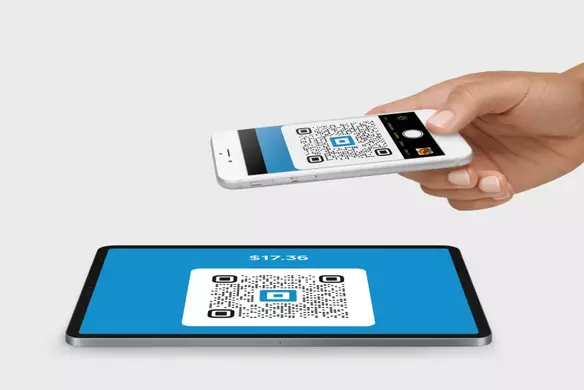
Merchant-presented codes are when the business creates and displays a QR code that the customer then scans on their phone. Once scanned, the customer is directed to a secure checkout page to complete their payment.
Customer-presented codes are when the customer generates a QR code in their digital wallet or payment app for the business to scan to finalize the transaction.
Here’s how the transaction flows in a typical merchant-presented QR code payment:
- The business generates a unique QR code for a specific transaction. This could be printed on a receipt, displayed on a screen, or on a table sticker in a restaurant.
- The customer uses their smartphone camera to scan the unique QR code.
- The customer is automatically directed to a secure payment page on their phone to complete the transaction with their card, Apple Pay, or Google Pay.
- The payment is processed, and both the business and the customer receive real-time confirmation of the completed transaction.
And here’s how the payment process looks with a customer-presented QR code:
- The customer opens their digital wallet or payment app on their phone, which generates a unique, single-use QR code.
- The business uses a QR code scanner or a camera-enabled POS system to scan the code displayed on the customer’s phone.
- The payment is securely processed through the business’s POS system.
- Both the business and the customer receive confirmation of the completed transaction
In both cases, this whole payment process takes a matter of seconds, with both you and your customer receiving instant confirmation of a successful transaction.
How to generate a QR code for payments
As QR codes become more widespread in Canada, you might be wondering how you can offer them to your customers when reaching the checkout. Square QR codes can help you accept QR code payments, while balancing convenience with the tight security that Canadians value above all other factors when it comes to financial transactions.
1. Provide contactless payment in-person via Square POS (Scan to Pay)
What it does: Prints a unique QR code on each receipt, allowing customers to scan and pay their bill directly to your Square POS from their phone.
Who can use it: Any business running in-person sales.
How it works:
- Enable Scan to Pay in your Square Dashboard
- Open the Square Point of Sale app.
- Add item(s) to cart or key in an amount and tap checkout.
- Select ‘Scan to Pay’ and a QR code will appear on the customer’s receipt.
- The customer scans, pays with a credit card or Apple Pay/Google Pay, and can even leave a tip directly from their device.
- The payment is processed instantly through your Square POS
Benefit: Businesses like restaurants can finalize multiple orders, allowing customers to pay when is convenient for them, without tying up credit card machines for individual transactions.
2. Provide contactless self-serve ordering via Square Online
What it does: Lets restaurant customers scan a table- or seat-specific QR code to view a menu, place an order, and pay on their phone.
Who can use it: Full-service and quick-service restaurants.
How it works:
- Create or log into your Square Online store.
- Generate and print QR codes for signs, tables, or parking spots.
- Customers scan to browse the menu, customize items, add notes, and pay.
- Orders flow straight into your POS and Kitchen Display System, consolidating orders for each table onto a single ticket for smoother kitchen operations.
- Service staff deliver food to diners using a ticket with the guest’s name and table number.
Benefit: Reduces wait times, frees up staff time, and lowers the risk of order errors while giving guests more control over their dining experience.
3. Provide contactless payments via Square Online Checkout
What it does: Creates a checkout link for a single item, service, or donation that customers can access by scanning a printed QR code.
Who can use it: Artists, service providers, nonprofits, and any business selling individual items.
How it works:
- Generate a checkout link in your Square Dashboard or POS app.
- Print the QR code and display it on signage, product tags, or marketing materials.
- Customers scan, open the secure checkout page, and pay instantly with a card, Apple Payor Google Pay.
Benefit: Ideal for situations where a full POS set-up is impractical, like a pop-up shop, a farmer’s market stand, or an art exhibit. A single, printed QR code allows customers to make a payment quickly and on the go.
Benefits of using QR codes for payments
Speed, convenience and operational efficiency are the three main benefits businesses can gain from using QR codes to process payments. Specifically, QR code payments enable:
- Faster service. No-touch QR code payments help restaurants, bars and cafes turn tables faster, help grocery stores and other high-traffic retail stores clear lines without delays, and enable low-touch or no-touch transactions in transportation hubs.
- Affordable operations. All you need is your smartphone to get up and running in accepting QR code payments, reducing the need for expensive payment hardware when starting out. As you grow, a full POS system is important to collect and use business insights like inventory management, sales tracking and customer relationship data.
- Flexibility and convenience. QR code payments allow businesses to create easy scan-and-pay experiences in virtually any setting they operate. Customers can pay for meals or goods on their own terms, using their own phone, without having to wait for staff or a credit card terminal, making for a faster and smoother process.
- Customer data and insights. Dynamic QR codes—backed by a platform like Square—collect customer data like transaction time, location, device type, and purchase history, and make it available via the Square Dashboard. This can help businesses analyze purchasing behavior, create customer profiles and buyer segments to fuel sales and marketing campaigns and even analyze when certain types of products are sold most often to help plan inventory and stock levels.
- Security and compliance: Every Square QR code payment is end-to-end encrypted, backed by Square’s fraud detection and monitoring tool, Risk Manager, and is tracked in your Square Dashboard for dispute protection. In Quebec, Square products and services remain incompatible with WEB-SRM, but Square integrates with Master Your Rush POS, which is WEB-SRM certified.

QR code payments FAQ
How to accept QR code payments?
You can accept QR code payments via Square Online where customers scan a QR code to browse a menu, place an order and pay directly on their phone, or with Scan to Pay where customers can pay their final bill by scanning a unique QR code on their receipt.
Is it safe to use QR code payments?
Yes, QR code payments are safe when processed through a POS platform like Square that uses end-to-end encryption, real-time fraud monitoring and free dispute management services to protect both the business and the customer.
Are there fees for QR code payments?
Square QR codes are free to create with a Square account and you only pay the standard processing fee of 2.8% + 30¢ per completed transaction.
How long do QR codes last?
How long a QR code lasts depends on the platform used to create it. Square QR codes never expire, unless you set them up to and can be used or deactivated at any time by the business.