


Table of contents
In the world of retail-related acronyms, SKU is likely one that you’ve heard a million times but you might not know the meaning. This unassuming little code is the backbone of effective inventory management, helping retailers track their products, prevent stockouts and ensure all staff can quickly locate specific product variations in online and in-store catalogues.
This article will walk through everything you need to know about SKUs, from what they are to how to create and use them in your retail stores.
What is a SKU (stock keeping unit?)
SKU (pronounced skew) stands for “stock keeping unit”. It’s an alphanumeric code that retailers create internally and use to identify, receive, and manage their product inventory or stock.
Typically, unique SKUs are applied to each individual product (and variation of that product) to help retailers keep track of stock levels and make it easier for employees to identify specific items under inventory. For example, the same t-shirt will have different SKUs for its black, white, and blue colour variations.
These codes show up in your point of sale (POS) system, on printed labels, in purchase orders, and across your online or in-store catalogues.
And while SKUs are most often used in retail settings, they can also be applied to service-based items like parts, treatments, service offerings, or even recurring billable tasks. In all cases, the goal is to keep internal records consistent and individual sales items easy to identify.

How to use a SKU
A well-structured SKU system makes it easier for both your team and your customers to find the right products quickly. Once your SKUs are in place, retailers use them in several key ways throughout their in-store and online operations. The most common uses for SKUs in retail include:
- Tracking stock levels: SKUs let you monitor how many units you have on hand across all your sales channels. Each sale, return or restock can automatically update the item’s inventory count in your POS and online store, helping you see when it’s time to reorder.
- Keeping product variations organized: Assigning unique SKUs to each size, colour or style of a product helps you quickly distinguish between similar items like “TSHRT-BLK-M” vs. “TSHRT-BLK-L”.
- Speeding up customer service: Staff can look up SKUs in your inventory management software or online store to check availability or product details, helping customers find the right item without waiting.
- Analyzing product performance: SKU-level reporting shows which products are selling well and which aren’t, making it easier to decide what to promote, discontinue or reorder.
- Expediting receiving and fulfilling: Clear SKUs make it faster to scan, sort, pick and ship items, reducing errors during receiving and order fulfilment.
Key characteristics of a SKU
Unlike other product codes like Universal Product Codes( UPCs) or serial numbers, SKUs are entirely customizable. This means that each business will likely have a slightly different format for their SKUs. The key is creating a format that is consistent across your product portfolio, easily identifiable by all staff members, and can scale with your business as it grows.
Key characteristics of a SKU include:
- Alphanumeric format (letters and numbers only but the use of dashes is fine too).
- Short, structured sequence (often 6 to 12 characters).
- Unique to each item and variation with a retailer’s inventory.
- Created internally by the business (not universal like UPCs or serial numbers).
- Encodes product attributes like category, brand, colour, size or model.
Here are a few sample SKUs as they would commonly appear in different types of retail businesses:
- Apparel: TSHRT-BLK-M — category (T-shirt), colour (black), and size (medium).
- Electronics: HDPHN-SONY-WL-BLK — type (headphones), brand (Sony), feature (wireless), and colour (black).
- Home goods: MUG-WHT-12OZ — product type (mug), colour (white), and capacity (12 ounces).
These examples show how a structured SKU format can help teams recognize product attributes at a glance, reduce confusion between similar items, and support cleaner reporting and inventory counts.
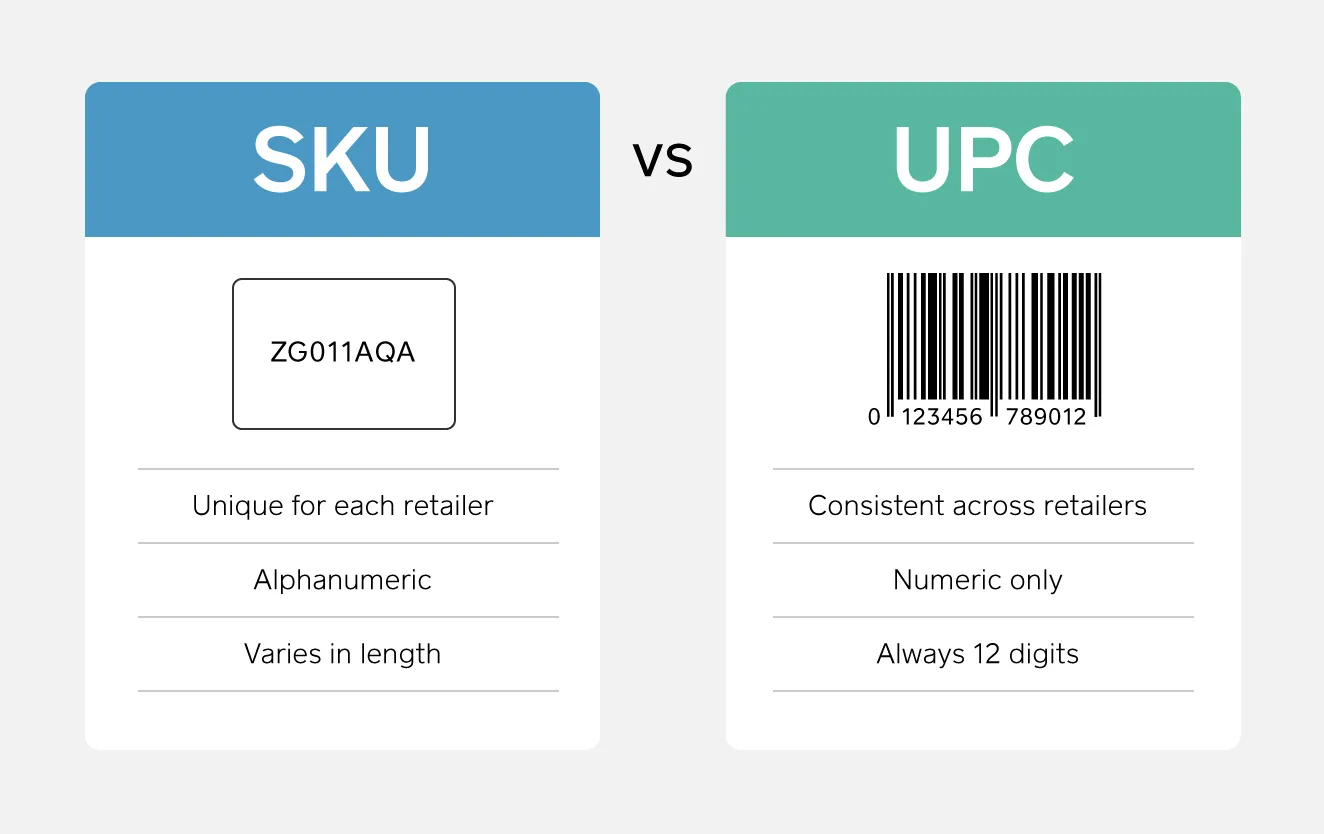
SKUs vs. UPC codes
SKU and UPC are two retail acronyms that are often used interchangeably. They are similar but serve different purposes for retailers.
A UPC is a 12-digit numeric code that manufacturers attach to products to allow barcode scanners and point of sale terminals to process them for sales transactions wherever they are sold.
A product has the same UPC no matter where it’s sold, but different stores can assign it different SKUs. This allows the retailer to create more concise codes for each of the product variations that have the same UPC, making it easier to differentiate between versions of the same item.
There are a lot of smaller retailers that use UPCs as SKUs because they carry fewer product variations and don’t need the added layer of inventory management. But larger shops (especially those that make their own products and have many different variations of the same item) may find it beneficial to create their own SKU system so that they have a personalized and standardized way to track their stock.
SKU best practices
If you use SKUs in your retail business, how you manage them is just as important as how you create them. A clear, consistent SKU system makes it easier to analyze inventory performance, understand carrying costs and ensure every item in your catalogue contributes to your business goals.
When SKU management is done well, you get reliable data that shows what’s selling, what’s not and where to invest, which helps you optimize stock levels, improve purchasing decisions and protect your margins.
When it’s done poorly, inaccurate or inconsistent SKUs can distort your reporting, hide stock issues, and lead to overbuying or underbuying – all of which create higher holding costs, stock inaccuracies and tied-up capital.
Here are some SKU best practices to follow:
- Ensure every SKU is unique for accurate tracking: Avoid duplicating or reusing SKUs, even for discontinued items. Keeping each identifier unique protects historical reporting and prevents mix-ups across locations or channels.
- Use only letters and numbers, and avoid ambiguous characters: Stick to alphanumeric formats and skip special characters or punctuation. Steer clear of characters that look similar — like O and 0, or I and 1 — to reduce errors during scanning or data entry. Using dashes to separate SKU attributes is helpful, and helps staff members quickly read and interpret each code.
- Keep SKUs concise and logical: Use a structure that reflects the attributes most important to your business, such as category, brand, style, colour or size. A short, predictable format makes SKUs easier for employees to read and use. For example, “SKTS–GRY–10” could represent a grey pair of skates that is a size 10.
- Start with a letter for quick recognition: Beginning each SKU with a letter helps employees quickly identify a product category or family at a glance. Tip: Try to avoid starting your SKUs with a 0, as many inventory management systems automatically remove the leading 0 from SKU databases as part of their data cleanup process.
- Maintain consistent formatting: Use the same order of attributes and the same abbreviations across your entire catalogue (e.g., GRN for green, LRG for large). Consistency helps staff identify products faster and ensures SKUs work cleanly across your POS, online store and purchase orders.
- Review and update your SKU system regularly: As your product assortment grows or changes, revisit your SKU structure to make sure it still supports your reporting needs and inventory workflows. Seasonal resets or inventory counts are a good time to audit your system.
You can manage SKUs manually using a system of your choosing like spreadsheets, or take an automated approach using tools that track and report on SKU performance for you.
Square for Retail, for example, also allows you to auto-generate new or missing SKUs for your product catalogue. This means Square can create unique, correctly formatted SKU codes for items or variations that don’t already have them, without your team needing to build or assign each code manually.
Auto-generation helps prevent duplicate or inconsistent SKUs, reduces errors during item setup, and keeps your catalogue aligned to one standard structure. As your business scales and adds more products, this automation saves time, keeps your inventory data accurate and ensures every item can be tracked cleanly across all the ways you sell.
Common SKU mistakes to avoid
Here are some common SKU mistakes that businesses can make, with tips on how to avoid them:
- Overcomplicating the structure: Long, overly detailed SKUs are hard to read and prone to errors. Keep formats concise and focused on the attributes that matter most to your team and inventory tracking efforts.
- Using special characters or confusing look-alikes: Avoid punctuation and characters like 0/O or 1/I that can be misread or dropped by software. Stick to simple alphanumeric codes with dashes to separate key SKU variables.
- Inconsistent formatting across products: Mixing different abbreviations or ordering attributes across SKUs creates confusion. For example, using MUG-WHT-12OZ for one item but 12OZ-WHITE-MUG for another makes it hard for staff to quickly recognize which part of the code refers to size, colour or category. Use one clear, repeatable pattern for every SKU.
- Duplicating SKUs: Every product variation needs its own unique identifier. Duplicate codes lead to inaccurate stock counts and fulfilment mistakes.
- Reusing old SKUs: Retire SKUs permanently when products are discontinued so historical reporting stays accurate.
- Failing to update SKUs when products change: If packaging, vendors or product details shift, make sure your SKU structure reflects those changes.
- Starting SKUs with zeros: Leading zeros can be dropped by certain inventory management systems or misread by staff. Begin codes with a letter instead.
- Using manufacturer part numbers as SKUs: Vendor numbers aren’t designed for your internal workflows and can change without warning. Create your own SKU system that you control.
- Not planning for growth: A structure that works for 20 products may not scale to 200. Choose a format with room to expand as your assortment grows.
- Failing to document the logic: If your team doesn’t understand the rules behind your SKU format, they won’t use it consistently. Document your conventions and share them during training and new hire onboarding.
SKU management is just as important as the SKU itself. It’s one thing to create a SKU for an individual product but effectively managing hundreds or thousands of SKUs – and making this tagging taxonomy work effectively for your retail operations – requires significant effort, thought and tooling.

SKU management
SKU management helps you understand what’s selling by analyzing sales and generating insights around product performance and, revealing where stock is sitting by comparing on-hand quantities across locations and channels.
It also shows you when to replenish or reduce inventory by highlighting low-stock items, slow movers and margin-heavy products that may be tying up capital. Depending on your catalogue size and needs, you can manage SKUs manually or use automated inventory tools like like Square for Retail that update counts and surface these insights for you in real time.
Manual SKU management
If you decide the manual SKU management route is for you, it helps to understand whether your current product mix is balanced – meaning you’re stocking the right proportion of high-, medium- and low-margin items based on how they actually sell.
To do this, you can calculate two simple metrics – your SKU ratio and your sales ratio – and compare them to see where your inventory is underperforming or outperforming your expectations.
Calculating SKU ratio
Start by making a list of all your SKUs in a spreadsheet. For each SKU, note the price, how much it cost you and the gross profit (you can subtract your cost from the price to determine your gross profit.)
Then create gross profit ranges in your spreadsheet (less than $20, $20–$29.99, etc) and note how many SKUs fall in each range. Choose ranges that make sense for your product catalogue, such as grouping items by category or by logical price or profit intervals.
Divide the number of SKUs in a range by the number of total SKUs (and multiply by 100) to get your SKU ratio for each range.
SKU ratio formula:
SKU ratio = (Number of SKUs in a gross profit range ÷ Total number of SKUs) × 100
Calculating sales ratio
Using the same gross profit ranges calculated above, note the number of units sold in a given period of time (for example, 6 months). Then divide the number of units sold in each gross profit range by the total units sold (and multiply by 100) to get the sales ratio for each range.
Sales ratio formula
Sales ratio = (Units sold in a gross profit range ÷ Total units sold) × 100
Examining your findings
Your best-performing products fall in the gross profit range that has a sales ratio significantly higher than the SKU ratio. It means there is high demand for those products and the potential for generating more sales if you increase inventory or marketing.
Your gross profit range where the SKU ratio is higher than your sales ratio? Those are your worst performers. It means there is too much supply and you should reduce inventory and marketing (or even stop selling the products).
After comparing your ratios, consider next steps like adjusting purchase quantities, reviewing pricing, or narrowing your product assortment to focus on higher-performing items.
Automated SKU management
Modern POS and inventory systems — such as Square for Retail – can automatically create, update and sync SKUs in real time so your stock counts stay consistent across every channel and location.
Automation reduces fulfilment errors and improves forecasting by giving you immediate visibility into low stock, fast sellers and reorder needs. Instead of updating spreadsheets or comparing ratios by hand, your system surfaces the insights you need to adjust purchasing and avoid costly overstock or stockout situations.
To automate your SKU management, look for POS and inventory tools that support barcode scanning, real-time syncing, automated SKU creation and SKU-level reporting. These features help streamline receiving, tracking and replenishment so your team can operate more efficiently, keeping your data accurate as your business grows.
The benefits of using SKUs to manage your business
When you use SKUs consistently, they become a powerful tool for understanding what’s happening in your retail business — from day-to-day stock levels to long-term product demand and revenue forecasting.
Here are some of the main benefits of using SKUs to manage your business.
- Better inventory visibility across channels and locations: SKUs make it easy to see what’s in stock, where it is and how quickly it’s selling, whether you’re looking at a single shop, multiple locations or your online store.
- More accurate inventory management: With a clear SKU system tied to your POS and inventory tools, you can spot slow movers and bestsellers quickly, helping you decide when to reorder, when to run a promotion and when to move stock between locations.
- Fewer stockouts and overstocks: Tracking items at the SKU level helps you avoid running out of popular products or tying up cash in items that aren’t selling, reducing inventory liability over time.
- Stronger demand forecasting: Analyzing sales by SKU reveals sell-through patterns by product and category, so you can better predict what customers will want and in what quantities throughout the year.
- More effective purchasing and supplier negotiations: SKU-level data on vendor performance, projected profit and sell-through helps buyers work with suppliers earlier and negotiate pricing and terms based on clear sales data.
- Improved customer experience: When staff can quickly look up SKUs, they can answer questions on the spot — like whether a size or colour is available at another location or online — and help customers find alternatives without keeping them waiting.
- Faster fulfilment and fewer errors: Clear SKUs on labels, shelves and stocking lists help teams pick, pack and ship the right items more efficiently, reducing mis-ships and returns.
- Cleaner data and reporting: A consistent SKU structure makes it easier to run meaningful reports on margins, categories, locations and seasons, instead of sifting through messy or duplicated product records.
- Scalability as you grow: A well-planned SKU system can handle new products, categories and channels without needing to be rebuilt every time your business expands.
- Smoother omnichannel operations: Using the same SKUs in-store and online helps keep product listings, stock counts and pricing aligned, which is especially important as more customers move between channels.
When you combine a thoughtful SKU system with the right tools—such as POS and inventory software designed for retail—you get real-time insight into what’s working, where to invest, and how to create a better experience for your customers.
Managing SKU numbers with Square for Retail
Here’s how to create SKUs and set up inventory tracking for your products in Square for Retail:
- Open Square Dashboard and go to your Item library.
- Toggle on ‘Enable inventory tracking for new items’ so tracking is turned on by default for new SKUs.
- Go to ‘Items and Services’ in your Item Library
- Select ‘Create Item’ to add a new product.
- Enter the item information, including a SKU (or let Square auto-generate one by turning on automatic SKU generation to assign unique codes for new items and existing variations that are missing SKUs).
- Upload a photo of the item.
- Add variation details such as price and size for each version of the product.
- For existing items, open them from the item library and scroll to Manage ‘Inventory’ to turn tracking on for specific variations and set low-stock alert levels.
Once inventory tracking is enabled, Square uses SKUs to monitor stock levels, so you can see what’s in stock, what’s sold and what needs attention without updating spreadsheets manually. You can organize your inventory further by creating categories (for example, jewelry, shoes, and clothing), assigning items to those categories, and editing or deleting items from your Item Library as your catalogue changes. To create categories in Square for Retail, go to ‘Items and Services’ in your Item Library, click ‘Create Category’ and fill in the details like category names. You can then assign items to that category.
Square inventory tools also let you create low-stock alerts and schedule inventory restocks. In the Square Dashboard, you can select an item (or multiple items in bulk) and set a low-stock alert threshold for each location, so you’re notified as soon as quantities drop and can reorder before popular products run out. This helps you stay ahead of stockouts and keep high-demand items on the shelf.
When you’re ready to label products, open your Item Library in your Square Dashboard, select ‘Actions and Print Labels’ and choose the items you want to label by category, purchase order or by searching for individual products. After selecting the label type and quantity, Square generates barcode labels that include your SKUs, making it faster to scan items at checkout, during receiving and when you’re doing stock counts.

FAQs about stock keeping units
What is a stock keeping unit?
A stock keeping unit (SKU) is a unique, alphanumeric code that a retailer creates internally to identify individual products and their variations, such as size, colour or style.
SKUs are used to track inventory, sales and stock levels across locations and online or in-store sales channels so you always know what you have on hand, what’s selling well, and what needs to be reordered.
How are SKUs different from UPC codes or barcodes?
SKUs are internal codes created by each retailer to organize and track their own inventory. UPCs (universal product codes) are standardized 12-digit numbers created by a manufacturer and used across all retailers to identify the same product.
Barcodes are the machine-readable symbol printed on a label or package, which can be either a SKU, a UPC code or another product identifier, depending on how a business chooses to set up its system.
How do I create SKUs for my products?
To create SKUs for your products, choose a simple, consistent format that combines key attributes like category, brand, colour, and size (for example, TSHRT-BLK-M for a medium black T-shirt).
Make sure each SKU is unique to a specific product variation, and document your rules so your team can apply the same structure as your catalogue grows.
What tools or software can help automate SKU management?
Square for Retail can help automate SKU management by generating SKUs, tracking stock in real time, syncing inventory across online and in-person channels, and providing SKU-level reports and low-stock alerts.