

Table of contents
An online booking website powered by robust scheduling software is essential for any client-focused business. Whether you run a salon, a med spa, a fitness studio, or any service-based company, giving clients a simple, hassle-free way to book appointments online is a must. But with so many options, how do you find the best online booking system for your small business?
Not all online booking software is created equal. The right platform should fit your unique business needs, streamline staff and client experiences, and scale with you as you grow. Below, we outline the top features to consider when evaluating online booking systems and share actionable tips to help you choose the right solution.
What to look for in an online booking system
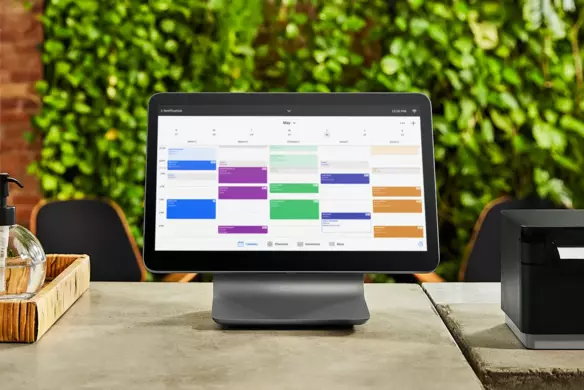
The right online booking system does more than just fill your calendar. It integrates with your day-to-day business, helping you operate more efficiently. This means making it easy to receive appointment requests, assign them to staff members and schedule your team accordingly.
Here are some key features to look for when evaluating a new online booking software platform:
| Feature | Why you need it |
|---|---|
| Customizable website | Allows you to create a digital booking portal that reflects your brand through customized colours, layout and service presentation. |
| Tool integrations | Seamlessly connects to your POS, client management tools, calendars and marketing software so you can manage everything in one place. |
| Automated reminders | Helps reduce no-shows and saves time with automatic confirmations and reminders via email or text. |
| User-friendly scheduling | Offers flexible options like recurring bookings and multi-staff appointments as well as keeping payment information on file to streamline the customer experience. |
| Payment capabilities | Lets you take deposits, accept multiple payment types (like cards, digital wallets, buy now/pay later) and manage transactions securely. |
| Staff management | Supports assigning appointments, tracking hours, splitting tips and setting wage rates to run your team more efficiently. |
| eCommerce and retail tools | Enables product sales, online ordering and inventory tracking to expand your revenue streams. |
| Mobile and social integrations | Makes it easy for clients to book from their phone or social media profiles like Instagram and Facebook. |
| Scalability | Grows with your business, offering new features and tools as you expand to more staff, services, or locations. |

1. Website customization
The online booking platform you choose should allow you to customize the appearance of your appointment website so that it reflects your company’s brand — without any coding involved. You should be able to select the colours, layout, font style and themes that optimize your site’s appearance and create a strong first impression for your customers that shows what you have to offer.
Whether you’re looking to create a booking landing page for clients coming from social media or adding a booking widget to your existing website, Square Appointments makes it easy to set up a branded and professional experience for your customers. You can customize your booking site with your business logo, colour palette, service categories, staff bios and working hours, and choose from pre-built or customizable layout options to showcase your offers and information clearly.
2. Integration with other business tools
As you’re selecting an online booking system, it’s a good idea to make sure the platform has the ability to integrate with all the other tools you need to run your business — like your calendar, point of sale, client CRM, or payroll.
If you have an existing website that you need to add a booking integration to, be sure that the online booking tool is compatible and user-friendly. If your goal is to eliminate the number of systems and tools you need to run your business, make sure the online booking system you choose can run seamlessly with your calendar, point of sale, client management tools, or staff management functions.
Square Appointments seamlessly integrates with third-party apps like Wix, QuickBooks, JotForm, and Homebase, along with all Square tools you need to operate your business smoothly—like a point of sale, client management software, team management tools, an online store, and even marketing capabilities like automated email campaigns and gift cards.
3. Automated appointment reminders
Appointment reminders can be the difference between clients showing up on time and late or no-show appointments. But manually sending appointment reminders is time-consuming and error-prone, so it’s essential that your scheduling software sends automated appointment reminders to clients so you don’t have to.
With Square Appointments, you can set up automated, custom appointment reminders for customers via text or email to facilitate confirmations and easy rescheduling. You can also add a cancellation or no-show fee as part of your policy on your website and link to it in your reminders to safeguard your business and staff’s time.
Did you know?
According to Square internal data, 36% of appointments booked with Square Appointments are made outside standard business hours. The Square Appointments automated messaging tool can reply to your clients on your behalf to confirm, cancel, or reschedule appointments 24/7. This helps to ensure that you can always reply to customer enquiries and appointment requests in real-time, without having to have staff on standby at all hours of the day.
4. User-friendly booking functionalities
The goal of your online booking website is to make it as easy as possible for clients to make appointments with you. To achieve that, consider the following as you choose an online booking system that will best suit your business:
- Customers may need to book multiple appointments with different members of your staff in a single visit, so look for an online booking platform that offers this functionality.
- Some clients prefer to book recurring appointments and store their payment information to expedite the scheduling and checkout processes, so be sure your scheduling software supports this feature.
- Health, beauty, and wellness businesses often need to store client information on treatments or preferences, so ensure the platform you choose offers the ability to attach client notes and files to their profiles.
Explore all of the user-friendly booking features that Square Appointments offers.

5. Payment capabilities
Booking itself is only half of the equation. Once a client has booked, you’ll need to offer them a variety of ways to pay for their service. And the more payment methods you can offer, the better, as an increasing number of younger consumers prefer to pay with mobile wallets or buy-now, pay-later options for larger expenses.
You can take secure payments online and in-person through the Square Appointments Point of Sale, via:
- Credit and debit cards
- Digital wallets, like Tap to Pay on iPhone or Tap to Pay on Android
- QR codes
- Payment links
- Next-business-day, same-day, or instant transfers
- Buy now, pay later with Afterpay (online only)
- Offline payments (if you lose internet connection)
- Physical or digital gift cards
Clients can keep a card on file for easy booking and you can enable an automatic deposit for services or a standard cancellation fee.
6. Staff management options
Managing staff scheduling can be tricky, but booking tools that help handle the scheduling and operations for your entire team can make a big difference. Look for a booking tool that makes it easy for clients to:
- Schedule appointments with their preferred staff member (or multiple staff members during the same visit).
- Automatically splits tips or assigns commission among your staff members.
- Allows you to set different wage rates for staff with varying responsibilities or seniority.
Square Appointments lets clients book services with any team member at any location from your booking site. This syncs with personal calendars, such as Google Calendar, to automatically block off appointment times and personal events to avoid double bookings.
For more advance staff scheduling, Canadian businesses can use Square Shifts to manage everything from work schedules and time tracking to tip pooling and commission settings.
With Square Shifts, team members can log into individual employee accounts to view their calendars, submit time-off requests, or swap shifts — all from one place. Businesses can also set up automatic timecards, divide tips among eligible staff, and access real-time labour and sales reports to help optimize staffing and reduce costs.
7. eCommerce and retail capabilities
Personal care and beauty businesses across the globe are launching new revenue streams to attract customers and boost profits, according to the Square Future of Beauty 2025 report. Whether that means selling retail products online and in-store (like 40% of report respondents) or offering subscription packages or seasonal product drops online, having eCommerce and retail capabilities that integrate with your online booking tool can help drive new profits for your business.
With Square Online, you can create a free, easy-to-use website that allows customers to shop online or order online and pick up in store. The platform also helps you track inventory in real time so you need never run out of your most popular products.
Square Appointments acts as an in-store and online point of sale, and integrates with Square Online so you can sell products and services in-store and on your website seamlessly.
8. Social media integrations and mobile compatibility
Most customers are going to discover or land on your website from their phone, so it’s critical that your online booking system is mobile-friendly and easy to use from a phone or tablet. Not all booking platforms are designed with the mobile experience in mind, so make sure you choose one that is, like Square Appointments.
In addition to mobile users, many first-time clients are likely to visit your Instagram or Facebook profiles to see what you have to offer and what your work looks like. Once they’re there, make it easy for them to book with you by adding a “book now” button at the top of your profile. Square Appointments integrates with Facebook and Instagram to help you reach customers on social media and let them book directly from your Instagram page.
9. Ability to scale with your business
Finally, and perhaps most importantly, pick an online booking system that’s going to fuel your business growth, not hinder it. As your business grows and expands, you don’t want to be caught piecing together multiple technologies and systems to operate your business. This can create inefficiencies, issues with matching staffing levels to customer demand, ultimately resulting in a poor client experience.
Think ahead and consider the tools you may need as you grow. Maybe you’ll want to focus more closely on marketing or have plans to expand but will need a business loan to do it. No matter what you think the future holds for your business, it’s smart to select an online booking platform that offers a full ecosystem of eCommerce tools to power your business through all stages, so you never outgrow the tools you started with.
Which booking system is right for your business?
There are plenty of online booking systems out there but not all are built with small business owners in mind. Here’s a quick look at four popular platforms with an overview of how they stack up for businesses of different sizes and needs.
| Platform | Pros | Cons |
|---|---|---|
| Square Appointments | All-in-one solution with integrated booking, payments, POS, and marketing; scalable plans; built-in tools for cancellation management, staff, and branding | Free plan limited to individuals; advanced team features available only on paid tiers |
| Calendly | Simple setup; clean interface; syncs with Google, Outlook, and Zoom; ideal for solo users | Lacks POS, tipping, and advanced team scheduling tools |
| Wix Bookings | Combines website builder with booking and payments; good for branded online presence | Requires Wix subscription; limited flexibility if not using a Wix-hosted website |
| Acuity Scheduling | Advanced availability settings; supports group bookings and recurring appointments; good customization | No free tier beyond trial; complex setup for new users |
Square Appointments stands out as an all-in-one solution built specifically for small businesses in the retail, restaurant, beauty and professional services industries. It offers online booking, staff scheduling, and secure in-store and online payment processing all in one place. The platform is fully integrated with Square’s broader commerce ecosystem that supports everything from client invoicing to marketing and loyalty programs management.
While larger enterprises may need more advanced customizations, transparent pricing, flat rate fees, and an ecosystem of integrated tools that scale with your business make Square the best online booking system for many service-based businesses.

Online booking system FAQs
What features should I look for in an online booking system?
When choosing an online booking system, look for tools that save you time and offer a smooth experience for your customers. Key features include:
- A free customizable booking page
- Automated appointment reminders
- Calendar syncing
- The ability to accept online and in-person payments
If you manage a team, prioritize platforms with staff scheduling, tip splitting and commission tracking. You’ll also want integrations with other tools you use, like your point-of-sale system, inventory or marketing software.
Square Appointments includes all of these features and integration capabilities in one platform, plus extras like client profiles and no-show protection.
How much does an online booking system cost?
Pricing for online booking systems varies based on features, team size and usage. Many platforms offer free plans with limited capabilities and paid tiers for more advanced features like team management and advanced customizations.
Square Appointments offers a free plan that includes unlimited appointments, a free online booking site and payment processing. As your business grows, you can upgrade to a paid plan with multi-staff support, advanced team management and commission tracking. Paid plans through Square Appointments start at $35 per month and can go up to $85.
What’s the best online booking system for small businesses?
The best online booking system for small businesses is one that’s easy to set up, affordable to run and flexible enough to support your growth. Square Appointments is built with small business owners in mind, combining scheduling, payments, staff tools and even eCommerce into one unified system.
How do online booking systems work?
Online booking systems let clients view your availability and book services directly from your website via an online booking portal or digital calendar. Once an appointment is booked, the system automatically updates your calendar, sends a confirmation to the customer and can be set up to send reminder emails or SMS messages in the lead up to the scheduled session.