


Table of contents
You’ve gone through the initial stages of opening a salon, from writing a business plan to getting licenses and permits. Whether you included a line item to build a salon website in your budget or you’re taking a DIY approach, establishing your online presence is an essential tactic for marketing your business and driving bookings.
Potential customers often do research online before they select a new salon. And with more than 40,000 salons spread across Canada, there’s no shortage of options for them. Your website is an important tool to help you carve out a slice of the market in your area by making yourself known to local customers looking for your services. It’s an opportunity to own your narrative, share client testimonials, highlight stylists’ work and make it simple for people to learn about your business and book an appointment.
This step-by-step checklist covers the seven steps to build a salon website in 2025.

1. Pick a website builder.
There is a wide range of approaches for creating business websites, from self-hosted services to booking platforms that make it easy to build a site with no coding required.
If you want to build your website yourself, the best website builders will give you:
- Intuitive drag-and-drop tools to build your pages.
- Customizable page templates and layouts.
- Easy access to website themes to customize for brand colours and fonts.
- A CMS to create and publish blog content.
- Basic search engine optimization (SEO) functionality.
Picking the right website builder from the start makes it easy to design, host, manage and scale your salon website without needing to migrate to a new platform later as your business grows.
Here’s what to consider when shopping for a website builder for your salon website:
- Security and stability. Look for a reputable platform with a strong track record for stability and uptime. This will ensure that your website doesn’t go down sporadically throughout the year and that the platform will be able to handle any future traffic growth or feature add-ons.
- Speed. Your website needs to load fast and be mobile responsive to show up well in search engines, ensuring a strong user experience for visitors. Dig into reviews that specifically talk about page speed and load times to find the platforms that take this seriously.
- SEO capabilities. Look for platforms that offer a minimum of basic SEO functionality, like the ability to specify SEO page titles, meta descriptions and image alt tags. These are the basic building blocks you need to help show up in search engines.
- Business integrations. Look for a platform that can integrate with your salon booking system and can perform online transactions. This will allow you to seamlessly manage schedules and payments from a single system.
- Cost. Choose a website plan that fits your budget, offers transparent pricing and flat-rate fees, and allows you to scale as your business grows.
- Templates and themes. The ideal website builder comes with an extensive templates and themes library that you can build from and customize. Ideally, this would include salon-specific templates with must-have pages and features like a booking page, image gallery and testimonials section.
Square Online helps you grow your business with a professional, beautiful website. The easy-to-use site builder allows you to integrate your appointment software so clients can browse services and book online 24/7. You can also sync up your point-of-sale system if you sell beauty products as part of your business and want to sell online.
2. Register your domain.
If you don’t have a website already, you’ll need to purchase a domain. This is the URL or web address that customers will use to find your website. It has implications for everything from branding to SEO to compliance with Canada’s internet registry laws.
Some website-building platforms, like Square Online, allow you to buy an available domain, or you can transfer one from a separate domain registrar like the Canadian Internet Registration Authority (CIRA).
Your domain could be your business name, your personal name or something that aligns with your salon brand and location.
A good domain name should be short and easy to share. Avoid using numbers, hyphens, underscores and symbols that are difficult to remember. Connect the domain name to keywords tied to your business such as the name of your town or neighbourhood, to help your business appear in local search results.
Examples of good domains:
- evolutionsalon.ca (brand name)
- torontohairstylist.ca (location + keyword targets)
If your business name isn’t available, consider an alternate domain extension, such as .salon, .ca or .hair.
Note about using .ca domains: To register a .ca domain, you must meet the Canadian Presence Requirements (CPR) by being a Canadian citizen or permanent resident, or by operating as a Canadian-registered corporation.
During this process, you can use domain lookup tools to find out if your desired URL is available. In some cases, it may be smart to consult with legal counsel to ensure you don’t run into trouble by choosing a domain name that may be confusingly similar to another business’s brand.
Once you’ve settled on a domain name, you can buy the rights to it directly through Square Online and begin building your website immediately. When you build through Square Online, your domain and all files and content within it are hosted securely on the same platform.
3. Pick a template and design your website.
Salon websites should be highly visual, with live imagery and aesthetics that showcase your services and communicate who you are as a brand.
Good Fortune takes visual branding to the next level, with videos, images, fonts and colours that scream personality and speak directly to the type of customers they want to attract.
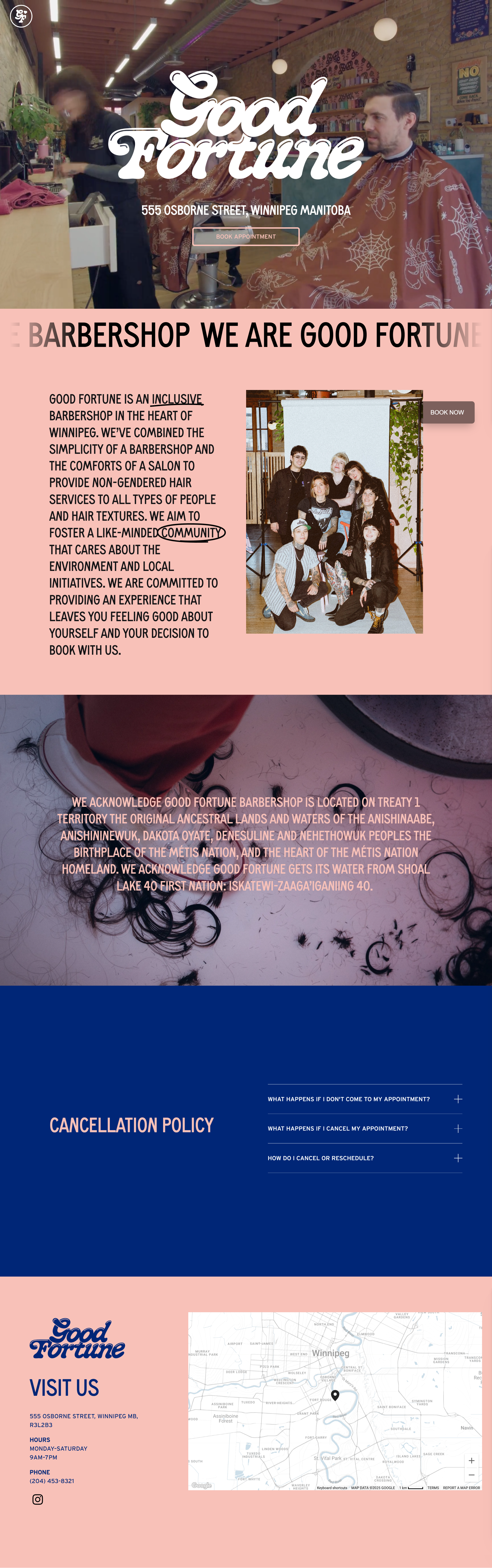
Your visual aesthetic starts with picking a template for your website. Square Online has an extensive template library for you to browse to find one that has the colours and fonts to match your brand.
While you can customize your website template to your specific offerings and needs, here is a list of essential pages or features for salon businesses you need:
- Home page: Make it clear who you are, what types of services you offer and what makes your salon unique.
- Services: A page detailing the services you provide is another important website section that can encourage visitors to schedule appointments, especially if they’re able to book each service directly. Think of this page like a menu, allowing clients to easily glance at the option they’d like to order, saving them time before they walk into your spa or salon — and during the appointment itself.
- Booking and buy buttons. These are clickable buttons that enable your clients to pay for your services or products on any website page quickly and easily. You can use it for single sessions, subscriptions or discounts.
- Online store: For many businesses that provide services, selling retail can be an effective way to bring in more revenue. Along with selling hair and beauty products used at your salon, this is a good place to promote branded merchandise and gift cards. Take the time to invest in detailed product descriptions and photographs to help engage and entice customers. Square offers Photo Studio solutions that help enhance your offerings.
- About page: Use this page to tell the story and mission of your business. This is a great place to let your personality shine.
- Contact: Tell clients where you’re located and what your hours are. Share your email address, phone number, social media accounts and any other relevant information to get in touch.
- Social media feed integration: A social media section on your website is a simple way to connect customers with your brand and give a peek into what they may experience, which can ultimately lead to more sales.
- Testimonials and reviews. Highlight what clients have said about your business, including client-approved photos, reviews of specific types of services and details on what makes your business appealing.
- Privacy policy and terms and conditions. Outline the rules of your website and how you use any client information you gather.
- Blog: While not a must-have, a blog can keep your website fresh with content that is relevant to your business and areas of expertise, as well as help your website show up in search results. Consider a page for updates and posting content about your business, community, or industry.
- FAQ: Give clients a simple way to learn key information about your business in one place. This is also a good place to outline your health and safety protocols.
4. Implement best practices for search engine optimization (SEO).
If you’re a salon owner looking to attract new clients, ranking well in search results is a must. And today, search isn’t limited to Google or Bing – AI tools like ChatGPT are also surfacing local businesses. Showing up across all of these platforms requires a consistent strategy designed to help your salon appear when people nearby search for services like yours and build your credibility among potential clients.
The most successful local businesses focus their efforts on the three dimensions of local search: your website, your Google Business Profile and customer reviews.
Tips for salon SEO include:
Make sure your website is indexed and visible on search engines.
Before anything else, ensure that search engines like Google can find and display your website. If they can’t, all of your SEO efforts will be in vain. Square Online users can verify that their site is indexed via their Square Dashboard. You can also choose to index or de-index specific pages that you want to show or hide to search engines. Keep in mind that indexing updates can take a few days to a few weeks to appear.
Claim and optimize your Google Business Profile.
A Google Business Profile is one of the most important ranking factors for local SEO, ensuring that you appear prominently in search results and map listings when customers search for your services. Add your business name, address, hours and services, then post photos, specials and updates to stay active and visible in local searches. Be sure to include relevant keywords in your company description to help potential customers find you. Square customers can set up and optimize their Google Business Profile directly from their Square Dashboard.

Manage your online reputation.
Reviews are one of the biggest local ranking factors. Ask happy customers to leave feedback and reply to every review. This engagement helps both search engines and AI tools understand your business’s credibility, and shows other customers that you take customer feedback seriously.
Do local keyword research.
Identify the phrases clients use to find salons like yours. Focus on location-based searches (e.g., “hair extensions in Montreal” or “Toronto balayage specialist”) to help keep your keyword list targeted. These keywords can be used to decide on new service pages or blog posts to create.
Optimize on-page basics.
Once you have your keywords, create pages on your site to target them. Ideally, you’ll have one page for each of your major keyword targets. To optimize these pages, follow on-page SEO best practices like:
- Create unique title tags for every page with your target keyword.
- Write short, keyword-rich meta descriptions.
- Use simple, descriptive URLs.
- Mention the keyword naturally in the page copy. You don’t need to repeat the keyword over and over again. For a page with 500 words, for example, include your keyword in the page’s title, once in the opening paragraph, and then 1-2 more times throughout the rest of the page.
Use internal linking.
Connect your homepage to key service pages and your contact page to help visitors and search engines navigate your website easily. When linking to a service page, find instances on your website where you mention that page’s target keyword. For example, if you have a service page for “hair extensions” and you mention that term on your blog, link that mention to the page.
Earn local citations.
Find ways to get mentioned on trusted local blogs, directories or community sites to build your salon’s authority. These are sources of information that AI tools and Google draw on to understand which businesses are most respected in your area.
Add structured data (schema).
Business owners who are tech savvy and want to make their website as accessible as possible for search crawlers and AI tools can learn how to create and deploy schema data to their websites. This technical markup helps Google and AI tools read your business details, services and pricing clearly.
For a salon business, you should include Organization, Local Business and Review schema to help search engines better understand the types of services you offer. Use a tool like Schema Builder for Structured Data to create the markup, and add it to your website as a custom code.
Square Online includes built-in SEO tools to help your website get discovered. You can easily edit your title tags, meta descriptions and image alt text, as well as verify your site with Google directly from your Square Dashboard. Every web page you publish is automatically structured for search engine indexing, so your salon can start appearing in local results faster.
5. Create a content plan.
Having a content-rich website is one of the best ways to attract new clients and rank highly in local search results. But you don’t need to publish dozens of blog posts per month to get there. Instead, your focus should be on creating meaningful and useful content that is highly relevant to customers in your area. It should answer real questions that your customers have and showcase your expertise as a service provider.
According to the Square 2025 Future of Beauty report, 82% of beauty leaders actively create how-to videos focused on at-home beauty and wellness practices to help their clients in between appointments. Here’s how to build a content plan that ticks these boxes:
- Focus on what matters locally: Unless you’re a national brand, your content should focus on what matters to your community. After all, that’s where your customers are. Write about topics that help position you as an expert in your community. For example, you could write content focusing on the “Top tips for protecting your hair from the rain in Vancouver,” or “The best places to get a manicure in Ottawa”. This shows that you’re present and plugged in locally.
- Prioritize quality over quantity: Skip the pressure to post daily. One in-depth and highly relevant article or detailed service page update each month can do far more for your SEO than several short posts.
- Create strong service pages: Each core service (like hair extensions or brow waxing) should have its own page with detailed descriptions, pricing, photos, FAQs, testimonials and a clear “Book Now” button. This is where new customers will go first to learn about your services and decide whether or not they want to book with you.
- Answer common questions: Look at the “People also ask” section in Google to find what local customers are searching for, then write content that answers those questions clearly. Social media and online forum threads are another goldmine for locally-relevant topics to write about.
- Use visuals and testimonials: Add photos of your work to your website and social channels, and weave real customer reviews into your pages. These are authentic signals that search engines and clients trust.
6. Promote your website.
Once your website is up and running, it’s time to spread the word. Post a website launch announcement on your social media accounts and consider running a promotion for the first wave of clients who book a session. You can also use your customer directory to craft an email newsletter with your updates, latest offerings and new blog content.
And don’t forget about word-of-mouth marketing. As you engage with clients in-person, let them know about your website and what it has to offer. This includes adding reminders on social media and in-person about how to book appointments on your website, and where to find useful information about your services.
If you really want to turbocharge traffic to your website, you can also consider paid promotions through Google Ads, which allows for hyperlocal and persona-based targeting that lets you deliver content directly to the people that want your services.
7. Track your website metrics.
Just like you use your internal dashboard to track the success of your services, you’ll want to use an analytics tool to check in on the health of your website.
This helps you answer questions like:
- How much traffic is your website driving?
- How much of it comes from search?
- What are your most popular and least popular pages?
- What percentage of website visitors are booking appointments?
All of this is critical information that helps you keep tabs on your website’s performance and make decisions about what to change, update or delete on your website. Square Dashboard offers reporting and metrics that can help you answer these questions as you grow your web presence.
Building a salon website can feel like a daunting challenge. But if you follow the steps above, and use an all-in-one platform like Square Online, you’ll be starting on a solid foundation for success.

Building a salon website FAQs
What should be included on a salon website?
A salon website should showcase your brand aesthetic, services and style while making it easy for visitors to learn about your services and book appointments. Include key pages like a homepage, services offered, about us, contact us and testimonials. Build a dedicated online booking page, integrated with salon management software to help make scheduling a breeze.
Add a gallery of your work and integrate your social media feed to show your personality and real client results. Square Online offers salon-specific templates that already include these must-have pages and booking features, so you can launch quickly.
What are salon SEO best practices?
Strong salon SEO helps your business appear in local searches when clients look for services like yours. Focus on these three key areas:
- Optimize your website: Make sure your site is indexed by Google and includes location-based keywords (e.g., “Toronto balayage” or “Vancouver hair extensions”).
- Claim your Google Business Profile: Add your salon’s address, hours, photos and services so local clients can easily find you.
- Manage customer reviews: Ask happy clients to leave reviews and respond to them regularly to build credibility and improve rankings.
Square Online makes SEO simple with built-in tools for indexing, editing titles, meta descriptions and image alt text.
How do I design my own salon website?
When designing your salon website, prioritize high quality and real-world visuals, simplicity and usability. Choose a clean, mobile-friendly template and feature real photos of your team, your salon space and your clients’ results. Each service should have its own page with pricing, FAQs and a Book Now button.
How much does it cost to build a salon website?
The cost of building a salon website depends on your platform, design preferences and the features you need. With Square Online, plans that include a website builder, site customization, a free domain and hosting start at $36 per month.