

Table of contents
Mobile payments are an increasingly popular way to accept in-person payments because they’re secure, fast and align with the payment habits of consumers today — especially Gen Z. In Canada, 80% of Gen Zers regularly use their mobile devices to make purchases in-store and to send money to their friends or contacts.
Most mobile payments in Canada — 54% to be exact — happen at a physical point-of-sale like in a store or service business. This means adapting your brick-and-mortar payment stack to accept mobile payments is an extremely valuable investment for your business, ensuring that you can accept the type of payments that your customers increasingly want to use.
This article walks you through everything you need to know about mobile payments. We’ll cover what mobile payments are, how they work, the different types of mobile payments as well as guidance on how to accept them.

What is a mobile payment?
A mobile payment is a regulated transaction that takes place through your mobile device. That is, instead of paying for products or services with cash, cheques, or physical credit cards, you use mobile wallets or mobile money transfers to pay digitally.
Mobile payments can be peer-to-peer or online through an e-commerce store or an app. In Canada, peer-to-peer payments mostly occur through Interac e-Transfer — a secure service available through your mobile banking app that lets you send funds to an email address or phone number. You can use this to send money to a service provider, pay back a friend, or send money to someone for an item from Kijiji or Facebook Marketplace.
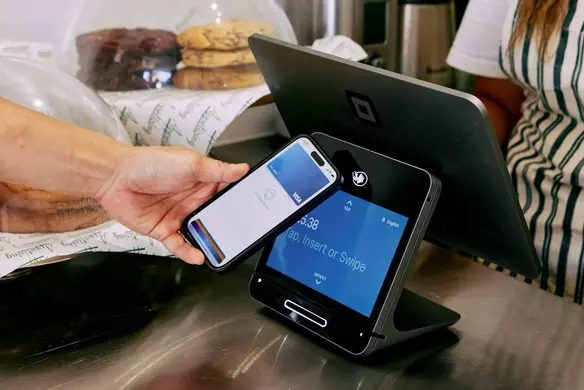
When making mobile payments at a brick-and-mortar business, you can use an app on your mobile device to pay for goods or services at the checkout counter. In this case, the business needs an NFC-enabled or contactless point-of-sale device to process the transaction. We’ll get into what that means further on in the article.
What is a mobile wallet?
A mobile wallet is a digital app that securely stores a user’s payment information and other credentials on a mobile device. They’re the virtual equivalent of a physical wallet, and are designed to hold credit, debit and prepaid card numbers, along with loyalty cards, tickets and more.
Instead of taking out your actual wallet and paying with your card, you go through the entire transaction process via your mobile device.
Most mobile wallets require thumbprint authorization, facial recognition authorization or other security measures in order to access the mobile wallet and pay.
How do mobile wallets work?
The technology that underpins mobile wallet payments is something called NFC, which stands for “near field communication”. NFC is what enables two devices — like your phone and a payments reader — to communicate wirelessly when they’re close together (that’s where the “near” part of NFC comes in). Typically, a mobile device has to be two inches or less from a reader to process the payment.
NFC is actually a subset of something called RFID (radio-frequency identification), a technology that allows us to identify things through radio waves. RFID is nothing new — it’s been used for decades for things like scanning items in grocery stores and luggage on baggage claims.
Today, there are a variety of companies that offer mobile payment apps. The most popular in Canada are Apple Pay and Google Pay. If you have a more recent model of an iOS or Android device, chances are it can support a mobile payments app.
On the merchant side of the equation, providers like Square offer a payments processor and system that can accept mobile payments. All you need to start accepting Apple Pay, Google Pay and Samsung Pay at your business is Square Reader (2nd generation) or your mobile device to enable Tap to Pay from the Square POS app.
Types of mobile payments
The world of mobile payments is wide and varied, with different technologies, apps, and financial systems working together to make payments safe and easy. Below, we break down what’s available in Canada.
- NFC mobile payments: An NFC (near-field communication) transaction occurs by tapping a smartphone on or near a contactless-enabled POS terminal. NFC technology securely transfers payment details from mobile wallets such as Apple Pay, Google Pay and Samsung Pay. Read more about how to set up mobile payments for your business.
- Mobile e-commerce: Mobile e-commerce — or m-commerce — includes any transaction that’s made via a checkout through a mobile-optimized website using a digital wallet, debit or credit card, or through a dedicated merchant app like ordering and paying for a coffee in advance using the Starbucks or McDonalds app. M-commerce is seeing rapid growth in Canada alongside mobile wallets, with transactions increasing 42% as of 2024. Square offers a variety of ways to accept mobile e-commerce payments, including the In-App Payments SDK technology for in-app payments and Square Online for secure e-commerce checkouts.
- QR codes: QR codes — or quick response codes — are another form of contactless mobile payment that use a smartphone’s camera to complete a transaction. These black and white squares provide a scannable link to either the customer’s payment details or to the merchant’s payment gateway. Square helps businesses accept QR code payments in two main ways: by printing a unique Scan to Pay QR code on receipts that customers can use to pay in-person transactions, and by allowing businesses to create and digitally share QR codes that link directly to a secure online checkout.
- Peer-to-peer payments: Peer-to-peer payments are a form of mobile transactions that send money from one individual to another, rather than between a consumer and a business. In Canada, Interac e-Transfer is the most-used tool for sending money to other people, with 88% using this service to send money to friends or service providers. Other options include PayPal, Wise and Payoneer.
- Direct carrier billing: Direct carrier billing is a type of mobile payment that allows users to charge digital purchases like fees for apps, games or subscriptions directly to their mobile phone bill. The transaction is added to the user’s monthly statement.
How do mobile payments work?
To pay with your mobile device at a store’s checkout counter with a mobile app or wallet, hold your device close to the NFC-enabled payments terminal. The reader should be within two inches of the source (mobile phone) to set the transaction in motion. Since there’s no physical contact between your device and the payments reader, mobile wallet payments are often referred to as contactless payments.
When this is happening, your device and the NFC-enabled point of sale are essentially talking to each other. Using that specific radio frequency we talked about, they pass encrypted information back and forth to process the payment. This all takes just seconds.
There’s also something called tokenization at play in a mobile payment transaction. Tokenization is part of why mobile payments are so secure, as the technology safeguards your bank details in mobile payments apps. Let’s take Apple Pay as an example. Here’s how it works: After you take a picture of your credit card and load it into your iPhone, Apple sends the details to your card’s issuing bank or network. The banks and networks then replace your bank details with a series of randomly generated numbers (the token). That random number is sent back to Apple, which then programs it into your phone. This means that the account details on your phone can’t be cloned into anything valuable to fraudsters.
The end-to-end mobile payments process:
- Open Apple Wallet on your iPhone or Google Wallet on your Android device and link your payment information, like credit cards, debit cards, or bank accounts.
- The app tokenizes your payment data to keep it safe and secure.
- When you want to make a purchase, open your digital wallet app and select your preferred payment method.
- Authenticate the transaction with a PIN, fingerprint, facial recognition, or other biometric method.
- Hold your device near an NFC-enabled payment gateway, like Square Reader. Or create a QR code in your mobile app that the business can scan.
- The digital wallet sends the tokenized payment data to the business’s POS, which then sends it to the payment processor and onto the acquiring bank for verification.
- The acquiring bank verifies the tokenized data against your original card details, checks for sufficient funds or credit, and approves or declines the transaction.
- Once the transaction is complete, the payment processor sends a confirmation code back to the business’s POS and to your mobile app, confirming the transaction was successful.
Benefits of mobile payments for your business
Mobile payments are a valuable investment for any business. They align with how consumers want to pay for goods and services in-store or online, and they extend the ways you can process transactions beyond cash and cards.
Here are some key benefits of mobile payments for businesses:
- Faster checkout. Mobile payments are one of the faster ways to pay and are processed almost instantly. This speeds up the checkout process and reduces line wait times, helping your staff serve more customers in a shorter period.
- Better security. Mobile payments use advanced encryption and tokenization to protect customer data. Each transaction generates a unique token, meaning your business never handles sensitive card information, reducing your liability and making it one of the most secure payment methods available.
- Insights into customer habits. Mobile transactions can be easily tracked in your point of sale system, giving you clear insights into sales trends, top-selling items and peak sales periods. Analyzing these trends enables data-backed inventory management, which allows you to predict when you’ll need to order new products and when you need to account for seasonal surges.
- More convenient. Consumers are carrying less cash and increasingly using their mobile devices for almost everything. Accepting mobile payments means that customers only have to carry their devices and can easily pay for items in your store, even if they forget their physical wallets.
- Attracting more tech-savvy customers. Accepting mobile payments shows your business is modern and in tune with what people want , which is especially important for the tech-savvy Gen Z consumer.
How to accept mobile payments for my business
To accept contactless mobile payments at your store through mobile apps, you need to get a point-of-sale device that’s equipped with NFC technology. This doesn’t have to be expensive. The Square Reader is just $69.
Once you get your Square mobile payments reader, it’s easy to start accepting Apple Pay, Google Pay, and Samsung Pay right away. All you do is ring up a purchase, look for the green light to appear on the reader, and then have the customer hold the phone over the reader to pay. The whole transaction is completed in just seconds.
The future of mobile payments
Mobile payments have revolutionized the way businesses are thinking about payments processing. On one front, we’re moving toward more secure, authenticated ways to process payments. And on another, we’re moving toward faster, more convenient ways to pay. For example, brands like Starbucks and Shoppers Drug Mart have created apps that allow you to save payment information and favourite products, so you can order your favourite coffee drink or refill your prescription with the tap of a button.
70% of U.S. consumers had made at least one mobile payment in 2023, and in-store mobile wallet use has increased 4.3% since 2022. Given how many consumers now use mobile payments — and their popularity among Gen Z — many brands have started accepting these payments. Being equipped to handle mobile payments is a strong signal to your customers that you value their customer experience and are ready to accept payments in whatever way they want to provide them.
With Square, you have a wide range of hardware options to accept mobile payments almost anywhere, making it easier for your customers to pay for goods and services on their terms.

Mobile payment FAQs
What is the meaning of mobile payment?
A mobile payment is any financial transaction that’s processed using a mobile device — usually a smartphone or a smartwatch — instead of cash or a card. This includes tapping your phone at a physical checkout counter, scanning a QR code or making purchases within a mobile browser or app.
What are the types of mobile payment?
Common types of mobile payments include contactless payments via a mobile wallet using near-field communication (NFC) technology at a point of sale (POS), QR code payments scanned either by the consumer’s mobile device or by the business’s POS, peer-to-peer transfers via Interac e-Transfer or PayPal, in-app or mobile commerce transactions, and carrier-enabled mobile transactions.
How can I set up mobile payments for my business?
To accept mobile payments at your store, you need to have a point-of-sale device that’s equipped with NFC technology, such as the Square Reader, Square Register, Square Handheld, Square Terminal, Square Stand, or Square Kiosk.
To start accepting mobile payments for your business:
- Purchase one of the Square devices listed above
- Download the Square Point of Sale app for iOS or Android
- Ring up your customer in the Square app
- When it’s time to pay, your customer can hold their mobile device near (two inches or closer) the reader to complete the transaction
- Square sends payments directly to your bank account in one to two business days
Alternatively, you can use Square Tap to Pay on iPhone or Android to accept contactless payments directly on a compatible smartphone without any extra hardware.
Are mobile payments safe?
Yes, mobile payments are very safe. NFC contactless payments have multiple layers of dynamic encryption that make them an extremely secure way to pay.