

Table of contents
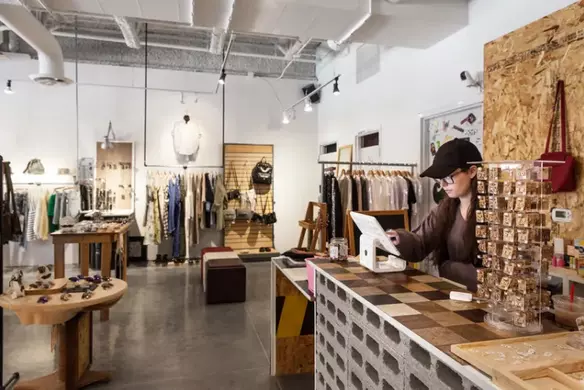
When you’re running a brick-and-mortar store, the checkout counter is the land of opportunity. If you approach it strategically improve the checkout experience, you can boost sales and keep customers coming back. And considering the competition from online stores, it’s essential to optimize every aspect of the in-person retail shopping experience – especially the checkout counter.
Why your checkout counter is critical
While checking out customers might seem like the final phase of the purchasing journey, it can be just the beginning of your relationship with them.
Creating a pleasant, engaging customer experience leaves a lasting impression that makes shoppers want to return – hopefully with the promise of future sales. And not only that, but with the right retail display, you can generate last-minute sales, which can add up over time.

Optimize your checkout counter to improve customer experience
Thanks to modern POS systems, brick-and-mortar retailers have increased flexibility when setting up their cash wells. Instead of being tethered to a traditional cash register, retailers can configure their checkout experience to meet customers’ need for the utmost convenience.
Efficiency and convenience are clearly of paramount importance in the checkout experience, but there are additional ways to optimize your checkout counter, including:
- Make sure you’re sufficiently staffed. You can have the best POS in the business, but if you’re not staffed appropriately, service suffers. Don’t make customers wait in line.
- Hold associates to a high standard. Train your associates to be friendly and engaging, so customers have a pleasant experience (and want to come back).
- Keep it entertaining. If you have the budget, try placing TVs near the checkout counter to keep customers entertained. And use the screen time wisely – showcase your brand so customers can get to know you better. You can also try turning your checkout counter into a work of art. Display beautiful photos that are aligned with your brand or have a friend paint a mini-mural. The idea is to give your customers something to enjoy during their short wait.
- Share your story. While you’re showing your stuff on the big screen, take other opportunities to tell your story. This is a good way to make your brand memorable and build customer loyalty. Use your checkout counter space to share your identity through pictures, press, your website or anything else that’s uniquely you.
How to increase sales at your checkout counter
You’ve tackled the experience, now let’s talk about sales:
- Display eye-catching “impulse inventory” close to the register. Since customers at the cash wrap are already committed to making a purchase, they may be more inclined to spend a few extra dollars. Encourage impulse purchases by placing inexpensive novelty items near the checkout line.
- Stock inexpensive “essentials.” As you’re stocking novelty items at the checkout counter, add essentials, too. This can vary depending on your inventory, but think about your target customers and add everyday basics they may have forgotten. While you’re at it, include gift cards if you have them. People are always looking for gift ideas, and when in doubt, gift cards offer an easy solution.
- Equip sales associates with upselling strategies. Whether you have a promotion running or you’re trying to drive sales for specific products, make sure your associates know about it. Then they can subtly upsell whenever possible. You don’t want them to come across as pushy, but if there’s a great two-for-one deal available, or another noteworthy promotion, they should be knowledgeable enough to share it with your customers.
- Cultivate customer loyalty. If you haven’t already set up a free loyalty rewards program, you should. While enrolling shoppers in a loyalty program may not up your sales immediately, it’s a way to encourage repeat customers, which can lead to more sales down the road. Set up signage that markets and explains the benefits of your loyalty program. Then, when customers are checking out, make it easy for them to sign up.
Convenience is key
By incorporating these checkout counter ideas, you can improve the customer experience, drive in-store sales, and build a loyal customer base. With Square POS, for example, you can pick and choose the hardware you need to process payments and facilitate faster checkout anywhere in the store. You can use hardware like Terminal or Stand at your checkout counter, but you can also speed up service by arming associates with mobile checkout options, such as Square Reader for iPhone, iPad and Android, or Square Terminal. Square hardware lets you accept all payment types, including credit and debit cards, cash, cheques and gift cards.
You can even take in-person contactless payments right on your phone with Tap to Pay for iPhone and Android, which is available through the free Square Point of Sale app. This option allows you to process payments in seconds – and yes, it keeps both your business and customer data private and secure.
All it takes is a simple set up and you’re ready to accept payments. Customers can pay for their purchases using major credit and debit cards or digital wallets like Apple Pay. If a customer doesn’t have a contactless card or payment method, you can perform a manual card entry or use a QR code or checkout link in the Square Point of Sale app.
Not only can this reduce customer wait times, but it also allows you to create a quick and professional checkout experience on the go. Do you offer delivery services? Equip your drivers with Tap to Pay. Are you hosting a pop-up shop? Take Tap to Pay with you. All payments go to the same Square account, making it easy to improve the experience for not only your customers, but you.