

Table of contents
If you own a business that’s centred around clients or services, invoicing is a huge part of the game. This guide walks you through the ins and outs of invoicing—everything from templates and workflow to handling late-paying clients. You’ll come away with tips and tricks that make invoicing a breeze.
What is an invoice?
An invoice is a record of the goods or services you provide to your clients and customers, and a method by which they can pay you for those goods or services. If you’re a contractor who fixed a roof, a makeup artist who styled a photo shoot, or a bakery that catered an event, it’s likely you need to send an invoice.
Why is it important to invoice?
Having a solid handle on all things invoicing is paramount to the success of your business. If you let things fall to the wayside or have a disorderly invoicing process, it could send the signal that you’re unprofessional. Especially when you’re dealing with costly projects (say, if you’re an event planner or contractor), that’s not exactly great for your brand—or for getting repeat customers.
A proper invoicing process and workflow are also crucial to manage your accounting. If you let invoices pile up, or if the process is confusing to your clients, it’s likely your invoices take an excessive amount of time to get settled. This is bad news when it comes to your cash flow management, and a big hassle when it comes to your accounting. Invoicing is also extremely important for tax reasons. When you own your own business, you need to keep meticulous records of all cash in and out—which includes copies of all invoices.
So if you’re just starting out (or if you’re already established and are having trouble staying on top of things), it behooves you to spend some time learning how to invoice professionally and efficiently. Your bottom line (and your accountant) will thank you.

Types of invoices
Depending on your business or the services you provide, there are different types of invoices that may make sense. Here are some common forms of invoices:
A proposal (or bid)
If you’re doing a large job, you might want to create a proposal or bid for the work. It should detail what you expect the services to cost when all is said and done. Be sure to make it clear to everyone that these are estimates for the work, not the final charge.
Interim invoices
It may make sense to issue interim invoices that allow clients or customers to pay for chunks of work at a time, rather than in one big lump sum when everything is completed. Interim invoices should be followed by one final invoice detailing all the work (and what’s been paid for).
Recurring invoices
If you have a company that does regular, recurring work for clients (say, if you’re a housekeeper or a dog walker), you may want to send recurring invoices at regular (agreed-upon) intervals (weekly or monthly, for example).
Recurring payments are easy to set up with Square Invoices and simplify billing by ensuring you get paid each month, week, day, or even year.
Final invoices
A final invoice details all the services rendered for a particular job or project. If there were interim invoices issued throughout the project, the final invoice should list those, as well as the final amount outstanding. We go through everything you should include on a final invoice in a later section.
Past-due invoices
If a client hasn’t paid an invoice, you may need to send another invoice for any charges resulting from late payments (which were previously detailed in your terms and conditions).
Invoice vs receipt
Invoices (and bills) are legally enforceable documents used to request payment from clients or customers. They often come with agreed-upon terms and conditions, such as the payment due date for the services rendered. A receipt, on the other hand, is documentation that payment has been received to authorize a sale, which can be used as proof of ownership.
Invoice vs bill
While both invoices and bills can be used to request payments, their purposes are different and they also tend to be used in different contexts.
Often used in business-to-business (B2B) scenarios, an invoice is a detailed proof of transaction. It not only serves the purpose of requesting a payment from a customer, but also doubles as an accounting tool and supports tax compliance. Payment terms may vary, and they’re usually listed on the invoice.
You’ll come across bills in business-to-consumer (B2C) situations, like when a customer asks for the bill at the end of a meal in a restaurant. It’s much simpler than an invoice in terms of information included. And, unlike an invoice, which can be used to request payments in the future, a bill implies immediate payment is expected.
Online invoicing vs paper invoicing
Sending a paper printout to a customer is an option. But a far more streamlined, convenient, and eco-friendly way to go is online invoicing. Choosing online invoicing software has some big benefits. Here are a few:
Faster payments
Snail mail is, well, slow. So by nature, the turnaround time for getting paid by post is sluggish. What’s more, if a client pays via cheque, the funds can take a while to clear, whereas credit or debit card charges are typically deposited into your account within a few business days.
With Square Invoices, you can send professional invoices straight to your customers’ email inboxes, where they have the option to pay with just a click. You can also send invoices with Square directly from your mobile device using the invoicing app, which is handy when you’re out in the field. The ability to send an invoice right after you’ve completed a job helps avoid unnecessary administrative time back at your computer and speeds up the time it takes for you to receive payment. Sixty-seven percent of invoices sent through Square get paid within the next business day.
Online invoicing can significantly cut down on time-consuming administrative tasks and help ensure timely payments.
Improved cash flow
We talked about cash flow earlier, and another way to mitigate any problems is to opt for online invoices. Faster payments mean you’re more likely to stay in the green.
Easier to manage
Paper invoices have a tendency to pile up—or get lost in the depths of file cabinets. Square Invoices automatically saves all your invoices in your Square Dashboard, so they’re easy to find when you need to reference them. They’re also much easier to track. The tool automatically filters your invoices by what’s been paid and what’s outstanding, so you can quickly see which clients you need to follow up with.
Quick to send
You can send invoices with Square directly from your mobile device (in the using the invoicing app, which is handy when you’re out in the field. The ability to send an invoice right after you’ve completed a job helps avoid unnecessary administrative time back at your computer.
How to make an invoice
Start with a professional template
Square Invoices features a professional-looking template in which you can fill in all the pertinent information related to the project or job. We also take things a step further and include an area where it’s easy for a customer to leave a tip or send feedback. Not ready to make the move to invoicing software? Square also offers free invoicing templates for download.
What to include in an invoice
While what to include in your invoice may vary from business type to business type (a dentist may want to list procedure codes for insurance reasons, for example), there are some general best practices.
- Your business name and contact information: Make it easy for customers to locate your invoice in their records. Adding your logo and brand colours with a tool like Square Invoices gives your invoice a polished, professional look.
- Your customer’s name: Including your customer’s business name as well as the full name and contact information of the person responsible for paying the invoice helps you easily pull up their invoice as needed.
- The invoice number (for your records): Each invoice should have a unique identifier, whether you use numbers, letters or project names. Invoicing software like Square Invoices automatically generates invoice numbers for you.
- Date and terms (specifically outlining the time period you expect to be paid): Set clear expectations with customers by giving them the exact timeline to pay you, as well as specifying your payment terms in the invoice notes.
- Price and description of the items (as well as quantity): Break down the services or products provided on separate line items, specifying unit prices/hours and quantities.
- Taxes, fees and discounts: Add your GST/HST number to your invoice templates. Disclose any extra fees transparently to comply with drip pricing regulations. List subtotals before tax and break down sales taxes clearly so customers know exactly how much they’re paying in tax. Show discounts clearly on line items and totals.
Having everything clearly detailed helps streamline your accounting and makes the invoice easier for your customers to skim and understand. For a closer look at invoices by industry, here are some examples of invoices by industry.
Spending time up front to implement a scalable invoicing workflow can save you time and money in the long run.
What does an invoice look like?
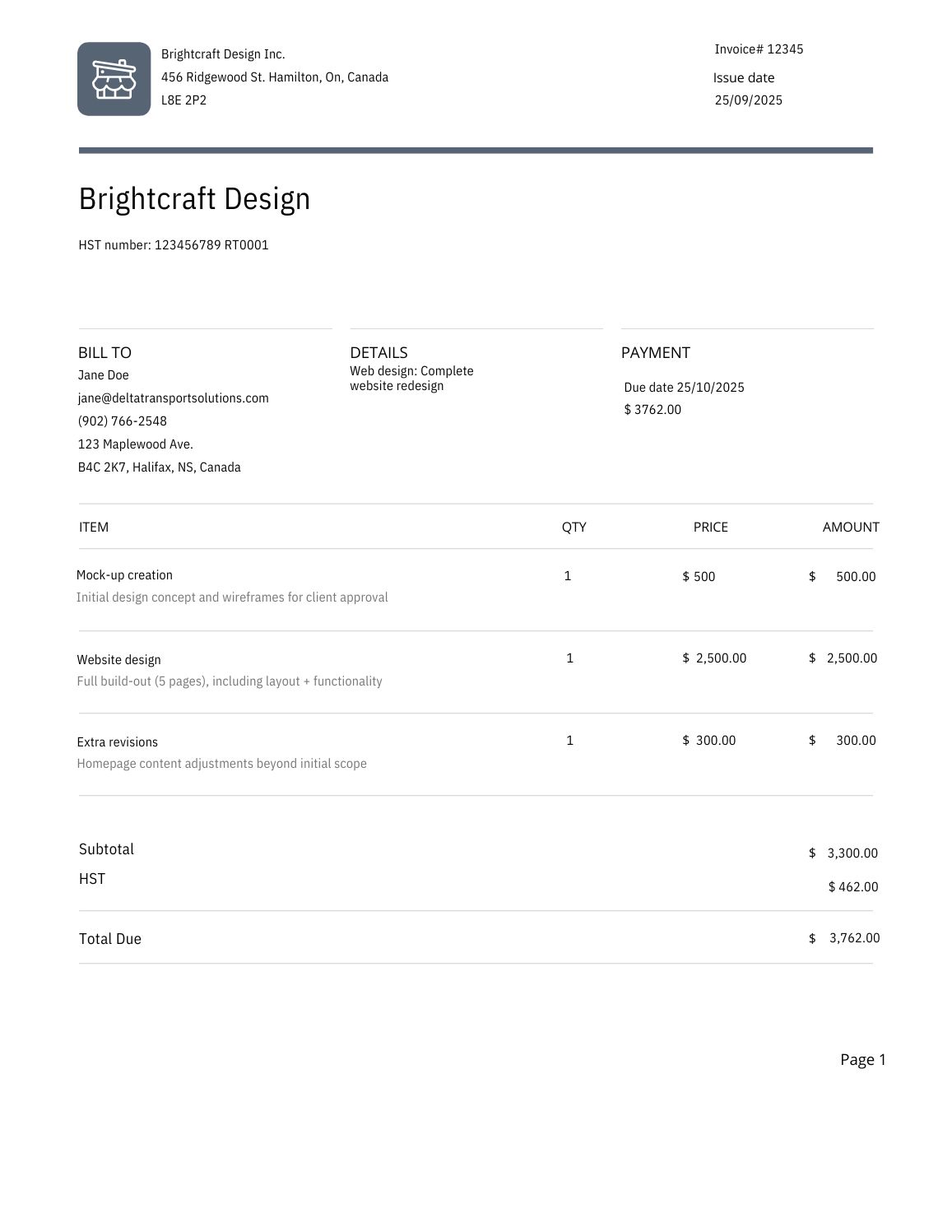
If you’re wondering what an invoice looks like, take a look at this mock-up invoice from a fictional company made using a free Square invoice template. It features some of the essential elements to include on an invoice, clearly displaying service descriptions and price breakdowns.
How to pay invoices
Once you receive an invoice, there are a few steps to follow to avoid issues like missed deadlines or accidental double payments.
- Review the invoice details: Get in the habit of always double-checking and reviewing the information on the invoice. What are you being charged for? Did you receive the products or services? When is payment due and what is the total after tax? If you spot a mistake, it’s easier to contact the vendor and ask them to reissue an invoice than to fix it after you’ve already paid.
- Choose a payment method: Next, take note of the available payment methods and decide how you’re going to pay. Make a decision based on your priorities. For example, an Interac e-Transfer is instant, which is good for your relationship with your vendor, but it won’t let you accumulate rewards like a credit card. Post-dated cheques give you more control over cash flow, as you’ll know exactly when money is leaving your account, but electronic payments are more convenient (and usually appreciated by supplierstoo).
- Schedule or send the payment: Make sure to pay before the deadline, whether you’re doing it through your online banking portal or using a vendor’s checkout link. You can also ask the vendor to set up automatic payments for recurring billing through pre-authorized debits (PAD) directly taken from your bank account or with a credit card.
- Keep records organized and updated: Use a system to know when you’ve paid for an invoice to avoid accidentally paying twice. Staying organized also makes things easier when filing taxes and writing off expenses.
Legal considerations
According to an Interac survey, seven in 10 Canadian business owners with less than five employees struggle to get paid on time and spend time chasing late payments. When sending an invoice, or paying for one, you should be aware of certain legal considerations to safeguard your business and maintain good relationships with vendors.
Contractual agreements and debt recovery
While an invoice itself isn’t considered a contract in Canada, the context that leads to an invoice being issued is often legally binding, like making an e-mail agreement. Plus, having a properly filled out invoice is a transaction record you can refer to in the event of disputes.
What happens if an invoice goes unpaid? The best practice is to first send payment reminder messages. According to the Business Disputes Register, you then have a few options in terms of recourse:
- File a dispute on the Business Disputes Register: Fill out a form with the details of the unpaid invoice dispute, pay a $38 fee and your dispute will be automatically made public on the Business Disputes Register website and through online searches. This can put pressure on a customer to pay if multiple reminders have failed.
- Mediation: You can privately hire a mediator to help you and your customer come to an agreement, but it is a voluntary process, not a legally required one. The idea is to come to a compromise and avoid going to court.
- Arbitration: Arbitration is similar to mediation, but both parties agree that they’ll be bound by any decision made by an arbitrator, which is legally binding and enforceable. It’s more complex and costly than mediation, but faster and less expensive than going to a court.
- Debt collection: You can hire debt collection agencies for a fee, usually 25% of the funds collected on your behalf, to recover the money owed to you.
- Small claims court: Small claims court doesn’t guarantee that you’ll get your money back if a customer doesn’t have the funds to pay you. But it is an avenue for dealing with an unpaid invoice, and you can look into the steps involved with your province or territory. For example, here’s an overview of the process for filing a claim in Ontario.
Compliance with Canada Revenue Agency requirements
Once you exceed the CRA’s small supplier revenue threshold, you’ll need to register for the GST/HST — and being a registrant comes with certain invoicing requirements.
First, you’ll need to include your GST/HST number on invoices. You also have to let your customers know if the GST/HST applies to their purchases. Per the CRA’s website, you are required to show one of the following:
- That the total amount paid or payable includes the GST/HST, which you would disclose as a note on your invoice.
- The amount paid or payable shows the amount of the GST/HST payable separately, which means showing both the subtotal before tax and after tax for each item on your invoice.
- The GST/HST rate includes breaking down the provincial and federal tax rates when you have to charge the GST in addition to the provincial sales tax (if the HST applies, you just need to show the HST rate).
There are some exceptions. Certain supplies, like basic groceries, are zero-rated, which means that a tax rate of 0% applies to them — and you’ll have to show it on your invoice. Other supplies are exempt, which means that the GST/HST doesn’t apply to them. In that case, you wouldn’t apply the GST/HST to them on your invoice. Find out more about zero-rated and exempt supplies.
Point-of-sale rebates that apply to items like books or children’s clothing in some provinces also need to be identified on your invoices. You still charge the HST on them, but apply the discount right away, showing both the tax and rebate on separate lines so the customer can see how much tax they were actually charged.
Finally, you also have to input specific information for customers who are GST/HST registrants and will be claiming tax credits. Consult the CRA’s input tax credit requirements chart for more details on the information required in different scenarios.
Construction Act and Similar Legislation
If you work in the construction industry, there is specific invoice-related legislation to keep in mind. For example, Ontario’s Construction Act introduced the concept of a “proper invoice” and set rules around payment timelines in the construction industry, along with a process to promptly address and resolve disputes. Contractors must include the following information on invoices to meet Construction Act requirements:
- The contractor’s name and address.
- The date of the invoice and the period, milestone or other contractual payment timeline related to the invoice.
- Information identifying the contract or other authorization, such as a contract number, contract line item number or purchase order number.
- A description of the services or materials supplied, including quantities.
- The amount payable for the services or materials supplied, and the payment terms.
- The name, title, mailing address and phone number of the person to whom payment is to be sent or, if payment is to be sent to an office or department, its name, mailing address and telephone number.
- Any other information that is necessary for the proper functioning of the owner’s accounts payable system that the owner reasonably requests.
When a contractor sends a proper invoice, the owner of the project must pay them within 28 days of receipt or issue a formal notice of non-payment if there is a dispute. In turn, the contractor must pay any sub-contractors within seven days of receiving payment.
Other provinces, like Alberta, Saskatchewan and Nova Scotia, have introduced similar legislation. If you work in the construction industry, look into your province’s requirements to properly format your invoices and safeguard protect protect your business.
How to keep track of your invoices
When it comes to your invoicing process, you should run a tight ship. That means putting systems into place to ensure that you are sending invoices and receiving payments in a timely, organized manner. Here are some tips to help you manage your invoicing workflow:
Send invoices quickly
You’re not going to get paid if you don’t send an invoice. So the first rule of invoice management is to send invoices right after you’ve completed a job. This is easy to do with Square Invoices, which lets you create and send invoices straight from the Square invoicing app on the spot.
Send the invoice to the right people
Sometimes it’s not the actual client who’s taking care of the invoice. Maybe it’s an accountant doing the bookkeeping, or maybe it’s actually the parent who’s paying for those wedding flowers. With Square Invoices, you can email both your client and whoever’s actually paying so you can get your money as quickly as possible.
Use online invoicing
Online invoicing helps keep things from getting “lost in the mail.” Since online invoices are sent digitally, it’s always easy for clients to find them—all they need to do is search their inbox (rather than their junk mail pile).
Set crystal-clear terms
You need to clearly outline your terms and conditions both ahead of time and on the final invoice. This includes any late fees associated with delinquent payments. Having everything in writing is key to preventing uncomfortable back-and-forth.
Have an organizational system
You should have records of all your invoices in one, organized location. This is crucial not only for bookkeeping and tax purposes but also for staying on top of things. With Square Invoices, everything is stored right in your Dashboard and sorted by status.
How to get paid quickly
To date, millions of dollars have been paid through Square Invoices. Based on some trends and data we’ve seen, here are some things you can do to ensure your invoices get paid quickly.
Leverage these smart strategies to ensure your invoices are paid quickly and seamlessly.
- Send invoices to clients on Thursdays. We’ve found that invoices sent on Thursdays have the highest likelihood of being paid within two days.
- Customize the due date of each invoice. With Square Invoices, you can add a message for the recipient to request that the customer issue payment upon receipt. This can lead to speedier payment returns.
- Avoid invoicing clients on Sundays. People are least likely to pay an invoice received on Sunday—it’s the laziest day of the week, after all.
How to deal with late payers
It’s par for the course—people forget to pay. But Square Invoices makes it super-easy to follow up with your delinquents. Because everything is sorted in your Dashboard by what’s been paid and what hasn’t, you can quickly go in and hit the Resend button for anyone who might need a reminder. That saves you the time of having to sit down and craft a bunch of awkward emails. For more tips on how to get those late invoices paid, read our post Three (Tactful) Ways to Get Clients to Pay Outstanding Invoices.
Get Started With Square Invoices
Ready to streamline invoicing how how you invoice with free invoicing software? Square Invoices lets you choose from a variety of professional invoice templates and customize them. You can offer customers multiple payment methods, which makes for a smoother checkout experience and encourages them to pay you promptly. Whether you send a deposit request, create a custom payment schedule or set up automatic recurring billing, you have options that fit your unique business needs.
Square Invoices also takes the guesswork out of applying the correct GST/HST tax rates to your invoices, helping you stay on top of tax filings. And it you allows allows you to keep track of everything in one place, including any contracts you create between your business and customers.
Choose your region and language
If you serve customers in Quebec, commercial documents have to be available in French. With Square Invoices, you can choose your region in Canada and select your language of choice to serve customers in English or French.

What is an invoice FAQs
What is an invoice in simple words?
An invoice is a document issued to a buyer by a seller, listing the products and services provided and requesting payment for them. Sending invoices helps you get paid on time while providing a record of a transaction for accounting purposes and the CRA’s GST/HST requirements.
Does an invoice mean I have to pay?
An invoice means that you have to pay for products or services provided to you, but it doesn’t mean that the information on it is automatically accurate. Mistakes can happen. If the items or amounts are incorrect, or if there’s been a misunderstanding about payment timelines, contact the seller promptly to address the issue.
When should I send an invoice?
You should send an invoice right after delivering a product or service, and in the case of a deposit, immediately after making an agreement with a customer. For long-term projects that involve recurring invoices, you can invoice customers after specific milestones, like project phases or on a monthly billing schedule.
Can I use an invoice as proof of payment?
No, an invoice is a request for payment, not a proof of payment. A proof of payment would be a receipt, which is issued once an invoice has been paid.
Is an invoice a bill or a receipt?
An invoice is a type of bill, though it’s a more in-depth, detailed one, but it’s not the same thing as a receipt. Both invoices and bills request payment from a customer, but they’re used in different contexts. An invoice is often used in B2B settings and can have different payment due dates and terms, while a bill is typically given in a B2C situation to request payment on the spot, like at the end of a meal in a restaurant. A receipt is issued after an invoice or bill has been paid.