

Table of contents
Cash registers and point of sale (POS) systems are the heart of retail, restaurant, beauty, service businesses and more. Both let you process hundreds of transactions per day, but there are some key differences in cost and capability: Cash registers are generally less expensive and offer more basic functionality, whereas POS systems can cost more but integrate more comprehensively with your back-office operations.
So, is a traditional cash register or a POS system register the best choice for your business? This will depend on your business style and size, the number of transactions you process, what functionality you need and your budget.
Read on for more information about cash register features and benefits, and how they compare to those of POS systems.
Types of small business cash registers
There are three main types of cash registers suitable for small businesses:
- Manual cash registers: This is the most basic type of cash register – functionality is limited to processing sales and printing receipts, so it doesn’t need an internet connection. If you’re a very small, cash-only business, dealing with low volumes, it may be all you need.
- Electronic cash registers (ECRs): An ECR has a digital display and supports barcode scanning for quicker checkout. It automatically calculates totals and can produce simple sales reports. For busy operations needing fast service and sales tracking, an ECR is a must-have.
- POS cash register systems: A cash register that’s part of a POS system provides much more functionality and flexibility than a standalone machine. It includes enhanced features such as inventory management and advanced reporting, it’s customizable and supports multiple payment methods. A POS system helps growing businesses streamline their operations.

Benefits of using a cash register
Cash register features vary, but there are three core advantages common to all cash registers:
- Sales records: Even the most basic cash registers create a record of each transaction and let you print an end-of-day sales report, which are essential for accounting, auditing and monitoring performance.
- Security: Registers have locked cash drawers that can only be opened when a transaction is processed or by an authorized user. This keeps a business’s money safe from customer or employee theft.
- Fast and accurate checkouts: Cash registers automatically calculate totals and the correct change needed, which minimizes human error and speeds up the transaction process. This efficiency reduces waiting times, leading to improved customer satisfaction.
Retail cash register basic features
Retail stores need cash registers with multiple customer-friendly features. Here are the most important:
- Receipt printer: Receipts are essential: they provide customers with proof of purchase and allow you to keep track of every sale. There are many different types of receipt printers. If your business is on the move, you’ll need a mobile receipt printer. For traditional retail stores, a regular printer will suffice.
- LCD display screen: A display screen allows customers to review purchases as you process them, giving them the confidence that they’re not being overcharged.
- Touchscreen interface: A keyboard or touch screen allows you to enter transactions and make any adjustments quickly and smoothly.
- Bar code scanners: Cash registers that integrate with barcode scanners are still needed in 2026. Retail stores with many products use barcodes to track inventory and sales.
- Cash transactions: Card and contactless payments are becoming more and more prevalent. However, certain customers still prefer to pay with cash and it’s important they’re able to do so.
- Discounts: Canadians love receiving discounts, according to a KPMG report that revealed 57% of shoppers say that finding a good discount is far more likely to motivate them than brand loyalty. Your cash register should let you manually enter a discount rate (e.g. 10%), which you can apply to certain items or to the subtotal.
Restaurant cash register basic features
Restaurant cash registers can be a bit more complicated. They require communication with the kitchen and waiting staff in addition to printing out receipts for sales and accepting payments. Some of the most popular restaurant cash register features include a kitchen printer, automatic tax computation, the ability to connect to a restaurant POS system, electronic payment processing and touch screens.
- Kitchen printer: A POS cash register system integrates with a kitchen printer and makes sending orders to the kitchen simple.
- Credit and debit card processing: Diners expect to be able to pay for their meal with a card – Payments Canada data shows that credit and debit cards make up the majority of transactions in Canada. The cash register that you choose should be able to connect to a card reader.
- Cash payment processing: Despite the fact that cash usage is on the decline, it’s still frequently used by nearly half of Canadians, according to Payments Canada. Make sure that these customers can still be served with a system that documents cash payments.
- Heavy-duty cash drawer: A heavy-duty cash drawer is a basic feature that’s popular with high-traffic businesses like fast-food restaurants. It allows you to make change for customers who pay in cash, and keep the money safe and secure.
A POS system vs. traditional cash registers
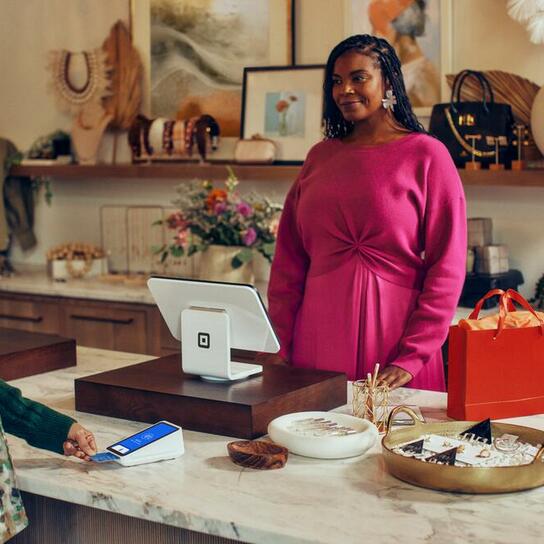
A traditional cash register handles the basics: it processes transactions, stores cash and prints receipts. A POS system does all of this too, but it also connects to software so you can keep track of your sales, inventory and locations – all in one place.
Here are the key differences:
- Cost and simplicity: A cash register is a single fixed cost (starting at around $320 for a basic model) and it doesn’t need a network connection or additional equipment. A POS is more complex. There’s the initial investment in the hardware (ranging from $0 witha solution like Tap to Pay on iPhone to $1,200 for a complete retail register) plus transaction fees (a percentage of each sale). Some POS providers also charge a monthly subscription, which can range from $0 to several hundreds of dollars.
- Data and insight: A POS system gives you access to real-time reporting and analytics; a basic cash register simply records the sale. With a live view of your business, you can see where the opportunities are to make more sales.
- Stock tracking: POS systems include inventory management, letting you monitor stock levels automatically as you sell. A traditional cash register can’t do this, so you’re more likely to run low or sell out of popular items.
- Scalability: If you have multiple locations, a POS system lets you manage everything from a single dashboard without needing to be on site. Cash registers operate as individual terminals and can’t share data across locations, so the admin required to keep on top of all your locations can quickly add up, causing friction while you scale.
- Flexibility: A POS system can accept a wide range of payments, including cards, contactless payments and digital wallets alongside cash. With a POS, you can also accept digital gift cards, store cards on file and issue invoices. However your customers want to pay, you can accommodate them. By contrast, most traditional cash registers are limited to cash and require a separate card terminal.
Essential features of POS systems
If a POS system makes the most sense for your business, these are the features worth looking for:
- Payment processing: Your POS should let you accept a variety of payment methods, including contactless cards, chip and PIN and digital wallets.
- Reporting and analytics: Built-in dashboards that show your top sellers, busiest hours, sales by location and team performance – all in real time.
- Inventory management: Track stock levels automatically as items sell across every channel (in-store, online and via invoices). Set low-stock alerts so you never run out of your best sellers.
- Employee management: Control who can access what on the POS, manage shifts and track team performance.
- Integration with existing tools: Your POS should work with the software you already use, from accounting tools like Xero to eCommerce platforms like Wix or WooCommerce and delivery services like DoorDash and Uber Eats.
- Ease of use: A good POS system should take minutes to set up, not days. Staff should be able to learn it quickly without lengthy training sessions.
- Loyalty programs: According to the Square 2025 Future of Retail report, 77% of retail business leaders say their loyalty program fosters repeat visits, 76% say it helps increase order size and 74% agree that it drives ROI. Your POS system can help you reward repeat customers, track their preferences and encourage them to come back.
- Customization: Tailor the checkout interface to suit your business: create custom item grids, set up modifiers for variations or special requests, apply automatic discounts and adjust receipt layouts to match your brand.
- Hardware options: Look for hardware that fits your setup, with optional extras you can add as you grow, such as a second screen for customers.
How does a POS cash register work?
Modern POS cash registers are composed of two components: hardware and software. They work together to ensure that your business runs smoothly.
POS system hardware components may include a cash drawer, receipt printer, barcode scanner and more. POS cash register providers often sell hardware that works well with their software.
While specific features depend on the provider, POS system software helps you simplify the way you run your business. For example, Square Register is purpose-built and runs on Square POS software out of the box, meaning the POS software is pre-installed and there’s no complex configuration to get started. Because the cash register connects directly to Square’s cloud-based POS platform, all parts of your business sync automatically – including transactions, inventory, customer data, reporting, staff permissions, online orders and more.
On-premise vs. cloud-based cash registers
Unless you have a mobile business, your hardware will likely stay on site, but your software can either be cloud-based and accessible from multiple devices, or only accessible from a specific device in person.
There are pros and cons to both choices. On-premise cash registers will often be a one-time purchase that may need future manual upgrades, while cloud-based services may have individual transaction fees or monthly fees. Let’s take a look at the different features of each option:
On-premise cash register
- An on-premise cash register works with an internal network of servers to store and retrieve data. It’s very similar to installing software on your personal computer and accessing it from the hard drive.
- On-premise systems work well for some businesses because they work quickly without relying on an internet connection.
- The biggest disadvantage with an on-premise cash register is that you are in charge of maintenance and upgrades, which sometimes require a specialist. You’ll also only be able to access the data if you’re in front of your cash register.
Cloud-based cash register
- A cloud-based POS cash register allows you to take your business anywhere that has an internet connection. This is a great option for mobile businesses and service providers like food trucks, pop-up shops, personal trainers and home repair specialists. Some cloud-based POS providers, like Square, also offer offline payments in instances where you’re operating without an internet connection.
- A cloud-based POS allows you to do business on any mobile device. Sales can be made when you or your employees are away from the shop.
- Cloud-based POS cash registers provide you with inventory counts, labour usage percentages, productivity reports and daily totals with just a few clicks.
- Cloud-based cash registers update automatically, often in real-time, eliminating the need for manual, time-consuming updates and reducing downtime.
- All the information in a cloud-based POS is centralized and synced across locations, making it an ideal choice for multi-location businesses
- With a cloud-based POS, you don’t have to worry about losing data in the event of a power outage or hardware malfunction. All data is securely stored in the cloud using security measures like end-to-end encryption.

Cash register feature FAQs
Does Square’s POS system have a dual screen?
Yes, Square Register is a fully integrated POS system with two screens. It has a large touchscreen where you can see all the information you need and process the sale, and a smaller touchscreen where customers can see what they’re buying and securely enter their PIN.
Does Square Register have a customizable interface?
Yes, you can customize the interface of your Square Register to help your staff process transactions efficiently. You can categorize items and move your most popular products to the top for faster navigation. You can also adjust settings for different service types, such as quick-service versus retail.
What is the difference between a cash register and a POS system?
A cash register is a standalone machine for processing transactions, printing receipts and holding cash. A POS system is a combination of hardware (including a register) and software that supports many business functions, such as inventory management and real-time reporting.