



Actualiza tu navegador.
Descarga la última versión de un navegador compatible debajo para obtener el mayor beneficio de este sitio web:
Square para Contratistas Eléctricos Administra trabajos eléctricos desde el presupuesto hasta el pago

Software para la oficina y el campo


Acepta pagos donde trabajes
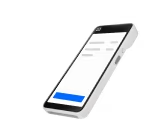
Acepta tarjetas y billeteras digitales en tu local o directamente en el lugar de trabajo. Usa hardware portátil para cobrar cuando el trabajo esté terminado y entrega recibos al momento.
Mantén organizados a tus equipos y calendarios
Administra solicitudes entrantes, programa trabajos y coordina técnicos desde un solo calendario. Da seguimiento a trabajos próximos, tareas de seguimiento y cambios de horario sin tener que usar múltiples herramientas.
Envía facturas y supervisa los saldos pendientes
Envía facturas por correo electrónico o mensaje de texto, acepta pagos en línea y supervisa saldos pendientes desde un solo lugar. Ofrece múltiples opciones de pago, incluidas transferencias ¹ACH para facturas de mayor importe.
Supervisa el desempeño de tu negocio
Consulta ventas, pagos y actividad de clientes desde un solo panel. Utiliza reportes y análisis para monitorear tendencias y mantenerte informado sobre las operaciones diarias.
Más herramientas para hacer crecer tu negocio eléctrico

Administra las finanzas de tu negocio
Accede a herramientas bancarias diseñadas para funcionar junto con tus pagos y ayudarte a administrar el movimiento de dinero y las finanzas diarias desde una sola plataforma.

Mantén organizada la información de tus clientes
Guarda datos de clientes, notas e historial de pagos en un solo lugar para dar seguimiento con mayor facilidad, gestionar trabajos recurrentes y mantener la información alineada entre la oficina y el campo.

¹Acepta pagos ACH
Ofrece a tus clientes otra forma de pagar facturas aceptando pagos ACH directamente desde cuentas bancarias elegibles.

Mantén contratos y presupuestos juntos
Envía contratos junto con presupuestos para instalaciones, acuerdos de mantenimiento y órdenes de cambio, de modo que el alcance del trabajo y los términos queden documentados antes de comenzar.


“Sabía que no quería usar cosas como Zelle o Venmo. Para mí, daba la impresión de que eras simplemente alguien haciendo esto como un trabajo secundario. Pero Square le dio legitimidad a mi negocio. Podía aceptar tarjetas de crédito y no necesitaba nada complicado.”
1133 Studios, photography studio, US
US
Hardware para cobrar al instante

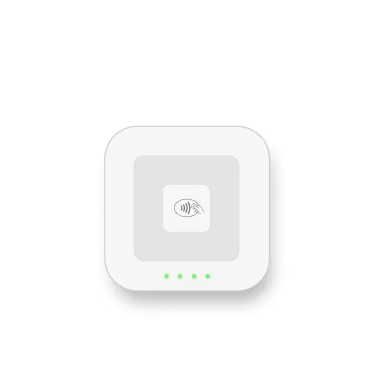
Square Reader
Prepárate para vender cualquier cosa en cualquier lugar, con un diseño súper portátil que se empareja con tu dispositivo.

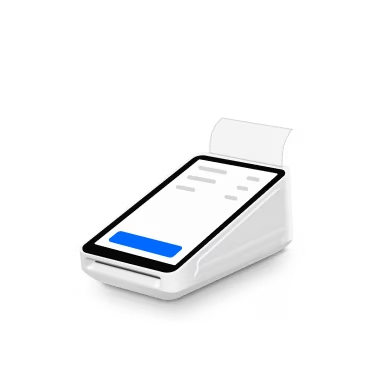
Square Terminal
Vende donde te convenga con un dispositivo integral y compacto que también imprime recibos.

Square Reader
Prepárate para vender cualquier cosa en cualquier lugar, con un diseño súper portátil que se empareja con tu dispositivo.
Square Terminal
Vende donde te convenga con un dispositivo integral y compacto que también imprime recibos.
Obtén un plan para administrar todo tu negocio
Principales funciones para negocios de servicios
Facturas únicas y recurrentes
Presupuestos y contratos
Proyectos
Detalles
Principales funciones para negocios de servicios
Facturas únicas y recurrentes
Presupuestos y contratos
Proyectos
Principales funciones para negocios de servicios
Calendario de pagos
Plantillas personalizadas de facturas
Límite de $10 para transferencias ACH
Límite de comisión de $10 para transferencias bancarias ACH
Detalles
Principales funciones para negocios de servicios
Calendario de pagos
Plantillas personalizadas de facturas
Límite de $10 para transferencias ACH
Límite de comisión de $10 para transferencias bancarias ACH
Square Pro
Obtén precios personalizados
Si procesas más de $250,000 al año, habla con nuestro equipo para ver si eres elegible para precios personalizados y comisiones de procesamiento. También puedes preguntar sobre descuentos de hardware, soporte de incorporación e implementación, especialistas técnicos y administración de cuentas.
Consejos para administrar facturas y pagos


Administra trabajos eléctricos desde un solo lugar.
Preguntas frecuentes
¿Qué es un software para contratistas eléctricos?
El software para contratistas eléctricos es una plataforma de administración empresarial diseñada para electricistas. Reúne las herramientas necesarias para administrar el trabajo, desde la primera consulta del cliente hasta el pago final.
La mayoría de las plataformas incluyen programación y despacho, presupuestos y cotizaciones, facturación y pagos, seguimiento de órdenes de trabajo, administración de clientes y reportes. En conjunto, estas funciones ayudan a agilizar tareas administrativas, respaldar registros precisos y mantener organizados a los equipos tanto en el campo como en la oficina.
¿Qué herramientas necesita un electricista para administrar su negocio?
Necesitas cuatro elementos para administrar un negocio eléctrico sin que el papeleo se acumule: una forma de cobrar, una forma de enviar facturas, una forma de administrar tu agenda y una forma de entender cómo está funcionando el negocio. Square reúne todo eso en una sola plataforma:
- Pagos: Acepta tarjetas, pagos sin contacto y Cash App Pay en el lugar de trabajo con Square Reader o Square Terminal.
- Facturación: Envía facturas y presupuestos profesionales desde tu teléfono entre trabajos.
- Programación: Permite que los clientes reserven servicios eléctricos en línea, las 24 horas del día, los 7 días de la semana, con Square Appointments.
- Administración de equipos: Registra horas, asigna trabajos y administra permisos con Square Team Management.
- Reportes: Consulta ingresos por tipo de servicio, monitorea tendencias y exporta información a QuickBooks o Xero desde Square Dashboard.
- No necesitas suscripciones separadas para cada función. Una cuenta, un inicio de sesión y un solo lugar para verlo todo.
¿Cómo cobran los electricistas en un lugar de trabajo?
Puedes aceptar pagos con tarjeta dondequiera que trabajes, ya sea en la casa de un cliente, en una obra comercial o en tu local, utilizando Square Reader o Square Terminal. No necesitas Wi-Fi. ⁶El modo sin conexión procesa el pago y sincroniza la información cuando vuelves a conectarte.
Métodos de pago que puedes aceptar en el lugar:
- Pago sin contacto (tarjetas sin contacto, Apple Pay, Google Pay, Cash App Pay)
- Chip (EMV)
- Deslizamiento de banda magnética
- Ingreso manual de la tarjeta¿Square funciona como software de programación para electricistas?
Sí. Square puede ayudarte a administrar programación para trabajos de servicio, seguimientos y trabajos recurrentes mediante Appointments. Los clientes pueden reservar en línea y tú puedes administrar tu calendario para saber quién va a dónde y cuándo. Para necesidades de despacho más complejas, muchos vendedores combinan Square con otras herramientas operativas y utilizan Square para presupuestos, facturación y pagos.
¿Puedo enviar facturas y presupuestos desde mi teléfono?
Sí. Square Invoices te permite crear y enviar una factura o presupuesto profesional desde tu teléfono inmediatamente después de terminar un trabajo, o incluso mientras estás evaluando el proyecto en el sitio.
Desde la aplicación puedes:
- Crear partidas personalizadas para mano de obra, materiales y permisos
- Solicitar un depósito antes de comenzar el trabajo
- Configurar recordatorios automáticos de pago
- Crear facturas recurrentes para contratos de mantenimiento o clientes recurrentes
- Permitir pagos con tarjeta, transferencia bancaria o Cash App Pay directamente desde la facturaTus clientes reciben una factura profesional con el nombre y logotipo de tu negocio. Tú puedes ver cuándo la abrieron y cuándo realizaron el pago.
¿Cómo administro los horarios de varios electricistas en mi equipo?
Las herramientas para equipos de Square te permiten administrar la disponibilidad de tu personal, asignar trabajos y evitar conflictos de programación desde una sola vista de calendario.
Puedes:
- Ver el calendario de cada electricista lado a lado
- Asignar trabajos o áreas de servicio específicas
- Configurar permisos personalizados
- Registrar entradas y salidas mediante la aplicación Square Team
- Enviar notificaciones de asignación de trabajoFunciona igual si tienes dos electricistas o veinte. A medida que tu equipo crece, puedes agregar nuevos miembros sin cambiar de plataforma.
Explorar administración de equipos →¿Cómo puedo dar seguimiento a los ingresos y la rentabilidad de los trabajos?
Square Dashboard te ofrece reportes en tiempo real sobre ingresos, tendencias de pago y servicios con mejor desempeño, accesibles desde tu teléfono, tableta o computadora.
Reportes útiles para un negocio eléctrico:
- Identificar qué tipos de trabajo generan más ingresos
- Detectar patrones estacionales
- Ver qué electricistas generan más ingresos
- Analizar clientes recurrentes y el importe promedio por transacción
- Sincronizar información con QuickBooks o Xero, o descargar archivos CSVNo necesitas crear hojas de cálculo ni esperar al cierre de mes. La información se actualiza conforme recibes pagos.
¿Square se sincroniza con software de contabilidad?
Sí. Square se integra directamente con QuickBooks y Xero, dos de las plataformas contables más utilizadas por empresas de servicios. Si utilizas otra herramienta contable, Square también ofrece exportaciones CSV y acceso mediante API para conexiones personalizadas.
¹ Las transferencias bancarias ACH están sujetas a elegibilidad y pueden estar sujetas a límites, incluido un límite máximo de cargo de $10. Consulta los Términos de ACH de Square para obtener más información.
² Tarifas de procesamiento: 2.6% + 10¢ por pagos con toque, inserción o deslizamiento; 2.9% + 30¢ para pagos en línea; 3.5% + 15¢ para pagos ingresados manualmente. Las funciones, tarifas y disponibilidad pueden variar según la cuenta, el dispositivo y el tipo de pago. No se requieren contratos a largo plazo.
³ Block, Inc. es una empresa de servicios financieros, no un banco. Los servicios bancarios son proporcionados por la filial bancaria de Square, Square Financial Services, Inc., o por Sutton Bank, miembros de la FDIC. Square Checking es proporcionado por Sutton Bank, miembro de la FDIC.
⁴ Todos los planes de venta a crédito son emitidos por Block, Inc. No están disponibles para comerciantes en Alabama (AL), Delaware (DE), Misuri (MO), Misisipi (MS), Nuevo Hampshire (NH) ni Tennessee (TN). Los montos de compra deben ser de entre $49 y $10,000. La tasa APR es del 15 %. Los plazos disponibles varían entre 3, 6, 12 y/o 24 pagos mensuales, según el monto de la compra. El impuesto sobre las ventas, cuando corresponda, deberá pagarse al momento de la compra. Todos los planes están sujetos a aprobación crediticia y otros factores.
⁵ Apple, el logotipo de Apple y Apple Pay son marcas comerciales de Apple Inc., registradas en Estados Unidos y otros países. Google Pay es una marca comercial de Google LLC. Android es una marca comercial de Google LLC.
⁶ Los pagos sin conexión se procesan automáticamente cuando vuelves a conectar tu dispositivo a internet y serán rechazados si no vuelves a conectarlo dentro de las 24 horas posteriores a tu primer pago sin conexión. Al habilitar los pagos sin conexión, eres responsable de cualquier pago vencido, rechazado o disputado que se haya aceptado mientras estabas sin conexión. Square no puede proporcionar información de contacto de los clientes para los pagos rechazados mientras estabas sin conexión. Los pagos sin conexión no son compatibles con versiones anteriores de Square Reader para pagos sin contacto y con chip (1.ª generación, v1 y v2).