Apply for and manage a Square loan
About Square loans
Square loans are business loans with no hidden fees or lengthy applications. Upon approval, funds are sent as soon as the next business day or instantly to your Square Checking account so you can invest in your business immediately to cover cash flow gaps, increase inventory, purchase equipment, hire employees, and more.
Loans range from $100–$10,000, and loan offers are based on a variety of factors, including payment processing volume, account history, and payment frequency. Accounts are reviewed on a daily basis and you’ll be notified if your business is eligible.
All loans are issued by Square Capital LLC.
Before you begin
Loan offers are available for a limited time. We are constantly evaluating your account, even if you have an active offer. Your offer may change or expire as your payment processing fluctuates or business changes.
Applying for a Square loan doesn’t affect your credit score, and collateral isn’t required.
There are no ongoing interest charges. Instead, you pay one fixed loan fee to borrow the loan. The fixed fee is the difference between the total owed amount and the initial loan amount. The fixed fee will never change, regardless of how quickly or slowly the loan is repaid.
Once you’ve selected an offer, the loan amount can’t be changed.
Loan repayment starts two days after your funding date, and minimum loan payments are due approximately every 30 days ending on the loan maturity date communicated in your loan agreement. Your loan must be fully repaid by your loan maturity date.
You’re required to repay a certain amount every month until your loan is paid back in full, and the amount is disclosed in your loan agreement. A percentage of daily card sales are deducted automatically for repayment.
Your loan repayment rate applies in addition to Square’s processing fees for transactions and can’t be adjusted.
If declined for a loan, review the email notice you received about your loan request for more information on reasoning. We regularly review accounts for eligibility, and there’s no specific timeframe for when your business will be re eligible for a loan. If your business becomes eligible again, you’ll be notified by email and in Square Dashboard.
Apply for a loan
If eligible, sign in to Square Dashboard and click Banking > Loans to view your loan offer.
Click and drag the slider bar to select the loan amount that’s right for your business. As you slide across different loan amounts, the fee and hold rate will adjust accordingly. The lower the loan offer size you select, the lower the percentage of daily card sales used to repay your loan.
Complete the application by filling out your personal and business information. When applying for a loan, we’re required by law to collect information about both you and your business for identity verification purposes. Information about your business such as your EIN (if your business has one) as well as information about you such as your SSN or ITIN, date of birth, and full name is required. There isn’t a way to apply without providing information about you such as a valid SSN or an ITIN.
If your business is an LLC, S Corp, C Corp, Partnership, or a Cooperative, provide additional information regarding the control and ownership of your business. We are required by law to collect this information. You will also need to provide information about any Beneficial Owners of your business (individuals that directly or indirectly own 25% or more of the business).
Review and click I accept to submit your application and accept the terms of your loan.
If approved for a loan, you’ll receive funds into your linked external bank account in 1-3 business days or into your Square Checking account instantly. If you opt to have funds sent to your bank account, the time it takes for your funds to be available depends on your bank’s processing speed. It can take up to three business days to process a deposit.
If your loan is deposited into your Square Checking account, you can access and spend your funds through your Square Debit Card.
Review and upload loan application documents
When applying for a Square Loan, your business name and taxpayer information will be used to verify you and your business. Typically, you’ll be notified of your application status within one to three business days. If you don’t receive a decision within this timeframe, additional information may be required to verify personal or business details. If so, you’ll be contacted through your Square Dashboard and via email to provide additional documentation.
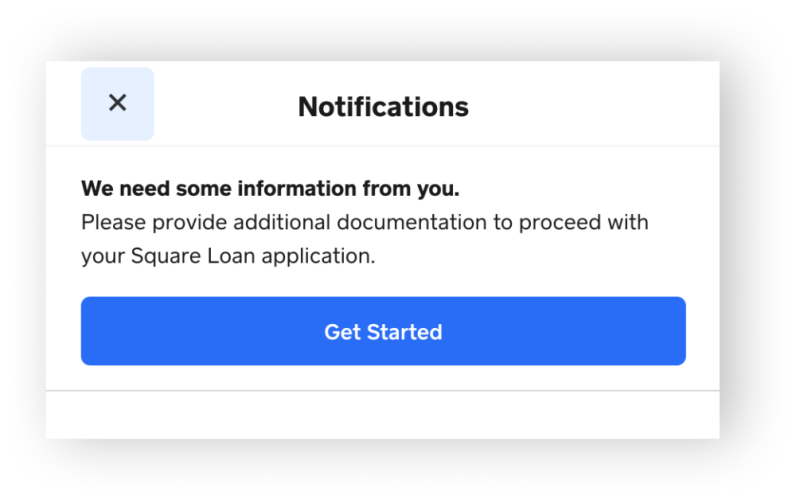
If additional documentation is requested for your loan application, the information is needed in order for your application to move forward. Your loan application cannot be reviewed if the request is incomplete.
Complete the request in full to the best of your ability. If the submitted information isn’t sufficient, you will be contacted via email and your Square Dashboard with additional details.
You have until the date specified in the email notification to complete the information request. If you don’t provide all of the requested information on time, your application will be canceled.
If we are unable to verify your legal name, Social Security number and/or date of birth, we may request:
- A government issued ID, such as a driver’s license or passport
- Social Security card
- A recent personal tax return
- Individual Taxpayer Identification Number (ITIN) letter from the IRS
If you don’t have a government-issued photo ID to verify your date of birth, you can submit one of the following documents:
- Birth certificate
- ITIN Letter
- U.S. Certificate of Naturalization (Form N-550)
- Employment Authorization document (I-668B or I-766)
- Military ID
- Tribal-issued photo ID
- DHS trusted traveler cards
If you can’t submit a copy of your Social Security card, you can submit one of the following documents along with your government-issued ID:
- Most recent personal tax return
- Individual Tax Identification Number (ITIN) letter from the IRS
- W-2 tax form
- Military Discharge documents
- Unemployment Benefits letter
Please be sure the document clearly displays your full legal name and Social Security number.
When applying for a Square Loan you need to provide your TIN for business verification purposes. Provide the following documentation based on your business type:
- Sole proprietor: Social Security number (SSN) or Individual Taxpayer Information Number (ITIN).
- Limited Liability Company, Partnership, C Corporation, or S Corporation: Employee Identification number (EIN).
- Single Member LLC: The business owner’s SSN or the business’s Employee Identification Number (EIN).
If we are unable to verify your legal business name and/or TIN, we may request one of the following:
- Your business’s government issued SS-4 or EIN confirmation letter
- Your most recent business tax returns confirming your business name and TIN
- Secretary of State documents that contain your business TIN
If you misplaced your SS-4 confirmation letter, call the IRS and reach their Business and Specialty Tax Line at 800-829-4933. For additional tips, visit the IRS online.
If you are a Single Member LLC and don’t have an EIN please clarify your entity type in the information request and submit a copy of your most recent Schedule C (Form 1040).
If you’re a sole proprietor, your business name is the same as your first and last name and your TIN is your Social Security number. Some sole proprietors may also register DBA (doing-business-as) names. If you have a DBA, you’ll be asked to provide it in the application. You can find out your business entity type from your tax returns.
Depending on your business type, beneficial owners or business managers who are a part of your business may need to be verified. If the information provided for any of the listed beneficial owners or business managers can’t be verified, one or more of the following documents may be requested:
- Social Security card
- A recent personal tax return
- Passport
- Individual Taxpayer Identification Number (ITIN) letter from the IRS
Upload application documents
- Sign in to Square Dashboard and go to Banking > Loans.
- Click Start to upload the requested items.
Cancel your loan application
You can cancel your loan application while it’s still processing. After approval, you can cancel within two business days of your funding date. If you cancel your loan, a subsequent offer isn’t guaranteed. To cancel your loan application:
Sign in to Square Dashboard and go to Loans.
Click the three dots on the top right corner of your plan details > Cancel loan.
Confirm cancelation by selecting Yes, cancel loan.
Review loan repayment details
Your repayment rate increases when business is strong or decreases if things slow down and applies to gross card sales, including tips and taxes paid by your customers using a credit or debit card, ACH payments, and QR code payments made with Cash App.
If your daily sales cannot cover the minimum payment, your linked bank account may be debited the remaining minimum payment and your repayment rate may be increased until the minimum payment is met.
In some cases due to the number of days in a month, these dates may not fall exactly every 30 days. For example, if your loan originated on the 29th, 30th, or 31st of the first month, your first minimum payment may fall on the 1st of the third month, and your loan maturity date may fall on the 1st of your final month. Your exact monthly repayment date and amount can be found from the Loans tab in Square Dashboard and in your loan agreement, which also includes your loan maturity date.
Here’s a loan repayment example:
Amount deposited in your bank account: $1,000
Total Borrowing Cost: $40
Total loan repayment due: $1,040
Term: 2 months
Percentage of daily card sales that go towards loan repayment: 10%
Minimum amount due every 1 month for 2 months: $520
Your entire loan balance must be repaid in full within the repayment time specified in your loan agreement. If the loan hasn’t been repaid in full at the end of this time, the remaining loan balance will be due in full.
Daily repayment example:
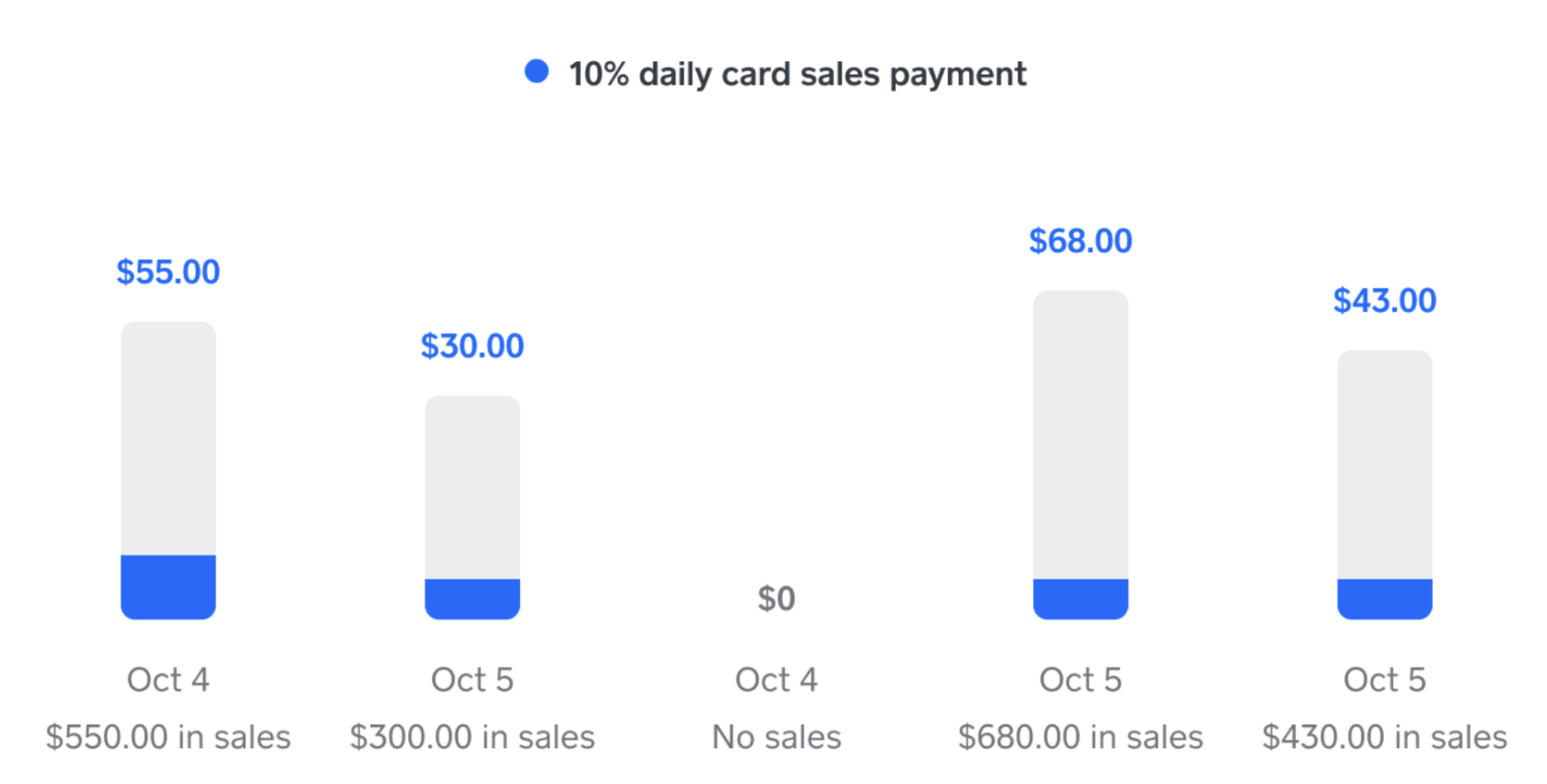
Monthly repayment example:

Numbers are for illustrative purposes only.
Submit a loan payment
You can submit prepayments any time at no additional cost. The total cost of your loan does not change by making prepayments. To submit a loan payment:
Sign in to Square Dashboard and go to Loans.
Click Make a payment.
Specify the loan payment amount, or choose to pay the current balance in full.
Review and confirm your payment.
Once you fully prepay your loan, your loan eligibility will be re-evaluated, but we can’t guarantee that you’ll receive a new offer. It can take up to 10 business days for payment confirmation and for your account to be evaluated for new loan offers. During this time you won’t have any loan offers in Square Dashboard.