Repay your loan
About repaying your loan
Repayment of your Square loan starts on the repayment start date specified in your loan agreement. A fixed percentage of your business’s daily card sales is automatically deducted and applied toward your loan balance until your loan is repaid in full.
Square loans are designed to be paid back within 12 months if your business’s payment processing does not change based on our initial estimations.
If there haven’t been any changes to your business and you maintain regular processing volume through Square, making your minimum payments on time shouldn’t be an issue. We encourage you to review the minimum loan payment requirements so you know what to expect if your business’s card sales change during repayment.
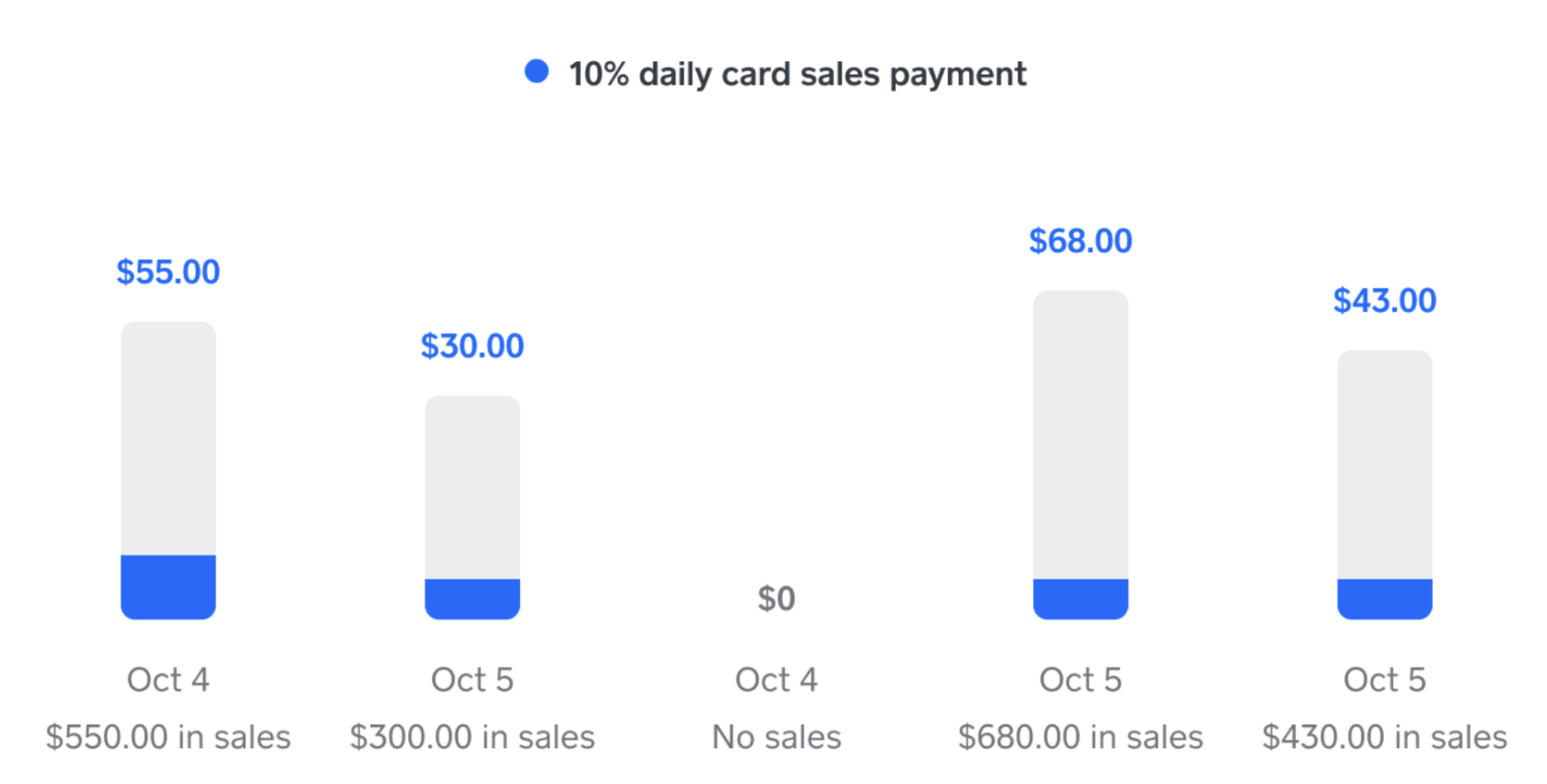
Numbers are for illustrative purposes only.
Before you begin
Loan maturity is 18 months from origination, which is the date your loan is due in full. If you make the minimum payment of 1/18th of your initial loan balance every 60 days, you’ll only pay down half your total loan balance in 18 months. You’ll owe the remaining balance upon the loan maturity date. At that point, Square will debit your linked bank account for the remaining balance.
Your repayment rate is determined by your business’s card processing, your offer size and other business factors. It’s designed to help your business stay on track with paying back the loan within a year. You can adjust the repayment rate of your offer by changing the loan offer amount prior to applying for the loan.
Making a payment will not disable your repayment rate, and this rate can’t be adjusted once your loan is accepted. The repayment rate will continue to be applied until the loan is repaid in full.
You can make additional payments to your loan at any time at no additional cost. The cost of your loan does not change by making prepayments.
If your daily sales don’t cover the minimum payment, Square will debit the remaining minimum payment from your payment balance to cover the amount due. If the amount in your balance is insufficient, Square will debit your linked bank account.
All payments are final and will not be refunded. If a payment is submitted the same day that you are debited for your minimum payment, the debited funds will be applied to the past due balance, and the payment you initiated will be applied to your remaining loan balance.
Prepayments cannot be made on merchant cash advances. If you have a merchant cash advance, please contact us to discuss your repayment options.
Make a loan payment
Sign in to Square Dashboard and go to Money > Loans.
You’ll see an overview of prior payments, how much you have left to cover of your current balance and a breakdown of each payment.
Click Make a payment and provide the desired payment amount.
Review and confirm your payment.
When you submit a payment, Square may first apply any pending funds from your card sales and then debit any remaining amount from your linked bank account. A debit will only be initiated if the pending funds don’t cover the entire prepayment.
If you fully prepay your loan, your business’s loan eligibility will be re-evaluated. We can’t guarantee that you’ll receive a new offer after you make an additional payment or pay off your loan. It can take up to 10 business days for payment confirmation and for your account to be evaluated for new loan offers, during which time you will not have any loan offers visible in Square Dashboard. If you had a Square loan offer prior to paying off your loan, submitting a prepayment will expire any existing offers.
If you need a loan payoff statement, contact us and we can provide this for you.
Add multiple business locations or accounts to repay a loan
Upon loan approval, the loan is tied to the specific account location that applied for the loan. If you have multiple locations, you may have the option to add additional Square locations as payers towards the loan. The repayment rate will apply to the other locations’ daily card sales, and sales you process at your locations will go towards paying down the loan balance.
Additionally, each individual Square account is tied to a unique email address. If your business begins to take payments while logged in to another Square account, your card sales on that account don’t automatically go towards the repayment of your loan. If you want to continue processing on another Square account, you may have the option of adding that account as a payer towards your loan.
If you would like us to link more of your locations or accounts to your loan, contact us.
Apply for financial hardship
Financial hardship encompasses situations where individuals or businesses are unable to meet financial obligations or face significant adverse events affecting operations. Common events that may cause financial hardship include:
Cash flow constraints
Unexpected expenses
Death of a family member
Illness or injury to yourself or to your family member
A decrease in business activity
Domestic violence
Divorce or separation from your partner
Natural disaster
If any of the events listed above apply to you or any other reasons that may cause financial hardship, contact us as soon as possible so we can get a better understanding of your situation.
Applying for financial hardship at Square doesn’t affect your credit rating, and there are no fees or costs when applying aside from the fee you already agreed to on your loan.
If you are still not satisfied with Square’s response, you can file a complaint via our complaints policy.