View your loan reports
About loan reporting
Reports for your loan show your daily card sales, loan payments and outstanding loan balance, and are available from Money > Loans in Square Dashboard.
Before you start
You’ll receive a daily email showing a detailed payment summary and your remaining balance.
Square does not provide tax advice and this information is not intended to be tax advice. For more information on how Square Loans affect your tax reporting, please consult with a tax adviser.
Square Loans don’t impact your credit score, either negatively or positively, and therefore credit references aren’t provided. We can provide a letter of completion after full repayment of your loan upon request or a letter of good standing, but you won’t see an impact on your credit score. If you would like to request one, contact us.
Square loan payments are first deducted from your Square balance, and any remaining amount will be debited from your linked bank account.
Download your payment history
- Sign in to Square Dashboard and click Money > Loans.
- Click the loan you want to view > All activity.
- Select the date range you’d like to view, or enter custom dates.
- A summary of your loan payments will populate for the date range selected.
- Sign in to Square Dashboard and click Money > Balance.
- Select transfer reports and click the date-selector tool to choose the date range you’d like to view.
- Click Export.
Understand fixed loan fees
The total cost of the loan is a fixed fee, which is the difference between total owed and loan amount. The actual loan amounts and payback percentages vary for each loan through Square. Here’s an example:
Square Loan offer amount that was deposited to your account: £10,000
Fixed fee: £1,200
Total amount owed: £11,200
Percentage of your business’s daily card sales that go towards payment: 11%
Following the example above, Square would collect 11% of your business’s daily card payments until you’ve repaid £11,200 in full.
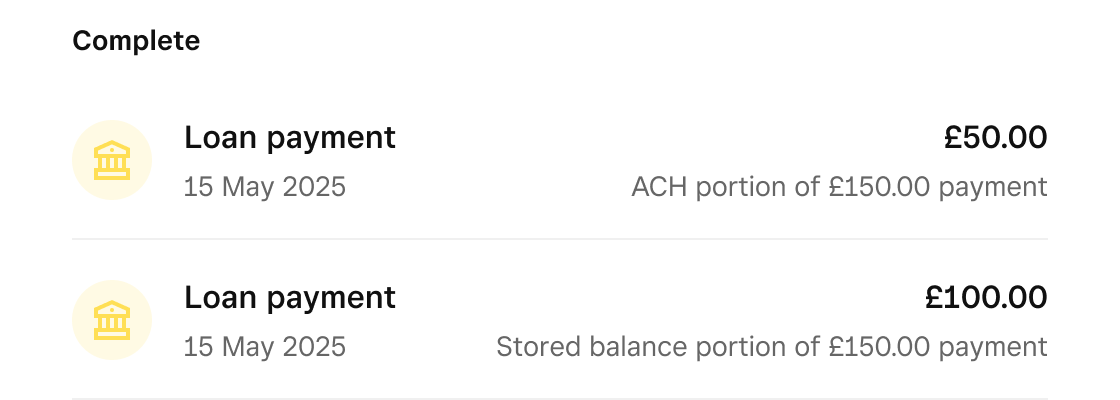
Additionally, Square loan payments are first deducted from your Square balance, and any remaining amount will be debited from your linked bank account. You may see two activities in your Square Dashboard for a single loan payment if it was deducted partially from both your balance and your linked bank account:
£100 on 15 May 2025 from the Square balance
£50 on 15 May 2025 from the linked bank account